
Custom Search
Showing posts with label linux network namespace. Show all posts
Showing posts with label linux network namespace. Show all posts
Monday, November 3, 2014

Monday, October 13, 2014
Multiple solutions to interconnect Linux namespaces using a software based switch
Howto connect two network namespaces using veth pairs
http://fosshelp.blogspot.com/2014/07/howto-connect-two-network-namespaces.html
Howto Connect two network namespaces using Linux Bridge and veth pairs
http://fosshelp.blogspot.com/2014/08/connect-two-network-namespaces-using.html
Howto Connect network namespaces using OpenvSwitch and veth pairs
http://fosshelp.blogspot.in/2014/10/network-namespaces-openvswitch-veth.html
Howto Connect network namespaces using OpenvSwitch and OpenvSwitch Ports
http://fosshelp.blogspot.com/2014/10/namespaces-openvswitch-and-openvswitch.html
Howto Connect network namespaces using OpenvSwitch and OpenvSwitch Ports
1)
Install OpenvSwitch
#sudo apt-get install openvswitch-switch
2)
Create Namespaces

http://www.opencloudblog.com/?p=66
2a)
Create 2 Namespaces
#sudo ip netns add ns1
#sudo ip netns add ns2
2b)
List all namespaces
#sudo ip netns list
3)
Create an OpenvSwitch
3a)
List all OpenvSwitchs
#sudo ovs-vsctl list-br
3b)
Create an OpenvSwitch "my-ov-switch1"
#sudo ovs-vsctl add-br my-ov-switch1
3c)
List all OpenvSwitchs
#sudo ovs-vsctl list-br
3d)
List all interfaces in the global namespace and find the OpenvSwitch "my-ov-switch1"
#ifconfig -a
OR
#ifconfig my-ov-switch1
4)
Create first internal ovs port and attach to namespace "ns1"
4a)
Create an internal ovs port
#sudo ovs-vsctl add-port my-ov-switch1 tap1 -- set Interface tap1 type=internal
4b)
List ports/interfaces in the OpenvSwitch "my-ov-switch1"
#sudo ovs-vsctl list-ports my-ov-switch1
* At this point you can see the port "tap1"
4c)
Check the newly created interface in the global namespace
#sudo ifconfig tap1
* At this point the interface "tap1" don't have IP associated with it.
4d)
Attach ovs port "tap1" to namespace "ns1"
#sudo ip link set tap1 netns ns1
* At this point if you run "#sudo ifconfig tap1" in global namespace you would not able to see the "tap1" interface there.
* Run "#ifconfig -a" in "ns1" namespace to see "tap1" interface.
* Example:#sudo ip netns exec ns1 ifconfig -a
4e)
Set the port/interface "tap1" to UP
#sudo ip netns exec ns1 ip link set dev tap1 up
#sudo ip netns exec ns1 ifconfig tap1
* At this point the port/interface "tap1" is in UP state. You can see the status as "UP BROADCAST MULTICAST", that means UP.
5)
Create second internal ovs port and attach to namespace "ns2"
5a)
Create an internal ovs port
#sudo ovs-vsctl add-port my-ov-switch1 tap2 -- set Interface tap2 type=internal
5b)
List ports/interfaces in the OpenvSwitch "my-ov-switch1"
#sudo ovs-vsctl list-ports my-ov-switch1
* At this point you can see the ports "tap1" and "tap2"
5c)
Check the newly created interface in the global namespace
#sudo ifconfig tap2
* At this point the interface "tap2" don't have IP associated with it.
5d)
Attach ovs port "tap2" to namespace "ns2"
#sudo ip link set tap2 netns ns2
* At this point if you run "#sudo ifconfig tap2" in global namespace you would not able to see the "tap2" interface there.
* Run "#ifconfig -a" in "ns2" namespace to see "tap2" interface.
* Example:#sudo ip netns exec ns2 ifconfig -a
5e)
Set the port/interface "tap2" to UP
#sudo ip netns exec ns2 ip link set dev tap2 up
#sudo ip netns exec ns2 ifconfig tap2
* At this point the port/interface "tap2" is in UP state. You can see the status as "UP BROADCAST MULTICAST", that means UP.
6)
Assign IP address to the interfaces "tap1" in the namespace "ns1 and "tap2" in the namespace "ns2" and ping from "ns1" to "ns2".
6a)
Assign IP address to the interface "tap1" in the namespace "ns1".
#sudo ip netns exec ns1 ip addr add 10.1.1.4/24 dev tap1
6b)
Assign IP address to the interface "tap2" in the namespace "ns2".
#sudo ip netns exec ns2 ip addr add 10.1.1.5/24 dev tap2
6c)
Check the IP address of the interfaces "tap1" and "tap2"
#sudo ip netns exec ns1 ifconfig -a tap1
#sudo ip netns exec ns2 ifconfig -a tap2
* You should see the IP for the interfaces "tap1" and "tap2"
6d)
Check the routing table in the namespace "ns1" and "ns2"
#sudo ip netns exec ns1 route -n
#sudo ip netns exec ns2 route -n
* You should see the entry for "tap1" and "tap2" in routing table of namespaces "ns1" and "ns2" respectively. If you can't see, that means interface is DOWN.
6e)
Ping from "ns1" to "ns2".
#sudo ip netns exec ns1 ping 10.1.1.5
* Ping should work
7)
7a)
Check the Flow Table of OpenvSwitch "my-ov-switch1"
#sudo ovs-ofctl show my-ov-switch1
#sudo ovs-ofctl dump-tables my-ov-switch1
#sudo ovs-ofctl dump-flows my-ov-switch1
7b)
#sudo ovs-vsctl show
8)
Ping to "173.194.36.16" (www.google.com)
8a)
Ping to "173.194.36.16" (www.google.com) from namespace "ns1"
#sudo ip netns exec ns1 ping 173.194.36.16
* Ping will not work : connect: Network is unreachable
8b)
Capture Ping (ICMP) packets from the OpenvSwitch "my-ov-switch1"
#sudo tshark -i my-ov-switch1 icmp
* We will not get any ICMP packets from the OpenvSwitch "my-ov-switch1" since the packet are droping from the namespace "ns1" itself since there is no default gateway (path to redirect all packets whose dest address not in 10.1.1.4/24 network) defined in the routing table of namespace "ns1".
8c)
Check the routing table in the namespace "ns1".
#sudo ip netns exec ns1 route -n
* You can see that there is no default gateway defined
8d)
Check the IP of the OpenvSwitch "my-ov-switch1"
#sudo ifconfig -a my-ov-switch1
8e)
Attach IP to OpenvSwitch "my-ov-switch1"
#sudo ip addr add 10.1.1.3/24 dev my-ov-switch1
8f)
Check the IP of the OpenvSwitch "my-ov-switch1"
#ifconfig -a my-ov-switch1
8g)
Add a default gateway to flow packets which are not destined for the network 10.1.1.x to outside.
Defalut gateway has to be set the IP address of the OpenvSwitch "my-ov-switch1"
#sudo ip netns exec ns1 route add default gw 10.1.1.3 tap1
8f)
Check the routing table in the namespace "ns1".
#sudo ip netns exec ns1 route -n
* You can see the entry of default gateway
8g)
Ping to 173.194.36.16 from namespace "ns1"
#sudo ip netns exec ns1 ping 173.194.36.16
* Ping will not work, But you will get the ICMP request packets in OpenvSwitch "my-ov-switch1" nad no reply packets.
* Use the command (#sudo tshark -i my-ov-switch1 icmp) to capture the packets from the OpenvSwitch "my-ov-switch1"
* That means reply packets are not routing properly. So we need to add SNAT in global namespace for packet which has source IP:10.1.1.4 or 10.1.1.x. OR we need to add MASQURIDE rule for interface "eth0"(virtualBox NAT).
Install OpenvSwitch
#sudo apt-get install openvswitch-switch
2)
Create Namespaces
http://www.opencloudblog.com/?p=66
2a)
Create 2 Namespaces
#sudo ip netns add ns1
#sudo ip netns add ns2
2b)
List all namespaces
#sudo ip netns list
3)
Create an OpenvSwitch
3a)
List all OpenvSwitchs
#sudo ovs-vsctl list-br
3b)
Create an OpenvSwitch "my-ov-switch1"
#sudo ovs-vsctl add-br my-ov-switch1
3c)
List all OpenvSwitchs
#sudo ovs-vsctl list-br
3d)
List all interfaces in the global namespace and find the OpenvSwitch "my-ov-switch1"
#ifconfig -a
OR
#ifconfig my-ov-switch1
4)
Create first internal ovs port and attach to namespace "ns1"
4a)
Create an internal ovs port
#sudo ovs-vsctl add-port my-ov-switch1 tap1 -- set Interface tap1 type=internal
4b)
List ports/interfaces in the OpenvSwitch "my-ov-switch1"
#sudo ovs-vsctl list-ports my-ov-switch1
* At this point you can see the port "tap1"
4c)
Check the newly created interface in the global namespace
#sudo ifconfig tap1
* At this point the interface "tap1" don't have IP associated with it.
4d)
Attach ovs port "tap1" to namespace "ns1"
#sudo ip link set tap1 netns ns1
* At this point if you run "#sudo ifconfig tap1" in global namespace you would not able to see the "tap1" interface there.
* Run "#ifconfig -a" in "ns1" namespace to see "tap1" interface.
* Example:#sudo ip netns exec ns1 ifconfig -a
4e)
Set the port/interface "tap1" to UP
#sudo ip netns exec ns1 ip link set dev tap1 up
#sudo ip netns exec ns1 ifconfig tap1
* At this point the port/interface "tap1" is in UP state. You can see the status as "UP BROADCAST MULTICAST", that means UP.
5)
Create second internal ovs port and attach to namespace "ns2"
5a)
Create an internal ovs port
#sudo ovs-vsctl add-port my-ov-switch1 tap2 -- set Interface tap2 type=internal
5b)
List ports/interfaces in the OpenvSwitch "my-ov-switch1"
#sudo ovs-vsctl list-ports my-ov-switch1
* At this point you can see the ports "tap1" and "tap2"
5c)
Check the newly created interface in the global namespace
#sudo ifconfig tap2
* At this point the interface "tap2" don't have IP associated with it.
5d)
Attach ovs port "tap2" to namespace "ns2"
#sudo ip link set tap2 netns ns2
* At this point if you run "#sudo ifconfig tap2" in global namespace you would not able to see the "tap2" interface there.
* Run "#ifconfig -a" in "ns2" namespace to see "tap2" interface.
* Example:#sudo ip netns exec ns2 ifconfig -a
5e)
Set the port/interface "tap2" to UP
#sudo ip netns exec ns2 ip link set dev tap2 up
#sudo ip netns exec ns2 ifconfig tap2
* At this point the port/interface "tap2" is in UP state. You can see the status as "UP BROADCAST MULTICAST", that means UP.
6)
Assign IP address to the interfaces "tap1" in the namespace "ns1 and "tap2" in the namespace "ns2" and ping from "ns1" to "ns2".
6a)
Assign IP address to the interface "tap1" in the namespace "ns1".
#sudo ip netns exec ns1 ip addr add 10.1.1.4/24 dev tap1
6b)
Assign IP address to the interface "tap2" in the namespace "ns2".
#sudo ip netns exec ns2 ip addr add 10.1.1.5/24 dev tap2
6c)
Check the IP address of the interfaces "tap1" and "tap2"
#sudo ip netns exec ns1 ifconfig -a tap1
#sudo ip netns exec ns2 ifconfig -a tap2
* You should see the IP for the interfaces "tap1" and "tap2"
6d)
Check the routing table in the namespace "ns1" and "ns2"
#sudo ip netns exec ns1 route -n
#sudo ip netns exec ns2 route -n
* You should see the entry for "tap1" and "tap2" in routing table of namespaces "ns1" and "ns2" respectively. If you can't see, that means interface is DOWN.
6e)
Ping from "ns1" to "ns2".
#sudo ip netns exec ns1 ping 10.1.1.5
* Ping should work
7)
7a)
Check the Flow Table of OpenvSwitch "my-ov-switch1"
#sudo ovs-ofctl show my-ov-switch1
#sudo ovs-ofctl dump-tables my-ov-switch1
#sudo ovs-ofctl dump-flows my-ov-switch1
7b)
#sudo ovs-vsctl show
8)
Ping to "173.194.36.16" (www.google.com)
8a)
Ping to "173.194.36.16" (www.google.com) from namespace "ns1"
#sudo ip netns exec ns1 ping 173.194.36.16
* Ping will not work : connect: Network is unreachable
8b)
Capture Ping (ICMP) packets from the OpenvSwitch "my-ov-switch1"
#sudo tshark -i my-ov-switch1 icmp
* We will not get any ICMP packets from the OpenvSwitch "my-ov-switch1" since the packet are droping from the namespace "ns1" itself since there is no default gateway (path to redirect all packets whose dest address not in 10.1.1.4/24 network) defined in the routing table of namespace "ns1".
8c)
Check the routing table in the namespace "ns1".
#sudo ip netns exec ns1 route -n
* You can see that there is no default gateway defined
8d)
Check the IP of the OpenvSwitch "my-ov-switch1"
#sudo ifconfig -a my-ov-switch1
8e)
Attach IP to OpenvSwitch "my-ov-switch1"
#sudo ip addr add 10.1.1.3/24 dev my-ov-switch1
8f)
Check the IP of the OpenvSwitch "my-ov-switch1"
#ifconfig -a my-ov-switch1
8g)
Add a default gateway to flow packets which are not destined for the network 10.1.1.x to outside.
Defalut gateway has to be set the IP address of the OpenvSwitch "my-ov-switch1"
#sudo ip netns exec ns1 route add default gw 10.1.1.3 tap1
8f)
Check the routing table in the namespace "ns1".
#sudo ip netns exec ns1 route -n
* You can see the entry of default gateway
8g)
Ping to 173.194.36.16 from namespace "ns1"
#sudo ip netns exec ns1 ping 173.194.36.16
* Ping will not work, But you will get the ICMP request packets in OpenvSwitch "my-ov-switch1" nad no reply packets.
* Use the command (#sudo tshark -i my-ov-switch1 icmp) to capture the packets from the OpenvSwitch "my-ov-switch1"
* That means reply packets are not routing properly. So we need to add SNAT in global namespace for packet which has source IP:10.1.1.4 or 10.1.1.x. OR we need to add MASQURIDE rule for interface "eth0"(virtualBox NAT).
Wednesday, October 8, 2014
Howto Connect network namespaces using OpenvSwitch and veth pairs
1)
Install OpenvSwitch
#sudo apt-get install openvswitch-switch
2)
Create Namespaces

http://www.opencloudblog.com/?p=66
2a)
Create 3 Namespaces
#sudo ip netns add ns1
#sudo ip netns add ns2
#sudo ip netns add ns3
2b)
List all namespaces
#sudo ip netns list
3)
Create an OpenvSwitch Switch
3a)
List all OpenvSwitchs
#sudo ovs-vsctl list-br
3b)
Create an OpenvSwitch "my-ov-switch1"
#sudo ovs-vsctl add-br my-ov-switch1
3c)
List all OpenvSwitchs
#sudo ovs-vsctl list-br
3d)
List all interfaces in the global namespace and find the OpenvSwitch "my-ov-switch1"
#ifconfig -a
OR
#ifconfig my-ov-switch1
4)
Create first veth/port interface pairs (Pipe) "tap1"======="ovs-tap1"
4a)
Create first veth/port interface pairs (Pipe) "tap1"======="ovs-tap1"
#sudo ip link add tap1 type veth peer name ovs-tap1
4b)
Check the newly created interfaces in the global namespace
#ifconfig tap1
#ifconfig ovs-tap1
* At this point the interfaces "tap1" and "ovs-tap1" don't have IP associated with it.
4c)
Move/Attach "tap1" interface from global namespace to the "ns1" namespace.
OR
Attach one side of the Pipe "tap1=======ovs-tap1" to "ns1" namespace.
#sudo ip link set tap1 netns ns1
* At this point run "#ifconfig -a" in global namespace an you would not able to see the "tap1" interface there.
* Run "#ifconfig -a" in "ns1" namespace to see "tap1" interface.
* Example:#sudo ip netns exec ns1 ifconfig -a
4d)
List ports/interfaces in the OpenvSwitch "my-ov-switch1"
#sudo ovs-vsctl list-ports my-ov-switch1
* At this point you can't see any ports
4e)
Move/Attach "ovs-tap1" interface/port from global namespace to the OpenvSwitch "my-ov-switch1".
OR
Attach other side of the Pipe "tap1=======ovs-tap1" to the OpenvSwitch "my-ov-switch1".
#sudo ovs-vsctl add-port my-ov-switch1 ovs-tap1
4f)
List ports/interfaces in the OpenvSwitch "my-ov-switch1"
#sudo ovs-vsctl list-ports my-ov-switch1
* At this point you can see the port/interface "ovs-tap1".
4g)
Check the status of the newly created ports/interfaces "tap1" and "ovs-tap1"
#sudo ip netns exec ns1 ifconfig -a tap1
#sudo ifconfig -a ovs-tap1
* At this point the ports/interfaces "tap1" and "ovs-tap1" are in DOWN state.. You can see the status as "BROADCAST MULTICAST", that means DOWN.
4h)
Set the ports/interfaces "tap1" and "ovs-tap1" to UP
#sudo ip netns exec ns1 ip link set dev tap1 up
#sudo ip link set dev ovs-tap1 up
4i)
Check the status of the newly created ports/interfaces "tap1" and "ovs-tap1"
#sudo ip netns exec ns1 ifconfig -a tap1
#sudo ifconfig -a ovs-tap1
* At this point the ports/interfaces "tap1" and "ovs-tap1" are in UP state. You can see the status as "UP BROADCAST MULTICAST", that means UP.
4j)
Check the routing table in the namespace "ns1"
#sudo ip netns exec ns1 route -n
* If the entry for the interface "tap1" is not there in the routing table, that means the interface "tap1" is DOWN.
* So we need to set the interface "tap1" UP with the command (#sudo ip netns exec ns1 ip link set dev tap1 up) to get the entry in routing table.
4k)
Display the current state of OpenvSwitch database contents
#sudo ovs-vsctl show
5)
Create second veth/port interface pairs (Pipe) "tap2"======="ovs-tap2"
5a)
Create second veth/port interface pairs (Pipe) "tap2"======="ovs-tap2"
#sudo ip link add tap2 type veth peer name ovs-tap2
5b)
Check the newly created interfaces in the global namespace
#ifconfig tap2
#ifconfig ovs-tap2
* At this point the interfaces "tap2" and "ovs-tap2" don't have IP associated with it.
5c)
Move/Attach "tap2" interface from global namespace to the "ns2" namespace.
OR
Attach one side of the Pipe "tap2=======ovs-tap2" to "ns2" namespace.
#sudo ip link set tap2 netns ns2
* At this point run "#ifconfig -a" in global namespace an you would not able to see the "tap2" interface there.
* Run "#ifconfig -a" in "ns2" namespace to see "tap2" interface.
* Example:#sudo ip netns exec ns2 ifconfig -a
5d)
List ports/interfaces in the OpenvSwitch "my-ov-switch1"
#sudo ovs-vsctl list-ports my-ov-switch1
* At this point you can see only one port "ovs-tap1".
5e)
Move/Attach "ovs-tap2" interface/port from global namespace to the OpenvSwitch "my-ov-switch1".
OR
Attach other side of the Pipe "tap2=======ovs-tap2" to the OpenvSwitch "my-ov-switch1".
#sudo ovs-vsctl add-port my-ov-switch1 ovs-tap2
5f)
List ports/interfaces in the OpenvSwitch "my-ov-switch1"
#sudo ovs-vsctl list-ports my-ov-switch1
* At this point you can see the port/interface "ovs-tap1" and "ovs-tap2"
5g)
Check the status of the newly created ports/interfaces "tap1" and "ovs-tap1"
#sudo ip netns exec ns2 ifconfig -a tap2
#sudo ifconfig -a ovs-tap2
* At this point the ports/interfaces "tap2" and "ovs-tap2" are in DOWN state. You can see the status as "BROADCAST MULTICAST", that means DOWN.
5h)
Set the ports/interfaces "tap2" and "ovs-tap2" to UP
#sudo ip netns exec ns2 ip link set dev tap2 up
#sudo ip link set dev ovs-tap2 up
5i)
Check the status of the newly created ports/interfaces "tap2" and "ovs-tap2"
#sudo ip netns exec ns2 ifconfig -a tap2
#sudo ifconfig -a ovs-tap2
* At this point the ports/interfaces "tap2" and "ovs-tap2" are in UP state. You can see the status as "UP BROADCAST MULTICAST", that means UP.
5j)
Check the routing table in the namespace "ns2"
#sudo ip netns exec ns2 route -n
* If the entry for the interface "tap2" is not there in the routing table, that means the interface "tap2" is DOWN.
* So we need to set the interface "tap2" UP with the command (#sudo ip netns exec ns2 ip link set dev tap2 up) to get the entry in routing table.
5k)
Display the current state of OpenvSwitch database contents
#sudo ovs-vsctl show
6)
Assign IP address to the interfaces "tap1" in the namespace "ns1 and "tap2" in the namespace "ns2" and ping from "ns1" to "ns2".
6a)
Assign IP address to the interface "tap1" in the namespace "ns1".
#sudo ip netns exec ns1 ip addr add 10.1.1.4/24 dev tap1
6b)
Assign IP address to the interface "tap2" in the namespace "ns2".
#sudo ip netns exec ns2 ip addr add 10.1.1.5/24 dev tap2
6c)
Check the IP address of the interfaces "tap1" and "tap2"
#sudo ip netns exec ns1 ifconfig -a tap1
#sudo ip netns exec ns2 ifconfig -a tap2
* You should see the IP for the interfaces "tap1" and "tap2"
6d)
Check the routing table in the namespace "ns1" and "ns2"
#sudo ip netns exec ns1 route -n
#sudo ip netns exec ns2 route -n
* You should see the entry for "tap1" and "tap2" in routing table of namespaces "ns1" and "ns2" respectively. If you can't see, that means interface is DOWN.
6e)
Ping from "ns1" to "ns2".
#sudo ip netns exec ns1 ping 10.1.1.5
* Ping should work
7)
Check the Flow Table of OpenvSwitch "my-ov-switch1"
http://openvswitch.org/cgi-bin/ovsman.cgi?page=utilities%2Fovs-ofctl.8.in
#sudo ovs-ofctl show my-ov-switch1
#sudo ovs-ofctl dump-tables my-ov-switch1
#sudo ovs-ofctl dump-flows my-ov-switch1
8)
Ping to "173.194.36.16" (www.google.com)
8a)
Ping to "173.194.36.16" (www.google.com) from namespace "ns1"
#sudo ip netns exec ns1 ping 173.194.36.16
* Ping will not work
8b)
Capture Ping (ICMP) packets from the OpenvSwitch "my-ov-switch1"
#sudo tshark -i my-ov-switch1 icmp
* We will not get any ICMP packets from the OpenvSwitch "my-ov-switch1" since the packet are dropping from the namespace "ns1" itself since there is no default gateway (path to redirect all packets whose dest address not in 10.1.1.4/24 network) defined in the routing table of namespace "ns1".
8c)
Check the routing table in the namespace "ns1".
#sudo ip netns exec ns1 route -n
* You can see that there is no default gateway defined
8d)
Check the IP of the OpenvSwitch "my-ov-switch1"
#ifconfig -a my-ov-switch1
8e)
Attach IP to OpenvSwitch "my-ov-switch1"
#sudo ip addr add 10.1.1.3/24 dev my-ov-switch1
8f)
Check the IP of the OpenvSwitch "my-ov-switch1"
#ifconfig -a my-ov-switch1
8g)
Add a default gateway to flow packets which are not destined for the network 10.1.1.x to outside.
Default gateway has to be set the IP address of the OpenvSwitch "my-ov-switch1"
#sudo ip netns exec ns1 route add default gw 10.1.1.3 tap1
8f)
Check the routing table in the namespace "ns1".
#sudo ip netns exec ns1 route -n
* You can see the entry of default gateway
8g)
Ping to 173.194.36.16 from namespace "ns1"
#sudo ip netns exec ns1 ping 173.194.36.16
* Ping will not work, But you will get the ICMP request packets in OpenvSwitch "my-ov-switch1" nad no reply packets.
* Use the command (#sudo tshark -i my-ov-switch1 icmp) to capture the packets from the OpenvSwitch "my-ov-switch1"
* That means reply packets are not routing properly. So we need to add SNAT in global namespace for packet which has source IP:10.1.1.4 or 10.1.1.x. OR we need to add MASQURIDE rule for interface "eth0"(virtualBox NAT).
Install OpenvSwitch
#sudo apt-get install openvswitch-switch
2)
Create Namespaces
http://www.opencloudblog.com/?p=66
2a)
Create 3 Namespaces
#sudo ip netns add ns1
#sudo ip netns add ns2
#sudo ip netns add ns3
2b)
List all namespaces
#sudo ip netns list
3)
Create an OpenvSwitch Switch
3a)
List all OpenvSwitchs
#sudo ovs-vsctl list-br
3b)
Create an OpenvSwitch "my-ov-switch1"
#sudo ovs-vsctl add-br my-ov-switch1
3c)
List all OpenvSwitchs
#sudo ovs-vsctl list-br
3d)
List all interfaces in the global namespace and find the OpenvSwitch "my-ov-switch1"
#ifconfig -a
OR
#ifconfig my-ov-switch1
4)
Create first veth/port interface pairs (Pipe) "tap1"======="ovs-tap1"
4a)
Create first veth/port interface pairs (Pipe) "tap1"======="ovs-tap1"
#sudo ip link add tap1 type veth peer name ovs-tap1
4b)
Check the newly created interfaces in the global namespace
#ifconfig tap1
#ifconfig ovs-tap1
* At this point the interfaces "tap1" and "ovs-tap1" don't have IP associated with it.
4c)
Move/Attach "tap1" interface from global namespace to the "ns1" namespace.
OR
Attach one side of the Pipe "tap1=======ovs-tap1" to "ns1" namespace.
#sudo ip link set tap1 netns ns1
* At this point run "#ifconfig -a" in global namespace an you would not able to see the "tap1" interface there.
* Run "#ifconfig -a" in "ns1" namespace to see "tap1" interface.
* Example:#sudo ip netns exec ns1 ifconfig -a
4d)
List ports/interfaces in the OpenvSwitch "my-ov-switch1"
#sudo ovs-vsctl list-ports my-ov-switch1
* At this point you can't see any ports
4e)
Move/Attach "ovs-tap1" interface/port from global namespace to the OpenvSwitch "my-ov-switch1".
OR
Attach other side of the Pipe "tap1=======ovs-tap1" to the OpenvSwitch "my-ov-switch1".
#sudo ovs-vsctl add-port my-ov-switch1 ovs-tap1
4f)
List ports/interfaces in the OpenvSwitch "my-ov-switch1"
#sudo ovs-vsctl list-ports my-ov-switch1
* At this point you can see the port/interface "ovs-tap1".
4g)
Check the status of the newly created ports/interfaces "tap1" and "ovs-tap1"
#sudo ip netns exec ns1 ifconfig -a tap1
#sudo ifconfig -a ovs-tap1
* At this point the ports/interfaces "tap1" and "ovs-tap1" are in DOWN state.. You can see the status as "BROADCAST MULTICAST", that means DOWN.
4h)
Set the ports/interfaces "tap1" and "ovs-tap1" to UP
#sudo ip netns exec ns1 ip link set dev tap1 up
#sudo ip link set dev ovs-tap1 up
4i)
Check the status of the newly created ports/interfaces "tap1" and "ovs-tap1"
#sudo ip netns exec ns1 ifconfig -a tap1
#sudo ifconfig -a ovs-tap1
* At this point the ports/interfaces "tap1" and "ovs-tap1" are in UP state. You can see the status as "UP BROADCAST MULTICAST", that means UP.
4j)
Check the routing table in the namespace "ns1"
#sudo ip netns exec ns1 route -n
* If the entry for the interface "tap1" is not there in the routing table, that means the interface "tap1" is DOWN.
* So we need to set the interface "tap1" UP with the command (#sudo ip netns exec ns1 ip link set dev tap1 up) to get the entry in routing table.
4k)
Display the current state of OpenvSwitch database contents
#sudo ovs-vsctl show
5)
Create second veth/port interface pairs (Pipe) "tap2"======="ovs-tap2"
5a)
Create second veth/port interface pairs (Pipe) "tap2"======="ovs-tap2"
#sudo ip link add tap2 type veth peer name ovs-tap2
5b)
Check the newly created interfaces in the global namespace
#ifconfig tap2
#ifconfig ovs-tap2
* At this point the interfaces "tap2" and "ovs-tap2" don't have IP associated with it.
5c)
Move/Attach "tap2" interface from global namespace to the "ns2" namespace.
OR
Attach one side of the Pipe "tap2=======ovs-tap2" to "ns2" namespace.
#sudo ip link set tap2 netns ns2
* At this point run "#ifconfig -a" in global namespace an you would not able to see the "tap2" interface there.
* Run "#ifconfig -a" in "ns2" namespace to see "tap2" interface.
* Example:#sudo ip netns exec ns2 ifconfig -a
5d)
List ports/interfaces in the OpenvSwitch "my-ov-switch1"
#sudo ovs-vsctl list-ports my-ov-switch1
* At this point you can see only one port "ovs-tap1".
5e)
Move/Attach "ovs-tap2" interface/port from global namespace to the OpenvSwitch "my-ov-switch1".
OR
Attach other side of the Pipe "tap2=======ovs-tap2" to the OpenvSwitch "my-ov-switch1".
#sudo ovs-vsctl add-port my-ov-switch1 ovs-tap2
5f)
List ports/interfaces in the OpenvSwitch "my-ov-switch1"
#sudo ovs-vsctl list-ports my-ov-switch1
* At this point you can see the port/interface "ovs-tap1" and "ovs-tap2"
5g)
Check the status of the newly created ports/interfaces "tap1" and "ovs-tap1"
#sudo ip netns exec ns2 ifconfig -a tap2
#sudo ifconfig -a ovs-tap2
* At this point the ports/interfaces "tap2" and "ovs-tap2" are in DOWN state. You can see the status as "BROADCAST MULTICAST", that means DOWN.
5h)
Set the ports/interfaces "tap2" and "ovs-tap2" to UP
#sudo ip netns exec ns2 ip link set dev tap2 up
#sudo ip link set dev ovs-tap2 up
5i)
Check the status of the newly created ports/interfaces "tap2" and "ovs-tap2"
#sudo ip netns exec ns2 ifconfig -a tap2
#sudo ifconfig -a ovs-tap2
* At this point the ports/interfaces "tap2" and "ovs-tap2" are in UP state. You can see the status as "UP BROADCAST MULTICAST", that means UP.
5j)
Check the routing table in the namespace "ns2"
#sudo ip netns exec ns2 route -n
* If the entry for the interface "tap2" is not there in the routing table, that means the interface "tap2" is DOWN.
* So we need to set the interface "tap2" UP with the command (#sudo ip netns exec ns2 ip link set dev tap2 up) to get the entry in routing table.
5k)
Display the current state of OpenvSwitch database contents
#sudo ovs-vsctl show
6)
Assign IP address to the interfaces "tap1" in the namespace "ns1 and "tap2" in the namespace "ns2" and ping from "ns1" to "ns2".
6a)
Assign IP address to the interface "tap1" in the namespace "ns1".
#sudo ip netns exec ns1 ip addr add 10.1.1.4/24 dev tap1
6b)
Assign IP address to the interface "tap2" in the namespace "ns2".
#sudo ip netns exec ns2 ip addr add 10.1.1.5/24 dev tap2
6c)
Check the IP address of the interfaces "tap1" and "tap2"
#sudo ip netns exec ns1 ifconfig -a tap1
#sudo ip netns exec ns2 ifconfig -a tap2
* You should see the IP for the interfaces "tap1" and "tap2"
6d)
Check the routing table in the namespace "ns1" and "ns2"
#sudo ip netns exec ns1 route -n
#sudo ip netns exec ns2 route -n
* You should see the entry for "tap1" and "tap2" in routing table of namespaces "ns1" and "ns2" respectively. If you can't see, that means interface is DOWN.
6e)
Ping from "ns1" to "ns2".
#sudo ip netns exec ns1 ping 10.1.1.5
* Ping should work
7)
Check the Flow Table of OpenvSwitch "my-ov-switch1"
http://openvswitch.org/cgi-bin/ovsman.cgi?page=utilities%2Fovs-ofctl.8.in
#sudo ovs-ofctl show my-ov-switch1
#sudo ovs-ofctl dump-tables my-ov-switch1
#sudo ovs-ofctl dump-flows my-ov-switch1
8)
Ping to "173.194.36.16" (www.google.com)
8a)
Ping to "173.194.36.16" (www.google.com) from namespace "ns1"
#sudo ip netns exec ns1 ping 173.194.36.16
* Ping will not work
8b)
Capture Ping (ICMP) packets from the OpenvSwitch "my-ov-switch1"
#sudo tshark -i my-ov-switch1 icmp
* We will not get any ICMP packets from the OpenvSwitch "my-ov-switch1" since the packet are dropping from the namespace "ns1" itself since there is no default gateway (path to redirect all packets whose dest address not in 10.1.1.4/24 network) defined in the routing table of namespace "ns1".
8c)
Check the routing table in the namespace "ns1".
#sudo ip netns exec ns1 route -n
* You can see that there is no default gateway defined
8d)
Check the IP of the OpenvSwitch "my-ov-switch1"
#ifconfig -a my-ov-switch1
8e)
Attach IP to OpenvSwitch "my-ov-switch1"
#sudo ip addr add 10.1.1.3/24 dev my-ov-switch1
8f)
Check the IP of the OpenvSwitch "my-ov-switch1"
#ifconfig -a my-ov-switch1
8g)
Add a default gateway to flow packets which are not destined for the network 10.1.1.x to outside.
Default gateway has to be set the IP address of the OpenvSwitch "my-ov-switch1"
#sudo ip netns exec ns1 route add default gw 10.1.1.3 tap1
8f)
Check the routing table in the namespace "ns1".
#sudo ip netns exec ns1 route -n
* You can see the entry of default gateway
8g)
Ping to 173.194.36.16 from namespace "ns1"
#sudo ip netns exec ns1 ping 173.194.36.16
* Ping will not work, But you will get the ICMP request packets in OpenvSwitch "my-ov-switch1" nad no reply packets.
* Use the command (#sudo tshark -i my-ov-switch1 icmp) to capture the packets from the OpenvSwitch "my-ov-switch1"
* That means reply packets are not routing properly. So we need to add SNAT in global namespace for packet which has source IP:10.1.1.4 or 10.1.1.x. OR we need to add MASQURIDE rule for interface "eth0"(virtualBox NAT).
Thursday, August 7, 2014
Networking How to force to send or broadcast ARP request
a)
Capture the packets from the interface "tap1" in the namespace "ns1"
Compute total ICMP echo requests, replies, loss, and percent loss using the option "-z icmp,srt"
#sudo ip netns exec ns1 tshark -i tap1 -f "icmp or arp" -z icmp,srt
b)
List ARP table in the namespace "ns1"
#sudo ip netns exec ns1 arp -n
Address HWtype HWaddress Flags Mask Iface
10.1.1.5 ether ba:01:a4:54:24:50 C tap1
c)
Clear ARP table in the namespace "ns1"
#sudo ip netns exec ns1 arp -d 10.1.1.5
d)
Ping from namespace "ns1"
#sudo ip netns exec ns1 ping 10.1.1.5
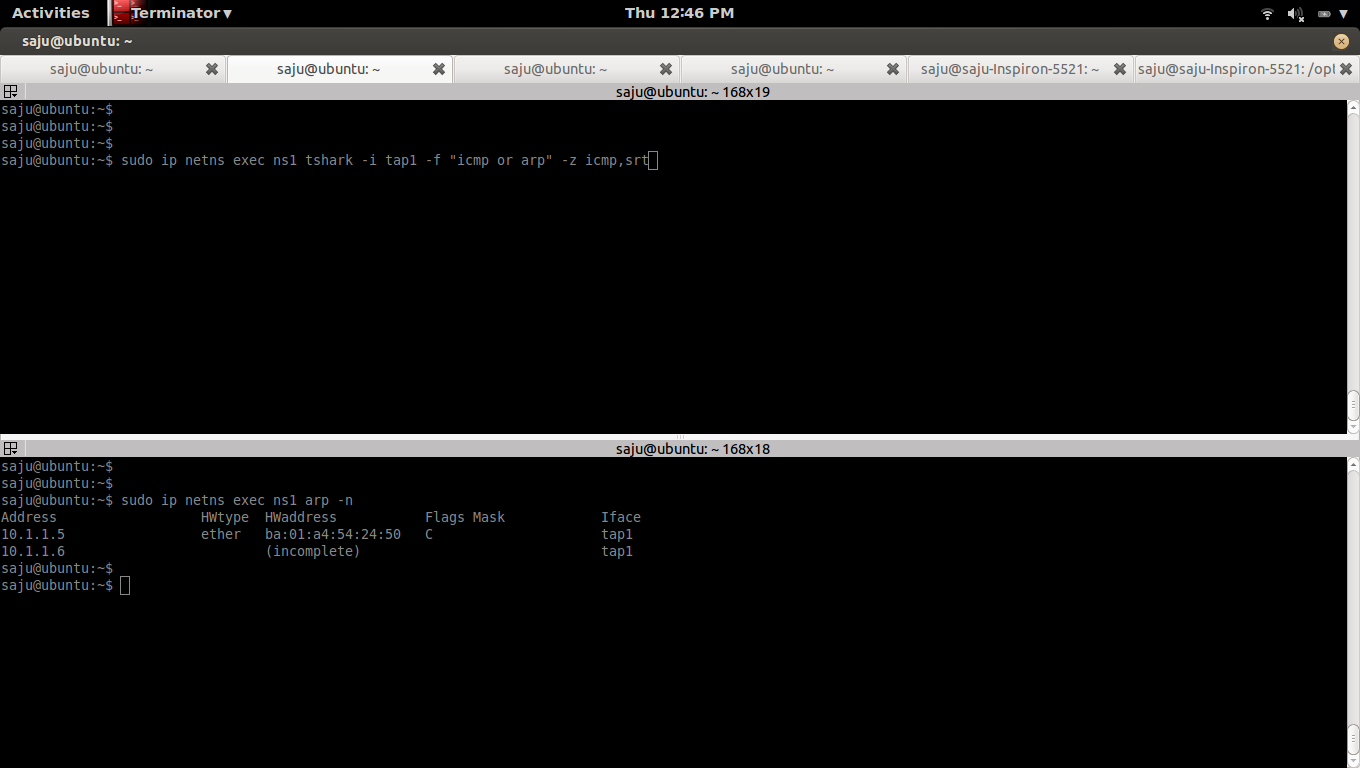


Capture the packets from the interface "tap1" in the namespace "ns1"
Compute total ICMP echo requests, replies, loss, and percent loss using the option "-z icmp,srt"
#sudo ip netns exec ns1 tshark -i tap1 -f "icmp or arp" -z icmp,srt
b)
List ARP table in the namespace "ns1"
#sudo ip netns exec ns1 arp -n
Address HWtype HWaddress Flags Mask Iface
10.1.1.5 ether ba:01:a4:54:24:50 C tap1
c)
Clear ARP table in the namespace "ns1"
#sudo ip netns exec ns1 arp -d 10.1.1.5
d)
Ping from namespace "ns1"
#sudo ip netns exec ns1 ping 10.1.1.5
Wednesday, August 6, 2014
How linux bridge broadcast ARP packets and works like a switch
1)
Create 3 namespaces, 3 veth pairs and a linux bridge
create_3_namespaces_and_1_bridge()
{
echo "Creating namespace and bridge......"
###Create 3 Namespaces
sudo ip netns add ns1
sudo ip netns add ns2
sudo ip netns add ns3
###Create Bridge
sudo brctl addbr br-test
sudo brctl stp br-test off
sudo ip link set dev br-test up
###Create veth pairs tap1---br-tap1
sudo ip link add tap1 type veth peer name br-tap1
#Move tap1 to ns1
sudo ip link set tap1 netns ns1
#Add br-tap1 to bridge br-test
sudo brctl addif br-test br-tap1
#UP tap1
sudo ip netns exec ns1 ip link set dev tap1 up
#UP br-tap1
sudo ip link set dev br-tap1 up
###Create veth pairs tap2---br-tap2
sudo ip link add tap2 type veth peer name br-tap2
#Move tap2 to ns2
sudo ip link set tap2 netns ns2
#Add br-tap2 to bridge br-test
sudo brctl addif br-test br-tap2
#UP tap2
sudo ip netns exec ns2 ip link set dev tap2 up
#UP br-tap2
sudo ip link set dev br-tap2 up
###Create veth pairs tap3---br-tap3
sudo ip link add tap3 type veth peer name br-tap3
#Move tap3 to ns3
sudo ip link set tap3 netns ns3
#Add br-tap3 to bridge br-test
sudo brctl addif br-test br-tap3
#UP tap3
sudo ip netns exec ns3 ip link set dev tap3 up
#UP br-tap3
sudo ip link set dev br-tap3 up
###Assign IP
#Assign IP to tap1
sudo ip netns exec ns1 ip addr add 10.1.1.4/24 dev tap1
#Assign IP to tap2
sudo ip netns exec ns2 ip addr add 10.1.1.5/24 dev tap2
#Assign IP to tap3
sudo ip netns exec ns3 ip addr add 10.1.1.6/24 dev tap3
###Test Ping
sudo ip netns exec ns1 ping 10.1.1.5 -c 1
if [ $? -eq 0 ]; then
echo "Ping working from ns1 (10.1.1.4) to ns2 (10.1.1.5)"
echo "Created namespace and bridge......"
else
echo "Failed to Create namespace and bridge......"
fi
}
delete_3_namespaces_and_1_bridge()
{
echo "Deleting namespace and bridge......"
sudo ip netns del ns1
sudo ip netns del ns2
sudo ip netns del ns3
sudo ip link set dev br-test down
sudo brctl delbr br-test
if [ $? -eq 0 ]; then
echo "Deleted namespace and bridge......"
else
echo "Failed to delete namespace and bridge......"
fi
}
create_3_namespaces_and_1_bridge
#delete_3_namespaces_and_1_bridge
* We don't need to add IP to the linux bridge.Bridge will act as a switch and broadcast the APR packets and make entries into the MAC table in the bridge, we can use the command "brctl showmacs" to see this table.
* When you ping from "tap1" in namespace "ns1" to "tap2" in namespace "ns2", "tap1" first send a ARP broadcast packet and and that packet will get received by bridge "br-test" via the interface "br-tap1", then the bridge will broadcast that ARP packet to all interfaces connected to that bridge, So the interface "tap2" get that packest via the interface "br-tap2", "tap1" will indentify that the destination IP is belongs to that interface and send a ARP ACK packet back to the interface "tap1". Once the "tap1" get that ARP ACK packet, that will populate the ARP table in the namespace "ns1" with IP and MAC entry. Then the ping (ICMP) packest are send from "tap1" to "tap2" based on the ARP table in the namespace "ns1", MAC table in the bridge "br-test" and ARP table in the "ns2".

2)
Capture ICMP and ARP packets from all veth interfaces
2a)
Capture ICMP and ARP packets from interface tap1 and br-tap1
#sudo ip netns exec ns1 tshark -i tap1 -f "icmp or arp"
#sudo tshark -i br-tap1 -f "icmp or arp"
2b)
Capture ICMP and ARP packets from interface tap2 and br-tap2
#sudo ip netns exec ns2 tshark -i tap2 -f "icmp or arp"
#sudo tshark -i br-tap2 -f "icmp or arp"
2c)
Capture ICMP and ARP packets from interface tap3 and br-tap3
#sudo ip netns exec ns3 tshark -i tap3 -f "icmp or arp"
#sudo tshark -i br-tap3 -f "icmp or arp"
3)
List ARP table of namespace ns1, ns2 and ns3 and Clear it
3a)
List ARP table
#sudo ip netns exec ns1 arp -n
Clear ARP table
#sudo ip netns exec ns1 arp -d
3b)
#sudo ip netns exec ns2 arp -n
#sudo ip netns exec ns2 arp -d
3c)
#sudo ip netns exec ns3 arp -n
#sudo ip netns exec ns3 arp -d
4)
Ping from ns1 (10.1.1.4) to ns2 (10.1.1.5)
#sudo ip netns exec ns1 ping 10.1.1.5
5)
5a)
5a,a)
Capture ICMP and ARP packets from interface tap1 and br-tap1
#sudo ip netns exec ns1 tshark -i tap1 -f "icmp or arp"
1 0.000000 be:bb:98:99:fe:b1 -> Broadcast ARP 42 Who has 10.1.1.5? Tell 10.1.1.4
2 0.000103 ba:01:a4:54:24:50 -> be:bb:98:99:fe:b1 ARP 42 10.1.1.5 is at ba:01:a4:54:24:50
3 0.000106 10.1.1.4 -> 10.1.1.5 ICMP 98 Echo (ping) request id=0x4456, seq=1/256, ttl=64
4 0.000158 10.1.1.5 -> 10.1.1.4 ICMP 98 Echo (ping) reply id=0x4456, seq=1/256, ttl=64 (request in 3)
4 5 1.000704 10.1.1.4 -> 10.1.1.5 ICMP 98 Echo (ping) request id=0x4456, seq=2/512, ttl=64
5 6 1.000865 10.1.1.5 -> 10.1.1.4 ICMP 98 Echo (ping) reply id=0x4456, seq=2/512, ttl=64 (request in 5)
6 7 2.003246 10.1.1.4 -> 10.1.1.5 ICMP 98 Echo (ping) request id=0x4456, seq=3/768, ttl=64
7 8 2.003495 10.1.1.5 -> 10.1.1.4 ICMP 98 Echo (ping) reply id=0x4456, seq=3/768, ttl=64 (request in 7)
8 9 3.004683 10.1.1.4 -> 10.1.1.5 ICMP 98 Echo (ping) request id=0x4456, seq=4/1024, ttl=64
9 10 3.004873 10.1.1.5 -> 10.1.1.4 ICMP 98 Echo (ping) reply id=0x4456, seq=4/1024, ttl=64 (request in 9)
10 11 4.006729 10.1.1.4 -> 10.1.1.5 ICMP 98 Echo (ping) request id=0x4456, seq=5/1280, ttl=64
11 12 4.006921 10.1.1.5 -> 10.1.1.4 ICMP 98 Echo (ping) reply id=0x4456, seq=5/1280, ttl=64 (request in 11)
12 13 5.008408 10.1.1.4 -> 10.1.1.5 ICMP 98 Echo (ping) request id=0x4456, seq=6/1536, ttl=64
13 14 5.008551 10.1.1.5 -> 10.1.1.4 ICMP 98 Echo (ping) reply id=0x4456, seq=6/1536, ttl=64 (request in 13)
15 5.008641 ba:01:a4:54:24:50 -> be:bb:98:99:fe:b1 ARP 42 Who has 10.1.1.4? Tell 10.1.1.5
16 5.008654 be:bb:98:99:fe:b1 -> ba:01:a4:54:24:50 ARP 42 10.1.1.4 is at be:bb:98:99:fe:b1
16 17 6.009508 10.1.1.4 -> 10.1.1.5 ICMP 98 Echo (ping) request id=0x4456, seq=7/1792, ttl=64
18 6.009641 10.1.1.5 -> 10.1.1.4 ICMP 98 Echo (ping) reply id=0x4456, seq=7/1792, ttl=64 (request in 17)
18 19 7.016597 10.1.1.4 -> 10.1.1.5 ICMP 98 Echo (ping) request id=0x4456, seq=8/2048, ttl=64
20 7.016719 10.1.1.5 -> 10.1.1.4 ICMP 98 Echo (ping) reply id=0x4456, seq=8/2048, ttl=64 (request in 19)
Notes:
* Interface "tap1"(be:bb:98:99:fe:b1) first Broadcast (send) an ARP packet to find MAC address associated with the IP 10.1.1.5. You can see it in line-1. You can see that, in that packet source MAC address is the MAC address of interface "tap1" and destination MAC address is None(Broadcast).
* In line-2, you can see that an ARP packet comes to Interface "tap1"(be:bb:98:99:fe:b1) from Interface "tap2"(ba:01:a4:54:24:50) and tells that the IP:10.1.1.5 is belongs to the interface "tap2"(ba:01:a4:54:24:50).You can see that, in that packet source MAC address is the MAC address of interface "tap2" and destination MAC address of interface "tap1".
* At this point, ARP table in the namespace "ns1" get populated with an entry of IP and MAC map, IP:10.1.1.5 and MAC:ba:01:a4:54:24:50. You can list ARP table in the namespace "ns1" with following command.
#sudo ip netns exec ns1 arp -n
Address HWtype HWaddress Flags Mask Iface
10.1.1.5 ether ba:01:a4:54:24:50 C tap1
* In line-3, send ICMP request packet.In that packet source IP is 10.1.1.4 and destination IP is 10.1.1.5
* In line-4, receive ICMP reply packet.In that packet source IP is 10.1.1.5 and destination IP is 10.1.1.4
* In line-15, receive ARP request packet from interface "tap2"(ba:01:a4:54:24:50) and asking that, is the IP:10.1.1.4 belongs to the interface "tap1", if yes, send a ARP reply packet.In that packet source MAC is "tap2"(ba:01:a4:54:24:50) and destination MAC is "tap1"(be:bb:98:99:fe:b1)
* In line-16, send ARP reply packet and tells that the IP:10.1.1.4 is associated with interface "tap1"(be:bb:98:99:fe:b1).
* At this point, ARP table in the namespace "ns2" get populated with an entry of IP and MAC map, IP:10.1.1.4 and MAC:be:bb:98:99:fe:b1. You can list ARP table in the namespace "ns2" with following command.
#sudo ip netns exec ns2 arp -n
Address HWtype HWaddress Flags Mask Iface
10.1.1.4 ether be:bb:98:99:fe:b1 C tap2
5a,b)
#sudo tshark -i br-tap1 -f "icmp or arp"
1 0.000000 be:bb:98:99:fe:b1 -> Broadcast ARP 42 Who has 10.1.1.5? Tell 10.1.1.4
2 0.000077 ba:01:a4:54:24:50 -> be:bb:98:99:fe:b1 ARP 42 10.1.1.5 is at ba:01:a4:54:24:50
3 0.000082 10.1.1.4 -> 10.1.1.5 ICMP 98 Echo (ping) request id=0x4456, seq=1/256, ttl=64
4 0.000132 10.1.1.5 -> 10.1.1.4 ICMP 98 Echo (ping) reply id=0x4456, seq=1/256, ttl=64 (request in 3)
4 5 1.000699 10.1.1.4 -> 10.1.1.5 ICMP 98 Echo (ping) request id=0x4456, seq=2/512, ttl=64
6 1.000836 10.1.1.5 -> 10.1.1.4 ICMP 98 Echo (ping) reply id=0x4456, seq=2/512, ttl=64 (request in 5)
6 7 2.003234 10.1.1.4 -> 10.1.1.5 ICMP 98 Echo (ping) request id=0x4456, seq=3/768, ttl=64
8 2.003465 10.1.1.5 -> 10.1.1.4 ICMP 98 Echo (ping) reply id=0x4456, seq=3/768, ttl=64 (request in 7)
8 9 3.004677 10.1.1.4 -> 10.1.1.5 ICMP 98 Echo (ping) request id=0x4456, seq=4/1024, ttl=64
10 3.004823 10.1.1.5 -> 10.1.1.4 ICMP 98 Echo (ping) reply id=0x4456, seq=4/1024, ttl=64 (request in 9)
10 11 4.006724 10.1.1.4 -> 10.1.1.5 ICMP 98 Echo (ping) request id=0x4456, seq=5/1280, ttl=64
12 4.006892 10.1.1.5 -> 10.1.1.4 ICMP 98 Echo (ping) reply id=0x4456, seq=5/1280, ttl=64 (request in 11)
12 13 5.008405 10.1.1.4 -> 10.1.1.5 ICMP 98 Echo (ping) request id=0x4456, seq=6/1536, ttl=64
14 5.008523 10.1.1.5 -> 10.1.1.4 ICMP 98 Echo (ping) reply id=0x4456, seq=6/1536, ttl=64 (request in 13)
15 5.008613 ba:01:a4:54:24:50 -> be:bb:98:99:fe:b1 ARP 42 Who has 10.1.1.4? Tell 10.1.1.5
16 5.008631 be:bb:98:99:fe:b1 -> ba:01:a4:54:24:50 ARP 42 10.1.1.4 is at be:bb:98:99:fe:b1
16 17 6.009503 10.1.1.4 -> 10.1.1.5 ICMP 98 Echo (ping) request id=0x4456, seq=7/1792, ttl=64
18 6.009613 10.1.1.5 -> 10.1.1.4 ICMP 98 Echo (ping) reply id=0x4456, seq=7/1792, ttl=64 (request in 17)
18 19 7.016586 10.1.1.4 -> 10.1.1.5 ICMP 98 Echo (ping) request id=0x4456, seq=8/2048, ttl=64
20 7.016691 10.1.1.5 -> 10.1.1.4 ICMP 98 Echo (ping) reply id=0x4456, seq=8/2048, ttl=64 (request in 19)
5b)
shows a list of learned MAC addresses for bridge "br-test"
#sudo brctl showmacs br-test
port no mac addr is local? ageing timer
3 66:c3:81:40:76:8c yes 0.00
1 86:1f:a0:72:1c:ea yes 0.00
2 86:d2:d0:1b:af:9e yes 0.00
* 1 --> br-tap1
* 2 --> br-tap2
* 3 --> br-tap3
Notes:
* Bridge "br-test" will broadcast first ARP packet (0.000000 be:bb:98:99:fe:b1 -> Broadcast ARP 42 Who has 10.1.1.5? Tell 10.1.1.4) from the interface "tap1" via "br-tap1" to all other interfaces ("br-tap2" and "br-tap3") attached to the bridge. Please check packets captured from "tap2", "br-tap2" and "tap3", "br-tap3", You can see this ARP packets there.
5c)
5c,a)
Capture ICMP and ARP packets from interface tap2 and br-tap2
#sudo ip netns exec ns2 tshark -i tap2 -f "icmp or arp"
1 0.000000 be:bb:98:99:fe:b1 -> Broadcast ARP 42 Who has 10.1.1.5? Tell 10.1.1.4
2 0.000037 ba:01:a4:54:24:50 -> be:bb:98:99:fe:b1 ARP 42 10.1.1.5 is at ba:01:a4:54:24:50
3 0.000068 10.1.1.4 -> 10.1.1.5 ICMP 98 Echo (ping) request id=0x4456, seq=1/256, ttl=64
4 0.000099 10.1.1.5 -> 10.1.1.4 ICMP 98 Echo (ping) reply id=0x4456, seq=1/256, ttl=64 (request in 3)
4 5 1.000731 10.1.1.4 -> 10.1.1.5 ICMP 98 Echo (ping) request id=0x4456, seq=2/512, ttl=64
5 6 1.000789 10.1.1.5 -> 10.1.1.4 ICMP 98 Echo (ping) reply id=0x4456, seq=2/512, ttl=64 (request in 5)
6 7 2.003271 10.1.1.4 -> 10.1.1.5 ICMP 98 Echo (ping) request id=0x4456, seq=3/768, ttl=64
7 8 2.003321 10.1.1.5 -> 10.1.1.4 ICMP 98 Echo (ping) reply id=0x4456, seq=3/768, ttl=64 (request in 7)
8 9 3.004730 10.1.1.4 -> 10.1.1.5 ICMP 98 Echo (ping) request id=0x4456, seq=4/1024, ttl=64
10 3.004777 10.1.1.5 -> 10.1.1.4 ICMP 98 Echo (ping) reply id=0x4456, seq=4/1024, ttl=64 (request in 9)
10 11 4.006775 10.1.1.4 -> 10.1.1.5 ICMP 98 Echo (ping) request id=0x4456, seq=5/1280, ttl=64
12 4.006823 10.1.1.5 -> 10.1.1.4 ICMP 98 Echo (ping) reply id=0x4456, seq=5/1280, ttl=64 (request in 11)
12 13 5.008434 10.1.1.4 -> 10.1.1.5 ICMP 98 Echo (ping) request id=0x4456, seq=6/1536, ttl=64
13 14 5.008479 10.1.1.5 -> 10.1.1.4 ICMP 98 Echo (ping) reply id=0x4456, seq=6/1536, ttl=64 (request in 13)
15 5.008568 ba:01:a4:54:24:50 -> be:bb:98:99:fe:b1 ARP 42 Who has 10.1.1.4? Tell 10.1.1.5
16 5.008612 be:bb:98:99:fe:b1 -> ba:01:a4:54:24:50 ARP 42 10.1.1.4 is at be:bb:98:99:fe:b1
16 17 6.009529 10.1.1.4 -> 10.1.1.5 ICMP 98 Echo (ping) request id=0x4456, seq=7/1792, ttl=64
18 6.009570 10.1.1.5 -> 10.1.1.4 ICMP 98 Echo (ping) reply id=0x4456, seq=7/1792, ttl=64 (request in 17)
18 19 7.016606 10.1.1.4 -> 10.1.1.5 ICMP 98 Echo (ping) request id=0x4456, seq=8/2048, ttl=64
20 7.016647 10.1.1.5 -> 10.1.1.4 ICMP 98 Echo (ping) reply id=0x4456, seq=8/2048, ttl=64 (request in 19)
Notes:
* Line-1, interface "tap2"(ba:01:a4:54:24:50) receives a ARP packets which asks "Who has 10.1.1.5? Tell 10.1.1.4"
* Line-2, interface "tap2"(ba:01:a4:54:24:50) sends a ARP reply packet which tells that the IP:10.1.1.5 is ours.
* Line-15, interface "tap2"(ba:01:a4:54:24:50) sends a ARP packets which asks "Who has 10.1.1.4? Tell 10.1.1.5"
* Line-16, interface "tap2"(ba:01:a4:54:24:50) sends a ARP reply packet which tells that the IP:10.1.1.4 is belogs to the interface "tap1"(be:bb:98:99:fe:b1).
* At this point, ARP table in the namespace "ns2" get populated with an entry of IP and MAC map, IP:10.1.1.4 and MAC:be:bb:98:99:fe:b1. You can list ARP table in the namespace "ns2" with following command.
#sudo ip netns exec ns2 arp -n
Address HWtype HWaddress Flags Mask Iface
10.1.1.4 ether be:bb:98:99:fe:b1 C tap2
5c,b)
#sudo tshark -i br-tap2 -f "icmp or arp"
1 0.000000 be:bb:98:99:fe:b1 -> Broadcast ARP 42 Who has 10.1.1.5? Tell 10.1.1.4
1 2 0.000042 ba:01:a4:54:24:50 -> be:bb:98:99:fe:b1 ARP 42 10.1.1.5 is at ba:01:a4:54:24:50
3 0.000071 10.1.1.4 -> 10.1.1.5 ICMP 98 Echo (ping) request id=0x4456, seq=1/256, ttl=64
4 0.000105 10.1.1.5 -> 10.1.1.4 ICMP 98 Echo (ping) reply id=0x4456, seq=1/256, ttl=64 (request in 3)
4 5 1.000724 10.1.1.4 -> 10.1.1.5 ICMP 98 Echo (ping) request id=0x4456, seq=2/512, ttl=64
6 1.000797 10.1.1.5 -> 10.1.1.4 ICMP 98 Echo (ping) reply id=0x4456, seq=2/512, ttl=64 (request in 5)
6 7 2.003267 10.1.1.4 -> 10.1.1.5 ICMP 98 Echo (ping) request id=0x4456, seq=3/768, ttl=64
8 2.003329 10.1.1.5 -> 10.1.1.4 ICMP 98 Echo (ping) reply id=0x4456, seq=3/768, ttl=64 (request in 7)
8 9 3.004703 10.1.1.4 -> 10.1.1.5 ICMP 98 Echo (ping) request id=0x4456, seq=4/1024, ttl=64
9 10 3.004784 10.1.1.5 -> 10.1.1.4 ICMP 98 Echo (ping) reply id=0x4456, seq=4/1024, ttl=64 (request in 9)
10 11 4.006770 10.1.1.4 -> 10.1.1.5 ICMP 98 Echo (ping) request id=0x4456, seq=5/1280, ttl=64
11 12 4.006830 10.1.1.5 -> 10.1.1.4 ICMP 98 Echo (ping) reply id=0x4456, seq=5/1280, ttl=64 (request in 11)
12 13 5.008430 10.1.1.4 -> 10.1.1.5 ICMP 98 Echo (ping) request id=0x4456, seq=6/1536, ttl=64
13 14 5.008486 10.1.1.5 -> 10.1.1.4 ICMP 98 Echo (ping) reply id=0x4456, seq=6/1536, ttl=64 (request in 13)
15 5.008578 ba:01:a4:54:24:50 -> be:bb:98:99:fe:b1 ARP 42 Who has 10.1.1.4? Tell 10.1.1.5
16 5.008614 be:bb:98:99:fe:b1 -> ba:01:a4:54:24:50 ARP 42 10.1.1.4 is at be:bb:98:99:fe:b1
16 17 6.009525 10.1.1.4 -> 10.1.1.5 ICMP 98 Echo (ping) request id=0x4456, seq=7/1792, ttl=64
18 6.009577 10.1.1.5 -> 10.1.1.4 ICMP 98 Echo (ping) reply id=0x4456, seq=7/1792, ttl=64 (request in 17)
18 19 7.016606 10.1.1.4 -> 10.1.1.5 ICMP 98 Echo (ping) request id=0x4456, seq=8/2048, ttl=64
20 7.016654 10.1.1.5 -> 10.1.1.4 ICMP 98 Echo (ping) reply id=0x4456, seq=8/2048, ttl=64 (request in 19)
5d)
5d,a)
Capture ICMP and ARP packets from interface tap3 and br-tap3
#sudo ip netns exec ns3 tshark -i tap3 -f "icmp or arp"
1 0.000000 be:bb:98:99:fe:b1 -> Broadcast ARP 42 Who has 10.1.1.5? Tell 10.1.1.4
Notes:
* Line-1, interface "tap3"(c2:73:bd:3a:bc:65) receives a ARP packet which asks "Who has 10.1.1.5? Tell 10.1.1.4". and no reply packet since the IP:10.1.1.5 doesn't belongs to the interface "tap3"
5d,b)
#sudo tshark -i br-tap3 -f "icmp or arp"
1 0.000000 be:bb:98:99:fe:b1 -> Broadcast ARP 42 Who has 10.1.1.5? Tell 10.1.1.4
Notes:
* Line-1, interface "br-tap3"(66:c3:81:40:76:8c) receives a ARP packet which asks "Who has 10.1.1.5? Tell 10.1.1.4". and no reply packet since the IP:10.1.1.5 doesn't belongs to the interface "br-tap3"
6)
6a)
Interface Configuration of veth pairs tap1 and br-tap1
#sudo ip netns exec ns1 ifconfig tap1
tap1 Link encap:Ethernet HWaddr be:bb:98:99:fe:b1
inet addr:10.1.1.4 Bcast:0.0.0.0 Mask:255.255.255.0
inet6 addr: fe80::bcbb:98ff:fe99:feb1/64 Scope:Link
UP BROADCAST RUNNING MULTICAST MTU:1500 Metric:1
RX packets:58 errors:0 dropped:0 overruns:0 frame:0
TX packets:43 errors:0 dropped:0 overruns:0 carrier:0
collisions:0 txqueuelen:1000
RX bytes:4836 (4.8 KB) TX bytes:3630 (3.6 KB)
#ifconfig br-tap1
br-tap1 Link encap:Ethernet HWaddr 86:1f:a0:72:1c:ea
inet6 addr: fe80::841f:a0ff:fe72:1cea/64 Scope:Link
UP BROADCAST RUNNING MULTICAST MTU:1500 Metric:1
RX packets:43 errors:0 dropped:0 overruns:0 frame:0
TX packets:58 errors:0 dropped:0 overruns:0 carrier:0
collisions:0 txqueuelen:1000
RX bytes:3630 (3.6 KB) TX bytes:4836 (4.8 KB)
6b)
Interface Configuration of veth pairs tap2 and br-tap2
#sudo ip netns exec ns2 ifconfig tap2
tap2 Link encap:Ethernet HWaddr ba:01:a4:54:24:50
inet addr:10.1.1.5 Bcast:0.0.0.0 Mask:255.255.255.0
inet6 addr: fe80::b801:a4ff:fe54:2450/64 Scope:Link
UP BROADCAST RUNNING MULTICAST MTU:1500 Metric:1
RX packets:54 errors:0 dropped:0 overruns:0 frame:0
TX packets:35 errors:0 dropped:0 overruns:0 carrier:0
collisions:0 txqueuelen:1000
RX bytes:4484 (4.4 KB) TX bytes:3014 (3.0 KB)
#ifconfig br-tap2
br-tap2 Link encap:Ethernet HWaddr 86:d2:d0:1b:af:9e
inet6 addr: fe80::84d2:d0ff:fe1b:af9e/64 Scope:Link
UP BROADCAST RUNNING MULTICAST MTU:1500 Metric:1
RX packets:35 errors:0 dropped:0 overruns:0 frame:0
TX packets:54 errors:0 dropped:0 overruns:0 carrier:0
collisions:0 txqueuelen:1000
RX bytes:3014 (3.0 KB) TX bytes:4484 (4.4 KB)
6c)
Interface Configuration of veth pairs tap3 and br-tap3
#sudo ip netns exec ns3 ifconfig tap3
tap3 Link encap:Ethernet HWaddr c2:73:bd:3a:bc:65
inet addr:10.1.1.6 Bcast:0.0.0.0 Mask:255.255.255.0
inet6 addr: fe80::c073:bdff:fe3a:bc65/64 Scope:Link
UP BROADCAST RUNNING MULTICAST MTU:1500 Metric:1
RX packets:33 errors:0 dropped:0 overruns:0 frame:0
TX packets:15 errors:0 dropped:0 overruns:0 carrier:0
collisions:0 txqueuelen:1000
RX bytes:2566 (2.5 KB) TX bytes:1222 (1.2 KB)
#ifconfig br-tap3
br-tap3 Link encap:Ethernet HWaddr 66:c3:81:40:76:8c
inet6 addr: fe80::64c3:81ff:fe40:768c/64 Scope:Link
UP BROADCAST RUNNING MULTICAST MTU:1500 Metric:1
RX packets:15 errors:0 dropped:0 overruns:0 frame:0
TX packets:33 errors:0 dropped:0 overruns:0 carrier:0
collisions:0 txqueuelen:1000
RX bytes:1222 (1.2 KB) TX bytes:2566 (2.5 KB)
6d)
Interface Configuration of bridge br-test
#ifconfig br-test
br-test Link encap:Ethernet HWaddr 66:c3:81:40:76:8c
inet6 addr: fe80::1ca2:7eff:fe1e:51a2/64 Scope:Link
UP BROADCAST RUNNING MULTICAST MTU:1500 Metric:1
RX packets:24 errors:0 dropped:0 overruns:0 frame:0
TX packets:8 errors:0 dropped:0 overruns:0 carrier:0
collisions:0 txqueuelen:0
RX bytes:1476 (1.4 KB) TX bytes:648 (648.0 B)
Create 3 namespaces, 3 veth pairs and a linux bridge
create_3_namespaces_and_1_bridge()
{
echo "Creating namespace and bridge......"
###Create 3 Namespaces
sudo ip netns add ns1
sudo ip netns add ns2
sudo ip netns add ns3
###Create Bridge
sudo brctl addbr br-test
sudo brctl stp br-test off
sudo ip link set dev br-test up
###Create veth pairs tap1---br-tap1
sudo ip link add tap1 type veth peer name br-tap1
#Move tap1 to ns1
sudo ip link set tap1 netns ns1
#Add br-tap1 to bridge br-test
sudo brctl addif br-test br-tap1
#UP tap1
sudo ip netns exec ns1 ip link set dev tap1 up
#UP br-tap1
sudo ip link set dev br-tap1 up
###Create veth pairs tap2---br-tap2
sudo ip link add tap2 type veth peer name br-tap2
#Move tap2 to ns2
sudo ip link set tap2 netns ns2
#Add br-tap2 to bridge br-test
sudo brctl addif br-test br-tap2
#UP tap2
sudo ip netns exec ns2 ip link set dev tap2 up
#UP br-tap2
sudo ip link set dev br-tap2 up
###Create veth pairs tap3---br-tap3
sudo ip link add tap3 type veth peer name br-tap3
#Move tap3 to ns3
sudo ip link set tap3 netns ns3
#Add br-tap3 to bridge br-test
sudo brctl addif br-test br-tap3
#UP tap3
sudo ip netns exec ns3 ip link set dev tap3 up
#UP br-tap3
sudo ip link set dev br-tap3 up
###Assign IP
#Assign IP to tap1
sudo ip netns exec ns1 ip addr add 10.1.1.4/24 dev tap1
#Assign IP to tap2
sudo ip netns exec ns2 ip addr add 10.1.1.5/24 dev tap2
#Assign IP to tap3
sudo ip netns exec ns3 ip addr add 10.1.1.6/24 dev tap3
###Test Ping
sudo ip netns exec ns1 ping 10.1.1.5 -c 1
if [ $? -eq 0 ]; then
echo "Ping working from ns1 (10.1.1.4) to ns2 (10.1.1.5)"
echo "Created namespace and bridge......"
else
echo "Failed to Create namespace and bridge......"
fi
}
delete_3_namespaces_and_1_bridge()
{
echo "Deleting namespace and bridge......"
sudo ip netns del ns1
sudo ip netns del ns2
sudo ip netns del ns3
sudo ip link set dev br-test down
sudo brctl delbr br-test
if [ $? -eq 0 ]; then
echo "Deleted namespace and bridge......"
else
echo "Failed to delete namespace and bridge......"
fi
}
create_3_namespaces_and_1_bridge
#delete_3_namespaces_and_1_bridge
* We don't need to add IP to the linux bridge.Bridge will act as a switch and broadcast the APR packets and make entries into the MAC table in the bridge, we can use the command "brctl showmacs
* When you ping from "tap1" in namespace "ns1" to "tap2" in namespace "ns2", "tap1" first send a ARP broadcast packet and and that packet will get received by bridge "br-test" via the interface "br-tap1", then the bridge will broadcast that ARP packet to all interfaces connected to that bridge, So the interface "tap2" get that packest via the interface "br-tap2", "tap1" will indentify that the destination IP is belongs to that interface and send a ARP ACK packet back to the interface "tap1". Once the "tap1" get that ARP ACK packet, that will populate the ARP table in the namespace "ns1" with IP and MAC entry. Then the ping (ICMP) packest are send from "tap1" to "tap2" based on the ARP table in the namespace "ns1", MAC table in the bridge "br-test" and ARP table in the "ns2".
2)
Capture ICMP and ARP packets from all veth interfaces
2a)
Capture ICMP and ARP packets from interface tap1 and br-tap1
#sudo ip netns exec ns1 tshark -i tap1 -f "icmp or arp"
#sudo tshark -i br-tap1 -f "icmp or arp"
2b)
Capture ICMP and ARP packets from interface tap2 and br-tap2
#sudo ip netns exec ns2 tshark -i tap2 -f "icmp or arp"
#sudo tshark -i br-tap2 -f "icmp or arp"
2c)
Capture ICMP and ARP packets from interface tap3 and br-tap3
#sudo ip netns exec ns3 tshark -i tap3 -f "icmp or arp"
#sudo tshark -i br-tap3 -f "icmp or arp"
3)
List ARP table of namespace ns1, ns2 and ns3 and Clear it
3a)
List ARP table
#sudo ip netns exec ns1 arp -n
Clear ARP table
#sudo ip netns exec ns1 arp -d
3b)
#sudo ip netns exec ns2 arp -n
#sudo ip netns exec ns2 arp -d
3c)
#sudo ip netns exec ns3 arp -n
#sudo ip netns exec ns3 arp -d
4)
Ping from ns1 (10.1.1.4) to ns2 (10.1.1.5)
#sudo ip netns exec ns1 ping 10.1.1.5
5)
5a)
5a,a)
Capture ICMP and ARP packets from interface tap1 and br-tap1
#sudo ip netns exec ns1 tshark -i tap1 -f "icmp or arp"
1 0.000000 be:bb:98:99:fe:b1 -> Broadcast ARP 42 Who has 10.1.1.5? Tell 10.1.1.4
2 0.000103 ba:01:a4:54:24:50 -> be:bb:98:99:fe:b1 ARP 42 10.1.1.5 is at ba:01:a4:54:24:50
3 0.000106 10.1.1.4 -> 10.1.1.5 ICMP 98 Echo (ping) request id=0x4456, seq=1/256, ttl=64
4 0.000158 10.1.1.5 -> 10.1.1.4 ICMP 98 Echo (ping) reply id=0x4456, seq=1/256, ttl=64 (request in 3)
4 5 1.000704 10.1.1.4 -> 10.1.1.5 ICMP 98 Echo (ping) request id=0x4456, seq=2/512, ttl=64
5 6 1.000865 10.1.1.5 -> 10.1.1.4 ICMP 98 Echo (ping) reply id=0x4456, seq=2/512, ttl=64 (request in 5)
6 7 2.003246 10.1.1.4 -> 10.1.1.5 ICMP 98 Echo (ping) request id=0x4456, seq=3/768, ttl=64
7 8 2.003495 10.1.1.5 -> 10.1.1.4 ICMP 98 Echo (ping) reply id=0x4456, seq=3/768, ttl=64 (request in 7)
8 9 3.004683 10.1.1.4 -> 10.1.1.5 ICMP 98 Echo (ping) request id=0x4456, seq=4/1024, ttl=64
9 10 3.004873 10.1.1.5 -> 10.1.1.4 ICMP 98 Echo (ping) reply id=0x4456, seq=4/1024, ttl=64 (request in 9)
10 11 4.006729 10.1.1.4 -> 10.1.1.5 ICMP 98 Echo (ping) request id=0x4456, seq=5/1280, ttl=64
11 12 4.006921 10.1.1.5 -> 10.1.1.4 ICMP 98 Echo (ping) reply id=0x4456, seq=5/1280, ttl=64 (request in 11)
12 13 5.008408 10.1.1.4 -> 10.1.1.5 ICMP 98 Echo (ping) request id=0x4456, seq=6/1536, ttl=64
13 14 5.008551 10.1.1.5 -> 10.1.1.4 ICMP 98 Echo (ping) reply id=0x4456, seq=6/1536, ttl=64 (request in 13)
15 5.008641 ba:01:a4:54:24:50 -> be:bb:98:99:fe:b1 ARP 42 Who has 10.1.1.4? Tell 10.1.1.5
16 5.008654 be:bb:98:99:fe:b1 -> ba:01:a4:54:24:50 ARP 42 10.1.1.4 is at be:bb:98:99:fe:b1
16 17 6.009508 10.1.1.4 -> 10.1.1.5 ICMP 98 Echo (ping) request id=0x4456, seq=7/1792, ttl=64
18 6.009641 10.1.1.5 -> 10.1.1.4 ICMP 98 Echo (ping) reply id=0x4456, seq=7/1792, ttl=64 (request in 17)
18 19 7.016597 10.1.1.4 -> 10.1.1.5 ICMP 98 Echo (ping) request id=0x4456, seq=8/2048, ttl=64
20 7.016719 10.1.1.5 -> 10.1.1.4 ICMP 98 Echo (ping) reply id=0x4456, seq=8/2048, ttl=64 (request in 19)
Notes:
* Interface "tap1"(be:bb:98:99:fe:b1) first Broadcast (send) an ARP packet to find MAC address associated with the IP 10.1.1.5. You can see it in line-1. You can see that, in that packet source MAC address is the MAC address of interface "tap1" and destination MAC address is None(Broadcast).
* In line-2, you can see that an ARP packet comes to Interface "tap1"(be:bb:98:99:fe:b1) from Interface "tap2"(ba:01:a4:54:24:50) and tells that the IP:10.1.1.5 is belongs to the interface "tap2"(ba:01:a4:54:24:50).You can see that, in that packet source MAC address is the MAC address of interface "tap2" and destination MAC address of interface "tap1".
* At this point, ARP table in the namespace "ns1" get populated with an entry of IP and MAC map, IP:10.1.1.5 and MAC:ba:01:a4:54:24:50. You can list ARP table in the namespace "ns1" with following command.
#sudo ip netns exec ns1 arp -n
Address HWtype HWaddress Flags Mask Iface
10.1.1.5 ether ba:01:a4:54:24:50 C tap1
* In line-3, send ICMP request packet.In that packet source IP is 10.1.1.4 and destination IP is 10.1.1.5
* In line-4, receive ICMP reply packet.In that packet source IP is 10.1.1.5 and destination IP is 10.1.1.4
* In line-15, receive ARP request packet from interface "tap2"(ba:01:a4:54:24:50) and asking that, is the IP:10.1.1.4 belongs to the interface "tap1", if yes, send a ARP reply packet.In that packet source MAC is "tap2"(ba:01:a4:54:24:50) and destination MAC is "tap1"(be:bb:98:99:fe:b1)
* In line-16, send ARP reply packet and tells that the IP:10.1.1.4 is associated with interface "tap1"(be:bb:98:99:fe:b1).
* At this point, ARP table in the namespace "ns2" get populated with an entry of IP and MAC map, IP:10.1.1.4 and MAC:be:bb:98:99:fe:b1. You can list ARP table in the namespace "ns2" with following command.
#sudo ip netns exec ns2 arp -n
Address HWtype HWaddress Flags Mask Iface
10.1.1.4 ether be:bb:98:99:fe:b1 C tap2
5a,b)
#sudo tshark -i br-tap1 -f "icmp or arp"
1 0.000000 be:bb:98:99:fe:b1 -> Broadcast ARP 42 Who has 10.1.1.5? Tell 10.1.1.4
2 0.000077 ba:01:a4:54:24:50 -> be:bb:98:99:fe:b1 ARP 42 10.1.1.5 is at ba:01:a4:54:24:50
3 0.000082 10.1.1.4 -> 10.1.1.5 ICMP 98 Echo (ping) request id=0x4456, seq=1/256, ttl=64
4 0.000132 10.1.1.5 -> 10.1.1.4 ICMP 98 Echo (ping) reply id=0x4456, seq=1/256, ttl=64 (request in 3)
4 5 1.000699 10.1.1.4 -> 10.1.1.5 ICMP 98 Echo (ping) request id=0x4456, seq=2/512, ttl=64
6 1.000836 10.1.1.5 -> 10.1.1.4 ICMP 98 Echo (ping) reply id=0x4456, seq=2/512, ttl=64 (request in 5)
6 7 2.003234 10.1.1.4 -> 10.1.1.5 ICMP 98 Echo (ping) request id=0x4456, seq=3/768, ttl=64
8 2.003465 10.1.1.5 -> 10.1.1.4 ICMP 98 Echo (ping) reply id=0x4456, seq=3/768, ttl=64 (request in 7)
8 9 3.004677 10.1.1.4 -> 10.1.1.5 ICMP 98 Echo (ping) request id=0x4456, seq=4/1024, ttl=64
10 3.004823 10.1.1.5 -> 10.1.1.4 ICMP 98 Echo (ping) reply id=0x4456, seq=4/1024, ttl=64 (request in 9)
10 11 4.006724 10.1.1.4 -> 10.1.1.5 ICMP 98 Echo (ping) request id=0x4456, seq=5/1280, ttl=64
12 4.006892 10.1.1.5 -> 10.1.1.4 ICMP 98 Echo (ping) reply id=0x4456, seq=5/1280, ttl=64 (request in 11)
12 13 5.008405 10.1.1.4 -> 10.1.1.5 ICMP 98 Echo (ping) request id=0x4456, seq=6/1536, ttl=64
14 5.008523 10.1.1.5 -> 10.1.1.4 ICMP 98 Echo (ping) reply id=0x4456, seq=6/1536, ttl=64 (request in 13)
15 5.008613 ba:01:a4:54:24:50 -> be:bb:98:99:fe:b1 ARP 42 Who has 10.1.1.4? Tell 10.1.1.5
16 5.008631 be:bb:98:99:fe:b1 -> ba:01:a4:54:24:50 ARP 42 10.1.1.4 is at be:bb:98:99:fe:b1
16 17 6.009503 10.1.1.4 -> 10.1.1.5 ICMP 98 Echo (ping) request id=0x4456, seq=7/1792, ttl=64
18 6.009613 10.1.1.5 -> 10.1.1.4 ICMP 98 Echo (ping) reply id=0x4456, seq=7/1792, ttl=64 (request in 17)
18 19 7.016586 10.1.1.4 -> 10.1.1.5 ICMP 98 Echo (ping) request id=0x4456, seq=8/2048, ttl=64
20 7.016691 10.1.1.5 -> 10.1.1.4 ICMP 98 Echo (ping) reply id=0x4456, seq=8/2048, ttl=64 (request in 19)
5b)
shows a list of learned MAC addresses for bridge "br-test"
#sudo brctl showmacs br-test
port no mac addr is local? ageing timer
3 66:c3:81:40:76:8c yes 0.00
1 86:1f:a0:72:1c:ea yes 0.00
2 86:d2:d0:1b:af:9e yes 0.00
* 1 --> br-tap1
* 2 --> br-tap2
* 3 --> br-tap3
Notes:
* Bridge "br-test" will broadcast first ARP packet (0.000000 be:bb:98:99:fe:b1 -> Broadcast ARP 42 Who has 10.1.1.5? Tell 10.1.1.4) from the interface "tap1" via "br-tap1" to all other interfaces ("br-tap2" and "br-tap3") attached to the bridge. Please check packets captured from "tap2", "br-tap2" and "tap3", "br-tap3", You can see this ARP packets there.
5c)
5c,a)
Capture ICMP and ARP packets from interface tap2 and br-tap2
#sudo ip netns exec ns2 tshark -i tap2 -f "icmp or arp"
1 0.000000 be:bb:98:99:fe:b1 -> Broadcast ARP 42 Who has 10.1.1.5? Tell 10.1.1.4
2 0.000037 ba:01:a4:54:24:50 -> be:bb:98:99:fe:b1 ARP 42 10.1.1.5 is at ba:01:a4:54:24:50
3 0.000068 10.1.1.4 -> 10.1.1.5 ICMP 98 Echo (ping) request id=0x4456, seq=1/256, ttl=64
4 0.000099 10.1.1.5 -> 10.1.1.4 ICMP 98 Echo (ping) reply id=0x4456, seq=1/256, ttl=64 (request in 3)
4 5 1.000731 10.1.1.4 -> 10.1.1.5 ICMP 98 Echo (ping) request id=0x4456, seq=2/512, ttl=64
5 6 1.000789 10.1.1.5 -> 10.1.1.4 ICMP 98 Echo (ping) reply id=0x4456, seq=2/512, ttl=64 (request in 5)
6 7 2.003271 10.1.1.4 -> 10.1.1.5 ICMP 98 Echo (ping) request id=0x4456, seq=3/768, ttl=64
7 8 2.003321 10.1.1.5 -> 10.1.1.4 ICMP 98 Echo (ping) reply id=0x4456, seq=3/768, ttl=64 (request in 7)
8 9 3.004730 10.1.1.4 -> 10.1.1.5 ICMP 98 Echo (ping) request id=0x4456, seq=4/1024, ttl=64
10 3.004777 10.1.1.5 -> 10.1.1.4 ICMP 98 Echo (ping) reply id=0x4456, seq=4/1024, ttl=64 (request in 9)
10 11 4.006775 10.1.1.4 -> 10.1.1.5 ICMP 98 Echo (ping) request id=0x4456, seq=5/1280, ttl=64
12 4.006823 10.1.1.5 -> 10.1.1.4 ICMP 98 Echo (ping) reply id=0x4456, seq=5/1280, ttl=64 (request in 11)
12 13 5.008434 10.1.1.4 -> 10.1.1.5 ICMP 98 Echo (ping) request id=0x4456, seq=6/1536, ttl=64
13 14 5.008479 10.1.1.5 -> 10.1.1.4 ICMP 98 Echo (ping) reply id=0x4456, seq=6/1536, ttl=64 (request in 13)
15 5.008568 ba:01:a4:54:24:50 -> be:bb:98:99:fe:b1 ARP 42 Who has 10.1.1.4? Tell 10.1.1.5
16 5.008612 be:bb:98:99:fe:b1 -> ba:01:a4:54:24:50 ARP 42 10.1.1.4 is at be:bb:98:99:fe:b1
16 17 6.009529 10.1.1.4 -> 10.1.1.5 ICMP 98 Echo (ping) request id=0x4456, seq=7/1792, ttl=64
18 6.009570 10.1.1.5 -> 10.1.1.4 ICMP 98 Echo (ping) reply id=0x4456, seq=7/1792, ttl=64 (request in 17)
18 19 7.016606 10.1.1.4 -> 10.1.1.5 ICMP 98 Echo (ping) request id=0x4456, seq=8/2048, ttl=64
20 7.016647 10.1.1.5 -> 10.1.1.4 ICMP 98 Echo (ping) reply id=0x4456, seq=8/2048, ttl=64 (request in 19)
Notes:
* Line-1, interface "tap2"(ba:01:a4:54:24:50) receives a ARP packets which asks "Who has 10.1.1.5? Tell 10.1.1.4"
* Line-2, interface "tap2"(ba:01:a4:54:24:50) sends a ARP reply packet which tells that the IP:10.1.1.5 is ours.
* Line-15, interface "tap2"(ba:01:a4:54:24:50) sends a ARP packets which asks "Who has 10.1.1.4? Tell 10.1.1.5"
* Line-16, interface "tap2"(ba:01:a4:54:24:50) sends a ARP reply packet which tells that the IP:10.1.1.4 is belogs to the interface "tap1"(be:bb:98:99:fe:b1).
* At this point, ARP table in the namespace "ns2" get populated with an entry of IP and MAC map, IP:10.1.1.4 and MAC:be:bb:98:99:fe:b1. You can list ARP table in the namespace "ns2" with following command.
#sudo ip netns exec ns2 arp -n
Address HWtype HWaddress Flags Mask Iface
10.1.1.4 ether be:bb:98:99:fe:b1 C tap2
5c,b)
#sudo tshark -i br-tap2 -f "icmp or arp"
1 0.000000 be:bb:98:99:fe:b1 -> Broadcast ARP 42 Who has 10.1.1.5? Tell 10.1.1.4
1 2 0.000042 ba:01:a4:54:24:50 -> be:bb:98:99:fe:b1 ARP 42 10.1.1.5 is at ba:01:a4:54:24:50
3 0.000071 10.1.1.4 -> 10.1.1.5 ICMP 98 Echo (ping) request id=0x4456, seq=1/256, ttl=64
4 0.000105 10.1.1.5 -> 10.1.1.4 ICMP 98 Echo (ping) reply id=0x4456, seq=1/256, ttl=64 (request in 3)
4 5 1.000724 10.1.1.4 -> 10.1.1.5 ICMP 98 Echo (ping) request id=0x4456, seq=2/512, ttl=64
6 1.000797 10.1.1.5 -> 10.1.1.4 ICMP 98 Echo (ping) reply id=0x4456, seq=2/512, ttl=64 (request in 5)
6 7 2.003267 10.1.1.4 -> 10.1.1.5 ICMP 98 Echo (ping) request id=0x4456, seq=3/768, ttl=64
8 2.003329 10.1.1.5 -> 10.1.1.4 ICMP 98 Echo (ping) reply id=0x4456, seq=3/768, ttl=64 (request in 7)
8 9 3.004703 10.1.1.4 -> 10.1.1.5 ICMP 98 Echo (ping) request id=0x4456, seq=4/1024, ttl=64
9 10 3.004784 10.1.1.5 -> 10.1.1.4 ICMP 98 Echo (ping) reply id=0x4456, seq=4/1024, ttl=64 (request in 9)
10 11 4.006770 10.1.1.4 -> 10.1.1.5 ICMP 98 Echo (ping) request id=0x4456, seq=5/1280, ttl=64
11 12 4.006830 10.1.1.5 -> 10.1.1.4 ICMP 98 Echo (ping) reply id=0x4456, seq=5/1280, ttl=64 (request in 11)
12 13 5.008430 10.1.1.4 -> 10.1.1.5 ICMP 98 Echo (ping) request id=0x4456, seq=6/1536, ttl=64
13 14 5.008486 10.1.1.5 -> 10.1.1.4 ICMP 98 Echo (ping) reply id=0x4456, seq=6/1536, ttl=64 (request in 13)
15 5.008578 ba:01:a4:54:24:50 -> be:bb:98:99:fe:b1 ARP 42 Who has 10.1.1.4? Tell 10.1.1.5
16 5.008614 be:bb:98:99:fe:b1 -> ba:01:a4:54:24:50 ARP 42 10.1.1.4 is at be:bb:98:99:fe:b1
16 17 6.009525 10.1.1.4 -> 10.1.1.5 ICMP 98 Echo (ping) request id=0x4456, seq=7/1792, ttl=64
18 6.009577 10.1.1.5 -> 10.1.1.4 ICMP 98 Echo (ping) reply id=0x4456, seq=7/1792, ttl=64 (request in 17)
18 19 7.016606 10.1.1.4 -> 10.1.1.5 ICMP 98 Echo (ping) request id=0x4456, seq=8/2048, ttl=64
20 7.016654 10.1.1.5 -> 10.1.1.4 ICMP 98 Echo (ping) reply id=0x4456, seq=8/2048, ttl=64 (request in 19)
5d)
5d,a)
Capture ICMP and ARP packets from interface tap3 and br-tap3
#sudo ip netns exec ns3 tshark -i tap3 -f "icmp or arp"
1 0.000000 be:bb:98:99:fe:b1 -> Broadcast ARP 42 Who has 10.1.1.5? Tell 10.1.1.4
Notes:
* Line-1, interface "tap3"(c2:73:bd:3a:bc:65) receives a ARP packet which asks "Who has 10.1.1.5? Tell 10.1.1.4". and no reply packet since the IP:10.1.1.5 doesn't belongs to the interface "tap3"
5d,b)
#sudo tshark -i br-tap3 -f "icmp or arp"
1 0.000000 be:bb:98:99:fe:b1 -> Broadcast ARP 42 Who has 10.1.1.5? Tell 10.1.1.4
Notes:
* Line-1, interface "br-tap3"(66:c3:81:40:76:8c) receives a ARP packet which asks "Who has 10.1.1.5? Tell 10.1.1.4". and no reply packet since the IP:10.1.1.5 doesn't belongs to the interface "br-tap3"
6)
6a)
Interface Configuration of veth pairs tap1 and br-tap1
#sudo ip netns exec ns1 ifconfig tap1
tap1 Link encap:Ethernet HWaddr be:bb:98:99:fe:b1
inet addr:10.1.1.4 Bcast:0.0.0.0 Mask:255.255.255.0
inet6 addr: fe80::bcbb:98ff:fe99:feb1/64 Scope:Link
UP BROADCAST RUNNING MULTICAST MTU:1500 Metric:1
RX packets:58 errors:0 dropped:0 overruns:0 frame:0
TX packets:43 errors:0 dropped:0 overruns:0 carrier:0
collisions:0 txqueuelen:1000
RX bytes:4836 (4.8 KB) TX bytes:3630 (3.6 KB)
#ifconfig br-tap1
br-tap1 Link encap:Ethernet HWaddr 86:1f:a0:72:1c:ea
inet6 addr: fe80::841f:a0ff:fe72:1cea/64 Scope:Link
UP BROADCAST RUNNING MULTICAST MTU:1500 Metric:1
RX packets:43 errors:0 dropped:0 overruns:0 frame:0
TX packets:58 errors:0 dropped:0 overruns:0 carrier:0
collisions:0 txqueuelen:1000
RX bytes:3630 (3.6 KB) TX bytes:4836 (4.8 KB)
6b)
Interface Configuration of veth pairs tap2 and br-tap2
#sudo ip netns exec ns2 ifconfig tap2
tap2 Link encap:Ethernet HWaddr ba:01:a4:54:24:50
inet addr:10.1.1.5 Bcast:0.0.0.0 Mask:255.255.255.0
inet6 addr: fe80::b801:a4ff:fe54:2450/64 Scope:Link
UP BROADCAST RUNNING MULTICAST MTU:1500 Metric:1
RX packets:54 errors:0 dropped:0 overruns:0 frame:0
TX packets:35 errors:0 dropped:0 overruns:0 carrier:0
collisions:0 txqueuelen:1000
RX bytes:4484 (4.4 KB) TX bytes:3014 (3.0 KB)
#ifconfig br-tap2
br-tap2 Link encap:Ethernet HWaddr 86:d2:d0:1b:af:9e
inet6 addr: fe80::84d2:d0ff:fe1b:af9e/64 Scope:Link
UP BROADCAST RUNNING MULTICAST MTU:1500 Metric:1
RX packets:35 errors:0 dropped:0 overruns:0 frame:0
TX packets:54 errors:0 dropped:0 overruns:0 carrier:0
collisions:0 txqueuelen:1000
RX bytes:3014 (3.0 KB) TX bytes:4484 (4.4 KB)
6c)
Interface Configuration of veth pairs tap3 and br-tap3
#sudo ip netns exec ns3 ifconfig tap3
tap3 Link encap:Ethernet HWaddr c2:73:bd:3a:bc:65
inet addr:10.1.1.6 Bcast:0.0.0.0 Mask:255.255.255.0
inet6 addr: fe80::c073:bdff:fe3a:bc65/64 Scope:Link
UP BROADCAST RUNNING MULTICAST MTU:1500 Metric:1
RX packets:33 errors:0 dropped:0 overruns:0 frame:0
TX packets:15 errors:0 dropped:0 overruns:0 carrier:0
collisions:0 txqueuelen:1000
RX bytes:2566 (2.5 KB) TX bytes:1222 (1.2 KB)
#ifconfig br-tap3
br-tap3 Link encap:Ethernet HWaddr 66:c3:81:40:76:8c
inet6 addr: fe80::64c3:81ff:fe40:768c/64 Scope:Link
UP BROADCAST RUNNING MULTICAST MTU:1500 Metric:1
RX packets:15 errors:0 dropped:0 overruns:0 frame:0
TX packets:33 errors:0 dropped:0 overruns:0 carrier:0
collisions:0 txqueuelen:1000
RX bytes:1222 (1.2 KB) TX bytes:2566 (2.5 KB)
6d)
Interface Configuration of bridge br-test
#ifconfig br-test
br-test Link encap:Ethernet HWaddr 66:c3:81:40:76:8c
inet6 addr: fe80::1ca2:7eff:fe1e:51a2/64 Scope:Link
UP BROADCAST RUNNING MULTICAST MTU:1500 Metric:1
RX packets:24 errors:0 dropped:0 overruns:0 frame:0
TX packets:8 errors:0 dropped:0 overruns:0 carrier:0
collisions:0 txqueuelen:0
RX bytes:1476 (1.4 KB) TX bytes:648 (648.0 B)
Monday, August 4, 2014
Howto Connect two network namespaces using linux bridge and veth pairs
1)
Add two namespaces "ns1" and "ns2"
#sudo ip netns add ns1
#sudo ip netns add ns2

2)
List all namespaces
#sudo ip netns list
3)
List all interfaces in the global namespace
#ifconfig -a
OR
#ifconfig -a | less
4)
Create a Linux Bridge
4a)
Create the bridge br-test
#sudo brctl addbr br-test
4b)
Run following command in global naamespace to see the bridge interface
#ifconfig br-test
4c)
Disable the Spanning Tree Protocol for bridge interface "br-test"
#sudo brctl stp br-test off
*The Spanning Tree Protocol (STP) is created so that only one path exists between any pair of LAN segments. It was developed to prevent routing loops in network. Loops can happen when there is more than one route to a destination. Bridges by default are not capable of handling more than one route to a destination address.STP is used on a bridge, it is either placed into a forwarding state or a blocking state
4d)
Bring up the bridge interface "br-test".
#sudo ip link set dev br-test up
* At this point, the port/interface "br-test" is UP. You can see the status as "UP BROADCAST MULTICAST" in the output of command "#ifconfig br-test", that means UP.
5)
Create first veth/port interface pairs (Pipe) "tap1"======="br-tap1" and connect to namespace "ns1" and linux bridge "br-test".
5a)
Create veth/port interface pairs (Pipe) "tap1" and "br-tap1" in the global namespace
#sudo ip link add tap1 type veth peer name br-tap1
* Pipe: "tap1"======="br-tap1"
5b)
List all interfaces in the global namespace
#ifconfig -a
OR
#ifconfig -a | less
* At this point the interface "tap1" and "br-tap1" don't have IP associated with it.
5c)
Move "tap1" interface from global namespace to the "ns1" namespace.
OR
Attach one side of the Pipe "tap1=======br-tap1" to "ns1" namespace.
#sudo ip link set tap1 netns ns1
* At this point run "#ifconfig -a" in global namespace an you would not able to see the "tap1" interface there.
* Run "#ifconfig -a" in "ns1" namespace to see "tap1" interface.
* Example:#sudo ip netns exec ns1 ifconfig -a
5d)
List interfaces in the linux bridge "br-test"
#brctl show br-test
* At this point you can see that there is no interfaces atatched to the linux bridge "br-test"
5e)
Move "br-tap1" interface from global namespace to the Linux Bridge "br-test".
OR
Attach other side of the Pipe "tap1=======br-tap1" to Linux Bridge "br-test".
#sudo brctl addif br-test br-tap1
5f)
List interfaces in the linux bridge "br-test"
#brctl show br-test
* At this point you can see that the interface "br-tap1" is atatched to the linux bridge "br-test"
5g)
Check the IP Address of linux bridge "br-test" and interface "br-tap1"
#sudo ifconfig br-test
#sudo ifconfig br-tap1
* You can see that, there is no IP address associated with linux bridge "br-test" and interface "br-tap1".
5h)
Check the IP Address of interface "tap1" in the namespace "ns1"
#sudo ip netns exec ns1 ifconfig -a tap1
* You can see that, there is no IP address associated with the interface "tap1"
5i)
Set interfaces "tap1" and "br-tap1" to UP
#sudo ip netns exec ns1 ip link set dev tap1 up
#sudo ip link set dev br-tap1 up
5j)
Again Check the interfaces "tap1" and "br-tap1".
#sudo ip netns exec ns1 ifconfig -a tap1
#sudo ifconfig -a br-tap1
* At this point, the ports/interfaces "br-tap1" and "tap1" are UP. You can see the status as "UP BROADCAST MULTICAST" in the output of command, that means UP.
6)
Create second veth/port interface pairs (Pipe) "tap2"======="br-tap2" and connect to namespace "ns2" and linux bridge "br-test".
6a)
Create veth/port interface pairs (Pipe) "tap2" and "br-tap2" in the global namespace
#sudo ip link add tap2 type veth peer name br-tap2
* Pipe: "tap2"======="br-tap2"
6b)
List all interfaces in the global namespace
#ifconfig -a
OR
#ifconfig -a | less
* At this point the interface "tap2" and "br-tap2" don't have IP associated with it.
6c)
Move "tap2" interface from global namespace to the "ns2" namespace.
OR
Attach one side of the Pipe "tap2=======br-tap2" to "ns2" namespace.
#sudo ip link set tap2 netns ns2
* At this point run "#ifconfig -a" in global namespace an you would not able to see the "tap2" interface there.
* Run "#ifconfig -a" in "ns2" namespace to see "tap2" interface.
* Example:#sudo ip netns exec ns2 ifconfig -a
6d)
List interfaces in the linux bridge "br-test"
#brctl show br-test
* At this point you can see that there is only one interface "br-tap1" is atatched to the linux bridge "br-test"
6e)
Move "br-tap2" interface from global namespace to the Linux Bridge "br-test".
OR
Attach other side of the Pipe "tap2=======br-tap2" to Linux Bridge "br-test".
#sudo brctl addif br-test br-tap2
6f)
List interfaces in the linux bridge "br-test"
#brctl show br-test
bridge name bridge id STP enabled interfaces
br-test 8000.822e41140e4c no br-tap1
br-tap2
* At this point you can see that the interfaces "br-tap1" and "br-tap2" are atatched to the linux bridge "br-test"
6g)
Check the IP Address of linux bridge "br-test" and interface "br-tap2"
#sudo ifconfig br-test
#sudo ifconfig br-tap2
* You can see that, there is no IP address associated with linux bridge "br-test" and interface "br-tap2".
6h)
Check the IP Address of interface "tap2" in the namespace "ns2"
#sudo ip netns exec ns2 ifconfig -a tap2
* You can see that, there is no IP address associated with the interface "tap2"
6i)
Set interfaces "tap2" and "br-tap2" to UP
#sudo ip netns exec ns2 ip link set dev tap2 up
#sudo ip link set dev br-tap2 up
6j)
Again Check the interfaces "tap2" and "br-tap2".
#sudo ip netns exec ns2 ifconfig -a tap2
#sudo ifconfig -a br-tap2
* At this point, the ports/interfaces "br-tap2" and "tap2" are UP. You can see the status as "UP BROADCAST MULTICAST" in the output of command, that means UP.
7)
Assign IP address to the interfaces "tap1" in the namespace "ns1 and "tap2" in the namespace "ns2" and ping from "ns1" to "ns2".
7a)
Assign IP address to the interface "tap1" in the namespace "ns1".
#sudo ip netns exec ns1 ip addr add 10.1.1.4/24 dev tap1
7b)
Assign IP address to the interface "tap2" in the namespace "ns2".
#sudo ip netns exec ns2 ip addr add 10.1.1.5/24 dev tap2
7c)
Check the IP address of the interfaces "tap1" and "tap2"
#sudo ip netns exec ns1 ifconfig -a tap1
#sudo ip netns exec ns2 ifconfig -a tap2
7d)
Ping from "ns1" to "ns2".
#sudo ip netns exec ns1 ping 10.1.1.5
* Ping works
7d,a)
Capture Ping (ICMP) packets from interfaces "tap1", "tap1" and bridge "br-test".
#sudo ip netns exec ns1 tshark -i tap1 icmp
#sudo ip netns exec ns2 tshark -i tap2 icmp
#sudo tshark -i br-tap1 icmp
#sudo tshark -i br-tap2 icmp
#sudo tshark -i br-test icmp
* You can see that packets are going from "tap1" to "tap2" through "br-tap1" and "br-tap2".
* You can also able to capture ICMP packets from interfaces "tap1", "tap2", "br-tap1" and "br-tap2".
* But you can't able to see/capture the ICMP packets from bridge interface "br-test", because destination IP/network 10.1.1.5 is local to the bridge, so packet will not flow outside the bridge through "br-test" and routing table. See the picture.

http://www.microhowto.info/troubleshooting/troubleshooting_ethernet_bridging_on_linux.html
7e)
Debug bridge
http://www.microhowto.info/troubleshooting/troubleshooting_ethernet_bridging_on_linux.html
In the course of its operation a bridge must attempt to determine which MAC addresses are reachable through each of its attached interfaces. It does this by inspecting the source address of each packet that arrives at the bridge and recording it in a table. In the case of the Linux bridging module it is possible to inspect the content of this table using the brctl showmacs command:
#brctl showmacs br-test
port no mac addr is local? ageing timer
1 82:2e:41:14:0e:4c yes 0.00
2 ea:9a:12:97:cb:89 yes 0.00
* Here "82:2e:41:14:0e:4c" is the MAC of "br-tap1" interface.
* Here "ea:9a:12:97:cb:89" is the MAC of "br-tap2" interface.


8)
Try to ping to differen IP/Network from namespace "ns1"

8a)
Ping to "173.194.36.16" (www.google.com) from namespace "ns1"
#sudo ip netns exec ns1 ping 173.194.36.16
connect: Network is unreachabl
* You will get error like "connect: Network is unreachable"
8b)
Check routing table in the namespace "ns1".
#sudo ip netns exec ns1 route -n
Kernel IP routing table
Destination Gateway Genmask Flags Metric Ref Use Iface
10.1.1.0 0.0.0.0 255.255.255.0 U 0 0 0 tap1
* Routing table has only one entry for the network 10.1.1.x.
* So we need to define the default gateway in the routing table to ping to another network. So the packets for different networks will flow through that gateway to outside.
8c)
Check the IP of Lnux bridge "br-test"
#ifconfig br-test
8d)
Set IP Address for the bridge "br-test"
#sudo ip addr add 10.1.1.3/24 dev br-test
8e)
Check the IP of Lnux bridge "br-test"
#ifconfig br-test
8f)
Add a default gateway to flow packets which are not destined for the network 10.1.1.x to outside.
#sudo ip netns exec ns1 route add default gw 10.1.1.3 tap1
* Defalut gateway has set to the IP address of the linux bridge "br-test"
8g)
Check routing table in the namespace "ns1".
#sudo ip netns exec ns1 route -n
Kernel IP routing table
Destination Gateway Genmask Flags Metric Ref Use Iface
0.0.0.0 10.1.1.3 0.0.0.0 UG 0 0 0 tap1
10.1.1.0 0.0.0.0 255.255.255.0 U 0 0 0 tap1
* Packets which are not destined for the network 10.1.1.x will flow through the default gateway "10.1.1.3" (linux bridge) to outside.
8h)
Ping to 173.194.36.16 from namespace "ns1"
#sudo ip netns exec ns1 ping 173.194.36.16
PING 173.194.36.16 (173.194.36.16) 56(84) bytes of data.
* Ping will not work.
* But, if you capture the packets from the interface "tap1", "br-tap1" and "br-test", you can see that request packets are flowing from "tap1" to "br-test" via "br-tap1".
* That means reply packets are not routing properly. So we need to add SNAT in global namespace for packet which has source IP:10.1.1.4 or 10.1.1.x. OR we need to add MASQURIDE rule for interface "eth0"(virtualBox NAT).

8h,a)
Capture the packets from the interface "tap1", "br-tap1" and "br-test".
#sudo ip netns exec ns1 tshark -i tap1 icmp
1 0.000000 10.1.1.4 -> 173.194.36.16 ICMP 98 Echo (ping) request id=0x1a07, seq=1/256, ttl=64
2 1.008723 10.1.1.4 -> 173.194.36.16 ICMP 98 Echo (ping) request id=0x1a07, seq=2/512, ttl=64
3 2.016698 10.1.1.4 -> 173.194.36.16 ICMP 98 Echo (ping) request id=0x1a07, seq=3/768, ttl=64
* Note: Here, You can see only the request packets.
#sudo tshark -i br-tap1 icmp
1 0.000000 10.1.1.4 -> 173.194.36.16 ICMP 98 Echo (ping) request id=0x1a07, seq=1/256, ttl=64
2 1.008766 10.1.1.4 -> 173.194.36.16 ICMP 98 Echo (ping) request id=0x1a07, seq=2/512, ttl=64
3 2.016713 10.1.1.4 -> 173.194.36.16 ICMP 98 Echo (ping) request id=0x1a07, seq=3/768, ttl=64
* Note: Here, You can see only the request packets.
#sudo tshark -i br-test icmp
1 0.000000 10.1.1.4 -> 173.194.36.16 ICMP 98 Echo (ping) request id=0x1a07, seq=1/256, ttl=64
2 1.008766 10.1.1.4 -> 173.194.36.16 ICMP 98 Echo (ping) request id=0x1a07, seq=2/512, ttl=64
3 2.016713 10.1.1.4 -> 173.194.36.16 ICMP 98 Echo (ping) request id=0x1a07, seq=3/768, ttl=64
* Note: Here, You can see only the request packets.
8h,b)
Check routing table in the golbal namespace
#route -n
Kernel IP routing table
Destination Gateway Genmask Flags Metric Ref Use Iface
0.0.0.0 10.0.2.2 0.0.0.0 UG 0 0 0 eth0
10.0.2.0 0.0.0.0 255.255.255.0 U 0 0 0 eth0
10.1.1.0 0.0.0.0 255.255.255.0 U 0 0 0 br-test
192.168.56.0 0.0.0.0 255.255.255.0 U 0 0 0 eth1
192.168.122.0 0.0.0.0 255.255.255.0 U 0 0 0 virbr0
* You can see that, global namespace has 3 interfaces "eth0"(virtualBox NAT), "eth1"(VirtualBox HostOnly) and Linux bridge "br-test".
* According to this routing table, request packets from the interface "br-test"(10.1.1.0) will go through the gateway 10.0.2.2 of interface "eth0"(virtualBox NAT).
#So try to capture the packets from the interface "eth0"(virtualBox NAT)
#sudo tshark -i eth0 icmp
1 0.000000 10.1.1.4 -> 173.194.36.16 ICMP 98 Echo (ping) request id=0x1a32, seq=1/256, ttl=63
2 1.009619 10.1.1.4 -> 173.194.36.16 ICMP 98 Echo (ping) request id=0x1a32, seq=2/512, ttl=63
3 2.017055 10.1.1.4 -> 173.194.36.16 ICMP 98 Echo (ping) request id=0x1a32, seq=3/768, ttl=63
* Note: Here, You can see only the request packets.
#Capture packets from the "wlan0" WIFI interface in the laptop.
#sudo tshark -i wlan0 icmp
1 0.000000 100.112.28.126 -> 173.194.36.16 ICMP 98 Echo (ping) request id=0x1a40, seq=1/256, ttl=62
0.041521 173.194.36.16 -> 100.112.28.126 ICMP 98 Echo (ping) reply id=0x1a40, seq=1/256, ttl=56 (request in 1)
2 1.007943 100.112.28.126 -> 173.194.36.16 ICMP 98 Echo (ping) request id=0x1a40, seq=2/512, ttl=62
1.065012 173.194.36.16 -> 100.112.28.126 ICMP 98 Echo (ping) reply id=0x1a40, seq=2/512, ttl=56 (request in 3)
* Note: Here, you can see both the request and reply packets.
Links
=======
http://www.microhowto.info/troubleshooting/troubleshooting_ethernet_bridging_on_linux.html
http://www.linuxfoundation.org/collaborate/workgroups/networking/bridge
http://www.tldp.org/HOWTO/Ethernet-Bridge-netfilter-HOWTO-3.html
Add two namespaces "ns1" and "ns2"
#sudo ip netns add ns1
#sudo ip netns add ns2
2)
List all namespaces
#sudo ip netns list
3)
List all interfaces in the global namespace
#ifconfig -a
OR
#ifconfig -a | less
4)
Create a Linux Bridge
4a)
Create the bridge br-test
#sudo brctl addbr br-test
4b)
Run following command in global naamespace to see the bridge interface
#ifconfig br-test
4c)
Disable the Spanning Tree Protocol for bridge interface "br-test"
#sudo brctl stp br-test off
*The Spanning Tree Protocol (STP) is created so that only one path exists between any pair of LAN segments. It was developed to prevent routing loops in network. Loops can happen when there is more than one route to a destination. Bridges by default are not capable of handling more than one route to a destination address.STP is used on a bridge, it is either placed into a forwarding state or a blocking state
4d)
Bring up the bridge interface "br-test".
#sudo ip link set dev br-test up
* At this point, the port/interface "br-test" is UP. You can see the status as "UP BROADCAST MULTICAST" in the output of command "#ifconfig br-test", that means UP.
5)
Create first veth/port interface pairs (Pipe) "tap1"======="br-tap1" and connect to namespace "ns1" and linux bridge "br-test".
5a)
Create veth/port interface pairs (Pipe) "tap1" and "br-tap1" in the global namespace
#sudo ip link add tap1 type veth peer name br-tap1
* Pipe: "tap1"======="br-tap1"
5b)
List all interfaces in the global namespace
#ifconfig -a
OR
#ifconfig -a | less
* At this point the interface "tap1" and "br-tap1" don't have IP associated with it.
5c)
Move "tap1" interface from global namespace to the "ns1" namespace.
OR
Attach one side of the Pipe "tap1=======br-tap1" to "ns1" namespace.
#sudo ip link set tap1 netns ns1
* At this point run "#ifconfig -a" in global namespace an you would not able to see the "tap1" interface there.
* Run "#ifconfig -a" in "ns1" namespace to see "tap1" interface.
* Example:#sudo ip netns exec ns1 ifconfig -a
5d)
List interfaces in the linux bridge "br-test"
#brctl show br-test
* At this point you can see that there is no interfaces atatched to the linux bridge "br-test"
5e)
Move "br-tap1" interface from global namespace to the Linux Bridge "br-test".
OR
Attach other side of the Pipe "tap1=======br-tap1" to Linux Bridge "br-test".
#sudo brctl addif br-test br-tap1
5f)
List interfaces in the linux bridge "br-test"
#brctl show br-test
* At this point you can see that the interface "br-tap1" is atatched to the linux bridge "br-test"
5g)
Check the IP Address of linux bridge "br-test" and interface "br-tap1"
#sudo ifconfig br-test
#sudo ifconfig br-tap1
* You can see that, there is no IP address associated with linux bridge "br-test" and interface "br-tap1".
5h)
Check the IP Address of interface "tap1" in the namespace "ns1"
#sudo ip netns exec ns1 ifconfig -a tap1
* You can see that, there is no IP address associated with the interface "tap1"
5i)
Set interfaces "tap1" and "br-tap1" to UP
#sudo ip netns exec ns1 ip link set dev tap1 up
#sudo ip link set dev br-tap1 up
5j)
Again Check the interfaces "tap1" and "br-tap1".
#sudo ip netns exec ns1 ifconfig -a tap1
#sudo ifconfig -a br-tap1
* At this point, the ports/interfaces "br-tap1" and "tap1" are UP. You can see the status as "UP BROADCAST MULTICAST" in the output of command, that means UP.
6)
Create second veth/port interface pairs (Pipe) "tap2"======="br-tap2" and connect to namespace "ns2" and linux bridge "br-test".
6a)
Create veth/port interface pairs (Pipe) "tap2" and "br-tap2" in the global namespace
#sudo ip link add tap2 type veth peer name br-tap2
* Pipe: "tap2"======="br-tap2"
6b)
List all interfaces in the global namespace
#ifconfig -a
OR
#ifconfig -a | less
* At this point the interface "tap2" and "br-tap2" don't have IP associated with it.
6c)
Move "tap2" interface from global namespace to the "ns2" namespace.
OR
Attach one side of the Pipe "tap2=======br-tap2" to "ns2" namespace.
#sudo ip link set tap2 netns ns2
* At this point run "#ifconfig -a" in global namespace an you would not able to see the "tap2" interface there.
* Run "#ifconfig -a" in "ns2" namespace to see "tap2" interface.
* Example:#sudo ip netns exec ns2 ifconfig -a
6d)
List interfaces in the linux bridge "br-test"
#brctl show br-test
* At this point you can see that there is only one interface "br-tap1" is atatched to the linux bridge "br-test"
6e)
Move "br-tap2" interface from global namespace to the Linux Bridge "br-test".
OR
Attach other side of the Pipe "tap2=======br-tap2" to Linux Bridge "br-test".
#sudo brctl addif br-test br-tap2
6f)
List interfaces in the linux bridge "br-test"
#brctl show br-test
bridge name bridge id STP enabled interfaces
br-test 8000.822e41140e4c no br-tap1
br-tap2
* At this point you can see that the interfaces "br-tap1" and "br-tap2" are atatched to the linux bridge "br-test"
6g)
Check the IP Address of linux bridge "br-test" and interface "br-tap2"
#sudo ifconfig br-test
#sudo ifconfig br-tap2
* You can see that, there is no IP address associated with linux bridge "br-test" and interface "br-tap2".
6h)
Check the IP Address of interface "tap2" in the namespace "ns2"
#sudo ip netns exec ns2 ifconfig -a tap2
* You can see that, there is no IP address associated with the interface "tap2"
6i)
Set interfaces "tap2" and "br-tap2" to UP
#sudo ip netns exec ns2 ip link set dev tap2 up
#sudo ip link set dev br-tap2 up
6j)
Again Check the interfaces "tap2" and "br-tap2".
#sudo ip netns exec ns2 ifconfig -a tap2
#sudo ifconfig -a br-tap2
* At this point, the ports/interfaces "br-tap2" and "tap2" are UP. You can see the status as "UP BROADCAST MULTICAST" in the output of command, that means UP.
7)
Assign IP address to the interfaces "tap1" in the namespace "ns1 and "tap2" in the namespace "ns2" and ping from "ns1" to "ns2".
7a)
Assign IP address to the interface "tap1" in the namespace "ns1".
#sudo ip netns exec ns1 ip addr add 10.1.1.4/24 dev tap1
7b)
Assign IP address to the interface "tap2" in the namespace "ns2".
#sudo ip netns exec ns2 ip addr add 10.1.1.5/24 dev tap2
7c)
Check the IP address of the interfaces "tap1" and "tap2"
#sudo ip netns exec ns1 ifconfig -a tap1
#sudo ip netns exec ns2 ifconfig -a tap2
7d)
Ping from "ns1" to "ns2".
#sudo ip netns exec ns1 ping 10.1.1.5
* Ping works
7d,a)
Capture Ping (ICMP) packets from interfaces "tap1", "tap1" and bridge "br-test".
#sudo ip netns exec ns1 tshark -i tap1 icmp
#sudo ip netns exec ns2 tshark -i tap2 icmp
#sudo tshark -i br-tap1 icmp
#sudo tshark -i br-tap2 icmp
#sudo tshark -i br-test icmp
* You can see that packets are going from "tap1" to "tap2" through "br-tap1" and "br-tap2".
* You can also able to capture ICMP packets from interfaces "tap1", "tap2", "br-tap1" and "br-tap2".
* But you can't able to see/capture the ICMP packets from bridge interface "br-test", because destination IP/network 10.1.1.5 is local to the bridge, so packet will not flow outside the bridge through "br-test" and routing table. See the picture.
http://www.microhowto.info/troubleshooting/troubleshooting_ethernet_bridging_on_linux.html
7e)
Debug bridge
http://www.microhowto.info/troubleshooting/troubleshooting_ethernet_bridging_on_linux.html
In the course of its operation a bridge must attempt to determine which MAC addresses are reachable through each of its attached interfaces. It does this by inspecting the source address of each packet that arrives at the bridge and recording it in a table. In the case of the Linux bridging module it is possible to inspect the content of this table using the brctl showmacs command:
#brctl showmacs br-test
port no mac addr is local? ageing timer
1 82:2e:41:14:0e:4c yes 0.00
2 ea:9a:12:97:cb:89 yes 0.00
* Here "82:2e:41:14:0e:4c" is the MAC of "br-tap1" interface.
* Here "ea:9a:12:97:cb:89" is the MAC of "br-tap2" interface.
8)
Try to ping to differen IP/Network from namespace "ns1"
8a)
Ping to "173.194.36.16" (www.google.com) from namespace "ns1"
#sudo ip netns exec ns1 ping 173.194.36.16
connect: Network is unreachabl
* You will get error like "connect: Network is unreachable"
8b)
Check routing table in the namespace "ns1".
#sudo ip netns exec ns1 route -n
Kernel IP routing table
Destination Gateway Genmask Flags Metric Ref Use Iface
10.1.1.0 0.0.0.0 255.255.255.0 U 0 0 0 tap1
* Routing table has only one entry for the network 10.1.1.x.
* So we need to define the default gateway in the routing table to ping to another network. So the packets for different networks will flow through that gateway to outside.
8c)
Check the IP of Lnux bridge "br-test"
#ifconfig br-test
8d)
Set IP Address for the bridge "br-test"
#sudo ip addr add 10.1.1.3/24 dev br-test
8e)
Check the IP of Lnux bridge "br-test"
#ifconfig br-test
8f)
Add a default gateway to flow packets which are not destined for the network 10.1.1.x to outside.
#sudo ip netns exec ns1 route add default gw 10.1.1.3 tap1
* Defalut gateway has set to the IP address of the linux bridge "br-test"
8g)
Check routing table in the namespace "ns1".
#sudo ip netns exec ns1 route -n
Kernel IP routing table
Destination Gateway Genmask Flags Metric Ref Use Iface
0.0.0.0 10.1.1.3 0.0.0.0 UG 0 0 0 tap1
10.1.1.0 0.0.0.0 255.255.255.0 U 0 0 0 tap1
* Packets which are not destined for the network 10.1.1.x will flow through the default gateway "10.1.1.3" (linux bridge) to outside.
8h)
Ping to 173.194.36.16 from namespace "ns1"
#sudo ip netns exec ns1 ping 173.194.36.16
PING 173.194.36.16 (173.194.36.16) 56(84) bytes of data.
* Ping will not work.
* But, if you capture the packets from the interface "tap1", "br-tap1" and "br-test", you can see that request packets are flowing from "tap1" to "br-test" via "br-tap1".
* That means reply packets are not routing properly. So we need to add SNAT in global namespace for packet which has source IP:10.1.1.4 or 10.1.1.x. OR we need to add MASQURIDE rule for interface "eth0"(virtualBox NAT).
8h,a)
Capture the packets from the interface "tap1", "br-tap1" and "br-test".
#sudo ip netns exec ns1 tshark -i tap1 icmp
1 0.000000 10.1.1.4 -> 173.194.36.16 ICMP 98 Echo (ping) request id=0x1a07, seq=1/256, ttl=64
2 1.008723 10.1.1.4 -> 173.194.36.16 ICMP 98 Echo (ping) request id=0x1a07, seq=2/512, ttl=64
3 2.016698 10.1.1.4 -> 173.194.36.16 ICMP 98 Echo (ping) request id=0x1a07, seq=3/768, ttl=64
* Note: Here, You can see only the request packets.
#sudo tshark -i br-tap1 icmp
1 0.000000 10.1.1.4 -> 173.194.36.16 ICMP 98 Echo (ping) request id=0x1a07, seq=1/256, ttl=64
2 1.008766 10.1.1.4 -> 173.194.36.16 ICMP 98 Echo (ping) request id=0x1a07, seq=2/512, ttl=64
3 2.016713 10.1.1.4 -> 173.194.36.16 ICMP 98 Echo (ping) request id=0x1a07, seq=3/768, ttl=64
* Note: Here, You can see only the request packets.
#sudo tshark -i br-test icmp
1 0.000000 10.1.1.4 -> 173.194.36.16 ICMP 98 Echo (ping) request id=0x1a07, seq=1/256, ttl=64
2 1.008766 10.1.1.4 -> 173.194.36.16 ICMP 98 Echo (ping) request id=0x1a07, seq=2/512, ttl=64
3 2.016713 10.1.1.4 -> 173.194.36.16 ICMP 98 Echo (ping) request id=0x1a07, seq=3/768, ttl=64
* Note: Here, You can see only the request packets.
8h,b)
Check routing table in the golbal namespace
#route -n
Kernel IP routing table
Destination Gateway Genmask Flags Metric Ref Use Iface
0.0.0.0 10.0.2.2 0.0.0.0 UG 0 0 0 eth0
10.0.2.0 0.0.0.0 255.255.255.0 U 0 0 0 eth0
10.1.1.0 0.0.0.0 255.255.255.0 U 0 0 0 br-test
192.168.56.0 0.0.0.0 255.255.255.0 U 0 0 0 eth1
192.168.122.0 0.0.0.0 255.255.255.0 U 0 0 0 virbr0
* You can see that, global namespace has 3 interfaces "eth0"(virtualBox NAT), "eth1"(VirtualBox HostOnly) and Linux bridge "br-test".
* According to this routing table, request packets from the interface "br-test"(10.1.1.0) will go through the gateway 10.0.2.2 of interface "eth0"(virtualBox NAT).
#So try to capture the packets from the interface "eth0"(virtualBox NAT)
#sudo tshark -i eth0 icmp
1 0.000000 10.1.1.4 -> 173.194.36.16 ICMP 98 Echo (ping) request id=0x1a32, seq=1/256, ttl=63
2 1.009619 10.1.1.4 -> 173.194.36.16 ICMP 98 Echo (ping) request id=0x1a32, seq=2/512, ttl=63
3 2.017055 10.1.1.4 -> 173.194.36.16 ICMP 98 Echo (ping) request id=0x1a32, seq=3/768, ttl=63
* Note: Here, You can see only the request packets.
#Capture packets from the "wlan0" WIFI interface in the laptop.
#sudo tshark -i wlan0 icmp
1 0.000000 100.112.28.126 -> 173.194.36.16 ICMP 98 Echo (ping) request id=0x1a40, seq=1/256, ttl=62
0.041521 173.194.36.16 -> 100.112.28.126 ICMP 98 Echo (ping) reply id=0x1a40, seq=1/256, ttl=56 (request in 1)
2 1.007943 100.112.28.126 -> 173.194.36.16 ICMP 98 Echo (ping) request id=0x1a40, seq=2/512, ttl=62
1.065012 173.194.36.16 -> 100.112.28.126 ICMP 98 Echo (ping) reply id=0x1a40, seq=2/512, ttl=56 (request in 3)
* Note: Here, you can see both the request and reply packets.
Links
=======
http://www.microhowto.info/troubleshooting/troubleshooting_ethernet_bridging_on_linux.html
http://www.linuxfoundation.org/collaborate/workgroups/networking/bridge
http://www.tldp.org/HOWTO/Ethernet-Bridge-netfilter-HOWTO-3.html
Monday, July 28, 2014
Howto connect two network namespaces using veth pairs
1)
Add two namespaces "ns1" and "ns2"
#sudo ip netns add ns1
#sudo ip netns add ns2
2)
List all namespaces
#sudo ip netns list
3)
List all interfaces in the global namespace
#ifconfig -a
OR
#ifconfig -a | less
4)
Create veth interface pairs "tap1" and "tap2" in the global namespace
#sudo ip link add tap1 type veth peer name tap2
5)
List all interfaces in the global namespace
#ifconfig -a
OR
#ifconfig -a | less
* At this point the interfaces "tap1" and "tap2" doesn't have IP associated with it.
6)
Move "tap1" and "tap2" interfaces from global namespace to the "ns1"and "ns2" namespace.
* Move "tap1" interface to "ns1" namespace
#sudo ip link set tap1 netns ns1
* Move "tap2" interface to "ns2" namespace
#sudo ip link set tap2 netns ns2
* At this point run "#ifconfig -a" in global namespace an you would not able to see the "tap1" and "tap2" interfaces there.
7)
Goto namespace "ns1" and "ns2" and run "#ifconfig -a" to see the interface "tap1" and "tap2"
#sudo ip netns exec ns1 ifconfig -a
#sudo ip netns exec ns2 ifconfig -a
8)
Assign IP addess to "tap1" and "tap2"
#sudo ip netns exec ns1 ip addr add 10.1.1.4/16 dev tap1
#sudo ip netns exec ns2 ip addr add 10.1.1.5/16 dev tap2
9)
Bring up the link/interface "tap1" and "tap2"
#sudo ip netns exec ns1 ip link set tap1 up
#sudo ip netns exec ns2 ip link set tap2 up
10)
Check the IP address of the interface "tap1" and "tap2"
#sudo ip netns exec ns1 ifconfig -a
#sudo ip netns exec ns2 ifconfig -a
11)
Ping from ns1 to ns2
#sudo ip netns exec ns1 ping 10.1.1.5
12)
Ping from ns2 to ns1
#sudo ip netns exec ns2 ping 10.1.1.4
13)
http://www.opencloudblog.com/?p=66

Add two namespaces "ns1" and "ns2"
#sudo ip netns add ns1
#sudo ip netns add ns2
2)
List all namespaces
#sudo ip netns list
3)
List all interfaces in the global namespace
#ifconfig -a
OR
#ifconfig -a | less
4)
Create veth interface pairs "tap1" and "tap2" in the global namespace
#sudo ip link add tap1 type veth peer name tap2
5)
List all interfaces in the global namespace
#ifconfig -a
OR
#ifconfig -a | less
* At this point the interfaces "tap1" and "tap2" doesn't have IP associated with it.
6)
Move "tap1" and "tap2" interfaces from global namespace to the "ns1"and "ns2" namespace.
* Move "tap1" interface to "ns1" namespace
#sudo ip link set tap1 netns ns1
* Move "tap2" interface to "ns2" namespace
#sudo ip link set tap2 netns ns2
* At this point run "#ifconfig -a" in global namespace an you would not able to see the "tap1" and "tap2" interfaces there.
7)
Goto namespace "ns1" and "ns2" and run "#ifconfig -a" to see the interface "tap1" and "tap2"
#sudo ip netns exec ns1 ifconfig -a
#sudo ip netns exec ns2 ifconfig -a
8)
Assign IP addess to "tap1" and "tap2"
#sudo ip netns exec ns1 ip addr add 10.1.1.4/16 dev tap1
#sudo ip netns exec ns2 ip addr add 10.1.1.5/16 dev tap2
9)
Bring up the link/interface "tap1" and "tap2"
#sudo ip netns exec ns1 ip link set tap1 up
#sudo ip netns exec ns2 ip link set tap2 up
10)
Check the IP address of the interface "tap1" and "tap2"
#sudo ip netns exec ns1 ifconfig -a
#sudo ip netns exec ns2 ifconfig -a
11)
Ping from ns1 to ns2
#sudo ip netns exec ns1 ping 10.1.1.5
12)
Ping from ns2 to ns1
#sudo ip netns exec ns2 ping 10.1.1.4
13)
http://www.opencloudblog.com/?p=66
Thursday, July 24, 2014
Howto Network gateway allow and deny packets
Howto gateway allow and deny packets
Gateway interface only allow certain packets to go through it, that is, if the routing table can't find the network which match the destination IP address of the packet.
Example:
* Your gateway interface is veth1
* IP of your gateway interface is 10.1.1.3
* Here the gateway interface veth1 only allow the packets which has destination IP address don't not match/belongs the networks added/defined in the routing table.
* So we need to add SNAT or MASQUERADE rule in the NAT table and change source IP of the packets and get the reply/ACK for the packets we sent.
* When you ping or wget/curl from our namespace "myns1" to different network (eg:ping 173.194.127.147 / www.google.com), the packets will go through the default gateway 10.1.1.3. But we will not get the response/reply back, if the routing table can't find the network for the source IP address of the packets.
http://fosshelp.blogspot.in/2014/07/introduction-to-network-namespace-and.html
Gateway interface only allow certain packets to go through it, that is, if the routing table can't find the network which match the destination IP address of the packet.
Example:
* Your gateway interface is veth1
* IP of your gateway interface is 10.1.1.3
* Here the gateway interface veth1 only allow the packets which has destination IP address don't not match/belongs the networks added/defined in the routing table.
* So we need to add SNAT or MASQUERADE rule in the NAT table and change source IP of the packets and get the reply/ACK for the packets we sent.
* When you ping or wget/curl from our namespace "myns1" to different network (eg:ping 173.194.127.147 / www.google.com), the packets will go through the default gateway 10.1.1.3. But we will not get the response/reply back, if the routing table can't find the network for the source IP address of the packets.
http://fosshelp.blogspot.in/2014/07/introduction-to-network-namespace-and.html
Wednesday, July 23, 2014
How to remove an interface from a Network Namespace
To remove an interface from a Network namespace you must send it back to the global namespace.
Syntax:
#ip netns exec ip link set netns 1
Example:
#ip netns exec myname-space ip link set veth1 netns 1
Syntax:
#ip netns exec
Example:
#ip netns exec myname-space ip link set veth1 netns 1
Introduction to Network Namespace, Default Gateway and ARP Table with VirtualBox Virtual Machine
A)
Setup the network namespace
Add a namespace
#sudo ip netns add myns1
2)
List all namespaces
#ip netns list
3)
Execute commands in a namespace
#sudo ip netns exec myns1
4)
Check all the interfaces and their IP in the namespace "myns1"
#sudo ip netns exec myns1 ifconfig -a
#sudo ip netns exec myns1 ip link list
5)
Create veth interface pairs (veth0 and veth1) in global namespace (VirtualBox VM)
#sudo ip link add veth0 type veth peer name veth1
6)
List and check veth pairs created in the global namespace (VirtualBox VM)
#ip link list
OR
#ifconfig -a
* At this point the interface veth0 and "veth1" don't have any IP,So don't belongs to any network.
7)
If you want to connect the global namespace (VirtualBox VM) to the "myns1" namespace, you will need to move one of the veth interfaces to the "myns1" namespace using this command.
#sudo ip link set veth1 netns myns1
8)
Check namespace "myns1", there you can see the moved interface "veth1".
#sudo ip netns exec myns1 ip link
OR
#sudo ip netns exec myns1 ifconfig -a
* At this point the interface "veth1" doesn't have any IP, So doesn't belongs to any network.
* If you run "#ip link list" or "#ifconfig -a" in global namespace, you can't see the "veth1" interface, since it moved to namespace "myns1".
9)
List routing table in the namespace "myns1"
#sudo ip netns exec myns1 route -n
OR
#sudo ip netns exec myns1 ip route list
* At this point, this will be empty.
10)
Assign an IP "10.1.1.2" to "veth1" interface OR Add the interface "veth1" to a network "10.1.1.2/24 or 10.1.1.x".
#sudo ip netns exec myns1 ifconfig veth1 10.1.1.2/24 up
11)
List routing table in the namespace "myns1"
#sudo ip netns exec myns1 route -n
OR
#sudo ip netns exec myns1 ip route list
* At this point you can see the network "10.1.1.2/24 or 10.1.1.x" with interface "veth1" in the routing table.
#sudo ip netns exec myns1 route -n
Kernel IP routing table
Destination Gateway Genmask Flags Metric Ref Use Iface
10.1.1.0 0.0.0.0 255.255.255.0 U 0 0 0 veth1
12)
List routing table in the global namespace (VirtualBox VM)
#route -n
OR
#ip route list
* You can see the "veth0" not there in the routing table. So we need to add it.
13)
Assign an IP "10.1.1.3" to "veth0" interface OR Add the interface "veth0" to the same network "10.1.1.2/24 or 10.1.1.x" of "veth1".
#sudo ifconfig veth0 10.1.1.3/24 up
* Note: "veth0" and "veth1" should be in same network "10.1.1.2/24 or 10.1.1.x".
14)
List routing table in the global namespace (VirtualBox VM)
#route -n
OR
#ip route list
* At this point you can see the network "10.1.1.2/24 or 10.1.1.x" with interface "veth0" in the routing table.
#route -n
Kernel IP routing table
Destination Gateway Genmask Flags Metric Ref Use Iface
0.0.0.0 10.0.2.2 0.0.0.0 UG 0 0 0 eth0
10.0.2.0 0.0.0.0 255.255.255.0 U 0 0 0 eth0
10.1.1.0 0.0.0.0 255.255.255.0 U 0 0 0 veth0
192.168.56.0 0.0.0.0 255.255.255.0 U 0 0 0 eth1
192.168.122.0 0.0.0.0 255.255.255.0 U 0 0 0 virbr0
15)
Test IPs
* Ping to interface "veth0" in the global namespace from global namespace
#ping 10.1.1.3
*Ping to interface "veth1" in the "myns1" namespace from global namespace
#ping 10.1.1.2
* Ping to interface "veth0" in the global namespace from "myns1" namespace
#sudo ip netns exec myns1 ping 10.1.1.3
B)
Testing
1)
Start tshark to caputre the packets from the "veth1" inferface in the network namespace "myns1"
#sudo ip netns exec myns1 tshark -i veth1 icmp
2)
Start tshark to caputre the packets from the "veth0" interface in the global network namespace
#sudo tshark -i veth0 icmp
3)
Check Routing Table in the network namespace "myns1"
#sudo ip netns exec myns1 route -n
Kernel IP routing table
Destination Gateway Genmask Flags Metric Ref Use Iface
10.1.1.0 0.0.0.0 255.255.255.0 U 0 0 0 veth1
* Note: This routing table doesn't have default gateway. So we can't ping to other network from this namespace "myns1". We can only ping to the network 10.1.1.x.
4)
Check ARP Table in the network namespace "myns1"
#sudo ip netns exec myns1 arp -a
? (10.1.1.3) at 52:14:8c:a0:4f:ea [ether] on veth1
* See it has only one entry that map the IP:10.1.1.3 to MAC:52:14:8c:a0:4f:ea
* Actually this entry is for the interface "veth1" (10.1.1.3) in the global namespace.
4,a)
You can delete that entry from ARP table like
#sudo ip netns exec myns1 arp -d 10.1.1.3
4,b)
Check ARP table again
#sudo ip netns exec myns1 arp -a
? (10.1.1.3) at
* Note the
4,c)
Ping to 10.1.1.3 to add/update the ARP table from the IP:10.1.1.3
#sudo ip netns exec myns1 ping 10.1.1.3
4,d)
Again check the ARP Table in the network namespace "myns1"
#sudo ip netns exec myns1 arp -a
? (10.1.1.3) at 52:14:8c:a0:4f:ea [ether] on veth1
* Now you can see the IP amd MAC map, IP:10.1.1.3 to MAC:52:14:8c:a0:4f:ea
5)
Find the IP and MAC of interface veth0 and veth1
5,a)
IP and MAC of interface veth0 in the global namespace
#ifconfig -a veth0
veth0 Link encap:Ethernet HWaddr 52:14:8c:a0:4f:ea
inet addr:10.1.1.3 Bcast:10.1.1.255 Mask:255.255.255.0
inet6 addr: fe80::5014:8cff:fea0:4fea/64 Scope:Link
UP BROADCAST RUNNING MULTICAST MTU:1500 Metric:1
RX packets:1158 errors:0 dropped:0 overruns:0 frame:0
TX packets:1848 errors:0 dropped:0 overruns:0 carrier:0
collisions:0 txqueuelen:1000
RX bytes:64991 (64.9 KB) TX bytes:150257 (150.2 KB)
* IP : 10.1.1.3
* MAC : 52:14:8c:a0:4f:ea
5,b)
IP and MAC of interface veth1 in the namespace "myns1"
#sudo ip netns exec myns1 ifconfig -a veth1
veth1 Link encap:Ethernet HWaddr 8e:a6:de:48:bf:a2
inet addr:10.1.1.2 Bcast:10.1.1.255 Mask:255.255.255.0
inet6 addr: fe80::8ca6:deff:fe48:bfa2/64 Scope:Link
UP BROADCAST RUNNING MULTICAST MTU:1500 Metric:1
RX packets:1848 errors:0 dropped:0 overruns:0 frame:0
TX packets:1158 errors:0 dropped:0 overruns:0 carrier:0
collisions:0 txqueuelen:1000
RX bytes:150257 (150.2 KB) TX bytes:64991 (64.9 KB)
* IP : 10.1.1.2
* MAC : 8e:a6:de:48:bf:a2
6)
ping to veth0 (10.1.1.3) in the global network namespace from network namespace "myns1" and check the packets flowing through the interface "veth0" and "veth1".
#sudo ip netns exec myns1 ping 10.1.1.3
PING 10.1.1.3 (10.1.1.3) 56(84) bytes of data.
64 bytes from 10.1.1.3: icmp_seq=1 ttl=64 time=0.062 ms
* Ping working
6,a)
Capture the Packets flowing through the interface "veth1" in the namespace "myns1"
#sudo ip netns exec myns1 tshark -i veth1
1 0.000000 10.1.1.2 -> 10.1.1.3 ICMP 98 Echo (ping) request id=0x680d, seq=1/256, ttl=64
2 0.000039 10.1.1.3 -> 10.1.1.2 ICMP 98 Echo (ping) reply id=0x680d, seq=1/256, ttl=64 (request in 1)
* request abd reply are working well
* Here you can see that packet flowing from 10.1.1.2 -> 10.1.1.3
6,b)
Capture the Packets flowing through the interface "veth0" in the global namespace
#sudo tshark -i veth0
1 0.000000 10.1.1.2 -> 10.1.1.3 ICMP 98 Echo (ping) request id=0x680d, seq=1/256, ttl=64
2 0.000031 10.1.1.3 -> 10.1.1.2 ICMP 98 Echo (ping) reply id=0x680d, seq=1/256, ttl=64 (request in 1)
* request abd reply are working well
* Here you can see that packet flowing from 10.1.1.2 -> 10.1.1.3
7)
Ping to an unknown IP (10.1.1.6) in the same network "10.1.1.x" from namespace "myns1"
#sudo ip netns exec myns1 ping 10.1.1.6
PING 10.1.1.6 (10.1.1.6) 56(84) bytes of data.
From 10.1.1.2 icmp_seq=1 Destination Host Unreachable
* Ping not works. Destination Host Unreachable
7,a)
Capture the Packets flowing through the interface "veth1" in the namespace "myns1"
#sudo ip netns exec myns1 tshark -i veth1
1 0.000000 8e:a6:de:48:bf:a2 -> Broadcast ARP 42 Who has 10.1.1.6? Tell 10.1.1.2
2 0.998262 8e:a6:de:48:bf:a2 -> Broadcast ARP 42 Who has 10.1.1.6? Tell 10.1.1.2
Note:
* Here "8e:a6:de:48:bf:a2" is the MAC of interface "veth1" (10.1.1.2) in the namespace "myns1".
* Here you can see that packet flowing from 8e:a6:de:48:bf:a2 to-> Broadcast
7,b)
Capture the Packets flowing through the interface "veth0" in the global namespace
#sudo tshark -i veth0
1 0.000000 8e:a6:de:48:bf:a2 -> Broadcast ARP 42 Who has 10.1.1.6? Tell 10.1.1.2
2 0.998262 8e:a6:de:48:bf:a2 -> Broadcast ARP 42 Who has 10.1.1.6? Tell 10.1.1.2
* Here you can see that packet flowing from 8e:a6:de:48:bf:a2 to-> Broadcast
7,c)
Check ARP Table in the network namespace "myns1"
#sudo ip netns exec myns1 arp -a
? (10.1.1.3) at 52:14:8c:a0:4f:ea [ether] on veth1
? (10.1.1.6) at
* You can see the entry for the IP:10.1.1.6, but MAC is
8)
Ping to an IP:192.168.56.101 in the different network "192.168.56.x" from namespace "myns1"
#sudo ip netns exec myns1 ping 192.168.56.101
connect: Network is unreachable
OR
#sudo ip netns exec myns1 ping www.google.com
ping: unknown host www.google.com
8,a)
Capture the Packets flowing through the interface "veth1" in the namespace "myns1"
#sudo ip netns exec myns1 tshark -i veth1
* Packets will not come here
8,b)
Capture the Packets flowing through the interface "veth0" in the global namespace
#sudo tshark -i veth0
* Packets will not come here
8,c)
Check Routing Table in the network namespace "myns1"
#sudo ip netns exec myns1 route -n
Kernel IP routing table
Destination Gateway Genmask Flags Metric Ref Use Iface
10.1.1.0 0.0.0.0 255.255.255.0 U 0 0 0 veth1
* Here we can't find any gateway.
* Here we need to add a default gateway to flow packets which are not destined for the network 10.1.1.x to outside.
* Note: We can use the interface "veth0" (10.1.1.3) in the global namespace as the gateway for the namespace "myns1".
* Note, "veth0" and "veth1" are veth pairs.
8,d)
Add a default gateway to flow packets which are not destined for the network 10.1.1.x to outside.
#sudo ip netns exec myns1 route add default gw 10.1.1.3 veth1
8,e)
Check Routing Table in the network namespace "myns1"
#sudo ip netns exec myns1 route -n
Kernel IP routing table
Destination Gateway Genmask Flags Metric Ref Use Iface
0.0.0.0 10.1.1.3 0.0.0.0 UG 0 0 0 veth1
10.1.1.0 0.0.0.0 255.255.255.0 U 0 0 0 veth1
http://fosshelp.blogspot.in/2014/07/howto-network-gateway-allow-and-deny.html
Again Ping to the IP:192.168.56.101 in the different network "192.168.56.x" from namespace "myns1" after adding the default gateway
#sudo ip netns exec myns1 ping 192.168.56.101
PING 192.168.56.101 (192.168.56.101) 56(84) bytes of data.
64 bytes from 192.168.56.101: icmp_seq=1 ttl=64 time=0.063 ms
* Ping works. That means the network "192.168.56.x" is reachable form the namespace "myns1"
* Note: The network "192.168.56.x"mis defined in the routing in the global namespace.
9,a)
Capture the Packets flowing through the interface "veth1" in the namespace "myns1"
#sudo ip netns exec myns1 tshark -i veth1
1 0.000000 10.1.1.2 -> 192.168.56.101 ICMP 98 Echo (ping) request id=0x7076, seq=1/256, ttl=64
1 2 0.000041 192.168.56.101 -> 10.1.1.2 ICMP 98 Echo (ping) reply id=0x7076, seq=1/256, ttl=64 (request in 1)
* Here you can see that packet flowing from 10.1.1.2 to-> 192.168.56.101
9,b)
Capture the Packets flowing through the interface "veth0" in the global namespace
#sudo tshark -i veth0
1 0.000000 10.1.1.2 -> 192.168.56.101 ICMP 98 Echo (ping) request id=0x7076, seq=1/256, ttl=64
1 2 0.000033 192.168.56.101 -> 10.1.1.2 ICMP 98 Echo (ping) reply id=0x7076, seq=1/256, ttl=64 (request in 1)
* Here you can see that packet flowing from 10.1.1.2 -> 192.168.56.101
* Note, Source IP of the request packet not changed, still it showing original source IP:10.1.1.2.
9,c)
Check Routing Table in the global namespace. Routing table in the VirtualBox VM.
#route -n
Kernel IP routing table
Destination Gateway Genmask Flags Metric Ref Use Iface
0.0.0.0 10.0.2.2 0.0.0.0 UG 0 0 0 eth0
10.0.2.0 0.0.0.0 255.255.255.0 U 0 0 0 eth0
10.1.1.0 0.0.0.0 255.255.255.0 U 0 0 0 veth0
192.168.56.0 0.0.0.0 255.255.255.0 U 0 0 0 eth1
192.168.122.0 0.0.0.0 255.255.255.0 U 0 0 0 virbr0
Note:
* Here i am using VirtualBox VM to test this.
* Here the network 10.0.2.x is VirtualBox NAT network.
* Here the network 10.1.1.x is the network I created for the namespace "myns1".
* Here the network 192.168.56.x is the HostOnly Network of VirtualBox.
* Here the gateway IP:10.0.2.2 belongs to the VirtualBox NAT network 10.0.2.x.
* Here 192.168.56.101 is the IP of this VirtualBox VM.
* Here the routing table will redirect the packets destined:192.168.56.101 and sourced:10.1.1.2 to network 192.168.56.x
10)
Ping to the IP:11.1.1.5 in the different network "11.1.1..x" from namespace "myns1" after adding the default gateway
#sudo ip netns exec myns1 ping 11.1.1.5
PING 11.1.1.5 (11.1.1.5) 56(84) bytes of data <== Hung
* Ping not works.
* Note, Here the network 11.1.1.x doen't exist in the routing table in the global namespace. So the packets will forwarded to the default gateway "10.0.2.2" defined in the routing table in the global namespace. Please check the routing table defined in the global namespace.
10,a)
Capture the Packets flowing through the interface "veth1" in the namespace "myns1"
#sudo ip netns exec myns1 tshark -i veth1
1 0.000000 10.1.1.2 -> 11.1.1.5 ICMP 98 Echo (ping) request id=0x734a, seq=1/256, ttl=64
2 1.008958 10.1.1.2 -> 11.1.1.5 ICMP 98 Echo (ping) request id=0x734a, seq=2/512, ttl=64
* See, we can see only request packets, no response/reply packets. That means response/reply packets are not flowing to this interface "veth0", somewhere reply packets got dropped.
* Note, Source IP of the request packet not changed, still it showing original source IP:10.1.1.2.
10,b)
Capture the Packets flowing through the interface "veth0" in the global namespace
#sudo tshark -i veth0
1 0.000000 10.1.1.2 -> 11.1.1.5 ICMP 98 Echo (ping) request id=0x734a, seq=1/256, ttl=64
2 1.008957 10.1.1.2 -> 11.1.1.5 ICMP 98 Echo (ping) request id=0x734a, seq=2/512, ttl=64
* See, we can see only request packets, no response/reply packets. That means response/reply packets are not flowing to this interface "veth0", somewhere reply packets got dropped.
* Note, Source IP of the request packet not changed, still it showing original source IP:10.1.1.2.
10,c)
Capture the Packets flowing through the interface "eth0" in the global namespace (VirtualBox VM).
#sudo tshark -i eth0
1 0.000000 10.1.1.2 -> 11.1.1.5 ICMP 98 Echo (ping) request id=0x734a, seq=1/256, ttl=63
2 1.008950 10.1.1.2 -> 11.1.1.5 ICMP 98 Echo (ping) request id=0x734a, seq=2/512, ttl=63
* Here "eth0" is the interface where default gateway is connected. Please check the routing table in the global namespace.
* You can see that our packets are flowing through this "eth0" interface, that means the routing table in the global namespace forwarding the packets to default gateway "10.0.2.2", because the destination IP:11.1.1.5 of the packet doesn't belongs to any networks defined in the routing table in the global namespace. Please check the routing table in the global namespace.
* See, we can see only request packets, no response/reply packets. That means response/reply packets are not flowing to this interface "veth0", somewhere reply packets got dropped.
* Note, Source IP of the request packet not changed, still it showing original source IP:10.1.1.2.
Capture the Packets flowing through the interface "wlan0" in the Host Machine (My laptop).
#sudo tshark -i wlan0 icmp
1 1.000145 192.168.0.131 -> 11.1.1.5 ICMP 98 Echo (ping) request id=0x2008, seq=132/33792, ttl=62
2 1.999461 192.168.0.131 -> 11.1.1.5 ICMP 98 Echo (ping) request id=0x2008, seq=133/34048, ttl=62
3 2.999875 192.168.0.131 -> 11.1.1.5 ICMP 98 Echo (ping) request id=0x2008, seq=134/34304, ttl=62
* See, we can see only request packets, no response/reply packets. That means response/reply packets are not flowing to this interface "wlan0", somewhere reply packets got dropped in the INTERNET.
* IMP Note: Here Source IP of the Packet got changed from 10.1.1.2 to 192.168.0.131, that means, we are doing SNAT or MASQUERADE before pushing the packets to the "wlan0" interface. I think VirtualBox doing this SNAT or MASQUERADE.
Find the IP of the www.google.com and Ping to that IP from namespace "myns1"
#sudo ip netns exec myns1 ping 173.194.127.147
PING 173.194.127.147 (173.194.127.147) 56(84) bytes of data.
* Ping not works.
* Note, Here the network 173.194.127.x doen't exist in the routing table in the global namespace. So the packets will forwarded to the default gateway "10.0.2.2" defined in the routing table in the global namespace.
11,a)
Capture the Packets flowing through the interface "veth1" in the namespace "myns1"
#sudo ip netns exec myns1 tshark -i veth1
1 0.000000 10.1.1.2 -> 173.194.127.147 ICMP 98 Echo (ping) request id=0x744f, seq=1/256, ttl=64
2 1.007237 10.1.1.2 -> 173.194.127.147 ICMP 98 Echo (ping) request id=0x744f, seq=2/512, ttl=64
11,b)
Capture the Packets flowing through the interface "veth0" in the global namespace
#sudo tshark -i veth0
1 0.000000 10.1.1.2 -> 173.194.127.147 ICMP 98 Echo (ping) request id=0x744f, seq=1/256, ttl=64
2 1.007330 10.1.1.2 -> 173.194.127.147 ICMP 98 Echo (ping) request id=0x744f, seq=2/512, ttl=64
Capture the Packets flowing through the interface "eth0" in the global namespace
#sudo tshark -i eth0
1 0.000000 10.1.1.2 -> 173.194.127.147 ICMP 98 Echo (ping) request id=0x744f, seq=1/256, ttl=63
2 0.190104 RealtekU_12:35:02 -> Broadcast ARP 60 Who has 10.1.1.2? Tell 10.0.2.2
3 1.007366 10.1.1.2 -> 173.194.127.147 ICMP 98 Echo (ping) request id=0x744f, seq=2/512, ttl=63
4 1.648765 RealtekU_12:35:02 -> Broadcast ARP 60 Who has 10.1.1.2? Tell 10.0.2.2
* Here "eth0" is the interface where default gateway is connected. Please check the routing table in the global namespace.
* You can see that our packets are reaching at this "eth0" interface, that means the routing table in the global namespace forwarding the packets to default gateway "10.0.2.2", because the destination IP:173.194.127.147 doesn't belongs to any networks defined in the routing table in the global namespace. Please check the routing table in the global namespace.
* Note, Source IP of the request packet not changed, still it showing original source IP:10.1.1.2.
11,d)
Capture the Packets flowing through the interface "wlan0" in the Host Machine (My laptop).
#sudo tshark -i wlan0 icmp
1 0.000000 192.168.0.131 -> 173.194.127.147 ICMP 98 Echo (ping) request id=0x2133, seq=23/5888, ttl=62
2 0.094715 173.194.127.147 -> 192.168.0.131 ICMP 98 Echo (ping) reply id=0x2133, seq=23/5888, ttl=53 (request in 1)
3 1.000054 192.168.0.131 -> 173.194.127.147 ICMP 98 Echo (ping) request id=0x2133, seq=24/6144, ttl=62
4 1.091640 173.194.127.147 -> 192.168.0.131 ICMP 98 Echo (ping) reply id=0x2133, seq=24/6144, ttl=53 (request in 3)
* Note: "wlan0" interface is connected to INTERNET via WIFI
* Here 192.168.0.131 is the IP of wlan0 interface
* See, we can see both request and response packets. That means the IP:173.194.127.147 is reachable in the INTERNET.
* IMP Note: Here Source IP of the Packet got changed from 10.1.1.2 to 192.168.0.131, that means, we are doing SNAT or MASQUERADE before pushing the packets to the "wlan0" interface. I think VirtualBox doing this SNAT or MASQUERADE.
* IMP Note: Destination IP of the reply packet is 192.168.0.131, because in request packet source IP was 192.168.0.131. I already motioned that VirtualBox did this SNAT or MASQUERADE in the request packet, so again the VirtualBox will do the de-SNAT or de-MASQUERADE and change destination IP of the reply packet form 192.168.0.131 to 10.1.1.2 before pushing the packet to the "eth0" interface in the VirtualBox VM.But here the VirtualBox can't push the reply packet to eth0 interface, since the destination IP of the reply packet is 10.1.1.2 and IP of the eth0 interface is 10.0.2.15 (different network).
* Solution for this issue is add SNAT or MASQUERADE NAT iptables rule in the VirtualBox VM and change the source IP address of the request packet to 10.0.2.15 (IP of eth0 interface) before pushing to the eth0 interface in the VirtualBox VM, so later when reply packets come, VirtualBox can de-SNAT or de-MASQUERADE reply packet and change destination IP from 192.168.0.131 to 10.0.2.15 and push the to eth0 (10.0.2.15) interface. Then our SNAT or MASQUERADE iptables rules in the VirtualBox VM again de-SNAT or de-MASQUERADE reply packet and change destination IP from 10.0.2.15 to 10.1.1.2 and route to "veth1" interface (network 10.1.1.x) in the VirtualBox VM. from there reply packet will reach to interface "veth0" (10.1.1.2) in the namespace "myns1".
11,e)
Add MASQUERADE rule to POSTROUTING chain of the NAT table for the interface "eth0" (in the VirtualBox VM) and test the ping again from the namespace "myns1" to 173.194.127.147 (www.google.com)
a)
Check rules in the POSTROUTING chain of the NAT table in the VirtualBox VM
#sudo iptables -t nat -L POSTROUTING -nv
b)
Add MASQUERADE target rule in the POSTROUTING chain of the NAT table for the interface "eth0" (in VirtualBox VM).
#sudo iptables -t nat -A POSTROUTING -o eth0 -j MASQUERADE
* Note: I haven't specified the protocol "-p tcp" here, So it will allow all including ICMP (Ping), or you can add "-p icmp" if you want to test only the Ping.
c)
Check rules in the POSTROUTING chain of the NAT table in the VirtualBox VM
#sudo iptables -t nat -L POSTROUTING -nv
Chain POSTROUTING (policy ACCEPT 1 packets, 328 bytes)
pkts bytes target prot opt in out source destination
1 84 MASQUERADE all -- * eth0 0.0.0.0/0 0.0.0.0/0 <===
d)
Ping to 173.194.127.147 (www.google.com) from the namespace "myns1" in the VirtualBox VM.
#sudo ip netns exec myns1 ping 173.194.127.147
PING 173.194.127.147 (173.194.127.147) 56(84) bytes of data.
64 bytes from 173.194.127.147: icmp_seq=1 ttl=61 time=108 ms
64 bytes from 173.194.127.147: icmp_seq=2 ttl=61 time=111 ms
* Ping works here
e)
Capture the Packets flowing through the interface "veth1" in the namespace "myns1"
#sudo ip netns exec myns1 tshark -i veth1 icmp
1 0.000000 10.1.1.2 -> 173.194.127.147 ICMP 98 Echo (ping) request id=0x332a, seq=1/256, ttl=64
2 0.108731 173.194.127.147 -> 10.1.1.2 ICMP 98 Echo (ping) reply id=0x332a, seq=1/256, ttl=61 (request in 1)
* See request and reply packets are flowing through "veth1" interface.
* We don't need any NAT here, since for namespace "myns1" the interface "veth1" (10.1.1.3) in the global namespace act as a gateway interface.
f)
Capture the Packets flowing through the interface "veth0" in the global namespace (VirtualBox VM).
#sudo tshark -i veth0 icmp
1 0.000000 10.1.1.2 -> 173.194.127.147 ICMP 98 Echo (ping) request id=0x332a, seq=1/256, ttl=64
2 0.108696 173.194.127.147 -> 10.1.1.2 ICMP 98 Echo (ping) reply id=0x332a, seq=1/256, ttl=61 (request in 1)
* See request and reply packets are flowing through "veth0" interface.
* Packets should flow through this interface "veth0" in the namespace "myns1" to reach the gateway interface "veth1" in the global namespace, since "veth0" and "veth1" are veth pairs.
g)
Capture the Packets flowing through the interface "eth0" in the global namespace (VirtualBox VM).
#sudo tshark -i eth0 icmp
1 0.000000 10.0.2.15 -> 173.194.127.147 ICMP 98 Echo (ping) request id=0x332a, seq=1/256, ttl=63
2 0.108550 173.194.127.147 -> 10.0.2.15 ICMP 98 Echo (ping) reply id=0x332a, seq=1/256, ttl=62 (request in 1)
* See request and reply packets are flowing through "eth0" interface.
* Note source IP address of the packet is changed here from 10.1.1.2 to 10.0.2.15 by our custom MASQUERADE target rule in the POSTROUTING chain of the NAT table. This conversion is required because the network of the interface is 10.0.2.x and source IP of the packet is 10.1.1.2 and reply packet will not pass through this interface because in reply packet destination IP addess will be the source IP address of the request Packet.
h)
Capture the Packets flowing through the interface "wlan0" in the Host Machine (My laptop).
#sudo tshark -i wlan0 icmp
1 0.000000 192.168.0.131 -> 173.194.127.147 ICMP 98 Echo (ping) request id=0x332a, seq=1/256, ttl=62
2 0.106184 173.194.127.147 -> 192.168.0.131 ICMP 98 Echo (ping) reply id=0x332a, seq=1/256, ttl=53 (request in 1)
* See request and reply packets are flowing through "wlan0" interface.
* Note: Source IP address of the request packet is again changed from 10.0.2.15 to 192.168.0.131. This NAT is done by the VIrtualBox and we can't see that NAT rule.
i)
Routing table from namespace "myns1"
#sudo ip netns exec myns1 route -n
Kernel IP routing table
Destination Gateway Genmask Flags Metric Ref Use Iface
0.0.0.0 10.1.1.3 0.0.0.0 UG 0 0 0 veth1
10.1.1.0 0.0.0.0 255.255.255.0 U 0 0 0 veth1
j)
Routing table from global namespace
#route -n
Kernel IP routing table
Destination Gateway Genmask Flags Metric Ref Use Iface
0.0.0.0 10.0.2.2 0.0.0.0 UG 0 0 0 eth0
10.0.2.0 0.0.0.0 255.255.255.0 U 0 0 0 eth0
10.1.1.0 0.0.0.0 255.255.255.0 U 0 0 0 veth0
192.168.56.0 0.0.0.0 255.255.255.0 U 0 0 0 eth1
192.168.122.0 0.0.0.0 255.255.255.0 U 0 0 0 virbr0
11,f)
Delete the MASQUERADE target rule in the POSTROUTING chain of the NAT table for the interface "eth0" (in the VirtualBox VM) and add SNAT target rule in the POSTROUTING chain of the NAT table and test the ping again from the namespace "myns1" to 173.194.127.147 (www.google.com)
a)
Delete MASQUERADE target rule in the POSTROUTING chain of the NAT table
#sudo iptables -t nat -A POSTROUTING -o eth0 -j MASQUERADE
b)
Check rules in the POSTROUTING chain of the NAT table in the VirtualBox VM
#sudo iptables -t nat -L POSTROUTING -nv
c)
Add SNAT target rule in the POSTROUTING chain of the NAT table for the interface "eth0" (in VirtualBox VM).
#sudo iptables -t nat -A POSTROUTING -p icmp --dst 173.194.127.147 -j SNAT --to-source 10.0.2.15
* See, here I specified "-p icmp" so we can test only ping. We can change it to "-p tcp" to allow tcp protocol or remove it to allow all protocols
d)
Check rules in the POSTROUTING chain of the NAT table in the VirtualBox VM
#sudo iptables -t nat -L POSTROUTING -nv
Chain POSTROUTING (policy ACCEPT 1 packets, 328 bytes)
pkts bytes target prot opt in out source destination
1 84 SNAT icmp -- * * 0.0.0.0/0 173.194.127.147 to:10.0.2.15
e)
Lsit all Tables and its chains and rules in the VirtualBox VM
#sudo iptables-save
# Generated by iptables-save v1.4.21 on Tue Jul 22 01:10:34 2014
*raw
:PREROUTING ACCEPT [171973:15026995]
:OUTPUT ACCEPT [128875:25991146]
COMMIT
# Completed on Tue Jul 22 01:10:34 2014
# Generated by iptables-save v1.4.21 on Tue Jul 22 01:10:34 2014
*nat
:PREROUTING ACCEPT [2:660]
:INPUT ACCEPT [1:576]
:OUTPUT ACCEPT [1:328]
:POSTROUTING ACCEPT [1:328]
-A PREROUTING -j LOG
-A POSTROUTING -s 192.168.122.0/24 -d 224.0.0.0/24 -j RETURN
-A POSTROUTING -s 192.168.122.0/24 -d 255.255.255.255/32 -j RETURN
-A POSTROUTING -s 192.168.122.0/24 ! -d 192.168.122.0/24 -p tcp -j MASQUERADE --to-ports 1024-65535
-A POSTROUTING -s 192.168.122.0/24 ! -d 192.168.122.0/24 -p udp -j MASQUERADE --to-ports 1024-65535
-A POSTROUTING -s 192.168.122.0/24 ! -d 192.168.122.0/24 -j MASQUERADE
-A POSTROUTING -d 173.194.127.147/32 -p icmp -j SNAT --to-source 10.0.2.15
COMMIT
# Completed on Tue Jul 22 01:10:34 2014
# Generated by iptables-save v1.4.21 on Tue Jul 22 01:10:34 2014
*mangle
:PREROUTING ACCEPT [193485:16689911]
:INPUT ACCEPT [158616:13775245]
:FORWARD ACCEPT [34861:2913076]
:OUTPUT ACCEPT [145297:30083538]
:POSTROUTING ACCEPT [180927:33061426]
-A POSTROUTING -o virbr0 -p udp -m udp --dport 68 -j CHECKSUM --checksum-fill
COMMIT
# Completed on Tue Jul 22 01:10:34 2014
# Generated by iptables-save v1.4.21 on Tue Jul 22 01:10:34 2014
*filter
:INPUT ACCEPT [158618:13775349]
:FORWARD ACCEPT [34861:2913076]
:OUTPUT ACCEPT [145290:30083718]
-A INPUT -i virbr0 -p udp -m udp --dport 53 -j ACCEPT
-A INPUT -i virbr0 -p tcp -m tcp --dport 53 -j ACCEPT
-A INPUT -i virbr0 -p udp -m udp --dport 67 -j ACCEPT
-A INPUT -i virbr0 -p tcp -m tcp --dport 67 -j ACCEPT
-A FORWARD -d 192.168.122.0/24 -o virbr0 -m conntrack --ctstate RELATED,ESTABLISHED -j ACCEPT
-A FORWARD -s 192.168.122.0/24 -i virbr0 -j ACCEPT
-A FORWARD -i virbr0 -o virbr0 -j ACCEPT
-A FORWARD -o virbr0 -j REJECT --reject-with icmp-port-unreachable
-A FORWARD -i virbr0 -j REJECT --reject-with icmp-port-unreachable
-A OUTPUT -o virbr0 -p udp -m udp --dport 68 -j ACCEPT
COMMIT
# Completed on Tue Jul 22 01:10:34 2014
f)
Ping to 173.194.127.147 (www.google.com) from the namespace "myns1" in the VirtualBox VM.
#sudo ip netns exec myns1 ping 173.194.127.147
PING 173.194.127.147 (173.194.127.147) 56(84) bytes of data.
64 bytes from 173.194.127.147: icmp_seq=1 ttl=61 time=96.2 ms
64 bytes from 173.194.127.147: icmp_seq=2 ttl=61 time=102 ms
* Ping works here
g)
Capture the Packets flowing through the interface "veth0" in the global namespace (VirtualBox VM).
#sudo tshark -i veth0 icmp
1 0.000000 10.1.1.2 -> 173.194.127.147 ICMP 98 Echo (ping) request id=0x3e3d, seq=1/256, ttl=64
1 2 0.096169 173.194.127.147 -> 10.1.1.2 ICMP 98 Echo (ping) reply id=0x3e3d, seq=1/256, ttl=61 (request in 1)
* See request and reply packets are flowing through "veth0" interface.
h)
Capture the Packets flowing through the interface "veth1" in the namespace "myns1"
#sudo ip netns exec myns1 tshark -i veth1 icmp
1 0.000000 10.1.1.2 -> 173.194.127.147 ICMP 98 Echo (ping) request id=0x3e3d, seq=1/256, ttl=64
2 0.096202 173.194.127.147 -> 10.1.1.2 ICMP 98 Echo (ping) reply id=0x3e3d, seq=1/256, ttl=61 (request in 1)
* See request and reply packets are flowing through "veth1" interface.
i)
Capture the Packets flowing through the interface "eth0" in the global namespace (VirtualBox VM).
#sudo tshark -i eth0 icmp
1 0.000000 10.0.2.15 -> 173.194.127.147 ICMP 98 Echo (ping) request id=0x3e3d, seq=1/256, ttl=63
2 0.096041 173.194.127.147 -> 10.0.2.15 ICMP 98 Echo (ping) reply id=0x3e3d, seq=1/256, ttl=62 (request in 1)
* See request and reply packets are flowing through "eth0" interface.
* Note source IP address of the packet is changed here from 10.1.1.2 to 10.0.2.15 by our custom SNAT target rule in the POSTROUTING chain of the NAT table. This conversion is required because the network of the interface is 10.0.2.x and source IP of the packet is 10.1.1.2 and reply packet will not pass through this interface because in reply packet destination IP addess will be the source IP address of the request Packet.
j)
Capture the Packets flowing through the interface "wlan0" in the Host Machine (My laptop).
#sudo tshark -i wlan0 icmp
0.000000 192.168.0.131 -> 173.194.127.147 ICMP 98 Echo (ping) request id=0x3e3d, seq=1/256, ttl=62
0.096050 173.194.127.147 -> 192.168.0.131 ICMP 98 Echo (ping) reply id=0x3e3d, seq=1/256, ttl=53 (request in 1)
* See request and reply packets are flowing through "wlan0" interface.
* Note: Source IP address of the request packet is again changed from 10.0.2.15 to 192.168.0.131. This NAT is done by the VIrtualBox and we can't see that NAT rule.
12)
Ping to www.google.com from namespace "myns1"
#sudo ip netns exec myns1 ping www.google.com
ping: unknown host www.google.com
12,a)
Capture the Packets flowing through the interface "veth1" in the namespace "myns1"
#sudo ip netns exec myns1 tshark -i veth1
1 0.000000 10.1.1.2 -> 10.0.2.3 DNS 74 Standard query 0xb814 A www.google.com
2 5.004542 10.1.1.2 -> 10.0.2.3 DNS 74 Standard query 0xb814 A www.google.com
3 5.015108 8e:a6:de:48:bf:a2 -> 52:14:8c:a0:4f:ea ARP 42 Who has 10.1.1.3? Tell 10.1.1.2
4 5.015479 52:14:8c:a0:4f:ea -> 8e:a6:de:48:bf:a2 ARP 42 10.1.1.3 is at 52:14:8c:a0:4f:ea
* Note: Here packets are flowing from 10.1.1.2 to-> 10.0.2.3
* Here "10.0.2.3" is the IP of VirtualBox DNS server.
12,b)
Capture the Packets flowing through the interface "veth0" in the global namespace
#sudo tshark -i veth0
1 0.000000 10.1.1.2 -> 10.0.2.3 DNS 74 Standard query 0xb814 A www.google.com
2 5.004539 10.1.1.2 -> 10.0.2.3 DNS 74 Standard query 0xb814 A www.google.com
3 5.015098 8e:a6:de:48:bf:a2 -> 52:14:8c:a0:4f:ea ARP 42 Who has 10.1.1.3? Tell 10.1.1.2
4 5.015449 52:14:8c:a0:4f:ea -> 8e:a6:de:48:bf:a2 ARP 42 10.1.1.3 is at 52:14:8c:a0:4f:ea
12,c)
Capture the Packets flowing through the interface "eth0" in the global namespace
#sudo tshark -i eth0
1 0.000000 10.1.1.2 -> 10.0.2.3 DNS 74 Standard query 0xb814 A www.google.com
2 0.002024 RealtekU_12:35:02 -> Broadcast ARP 60 Who has 10.1.1.2? Tell 10.0.2.2
3 5.004501 10.1.1.2 -> 10.0.2.3 DNS 74 Standard query 0xb814 A www.google.com
4 5.008109 RealtekU_12:35:02 -> Broadcast ARP 60 Who has 10.1.1.2? Tell 10.0.2.2
13)
Ping to www.google.com from global namespace in the VirtualBox VM
PING www.google.com (173.194.127.242) 56(84) bytes of data.
64 bytes from 173.194.127.242: icmp_seq=1 ttl=63 time=93.6 ms
64 bytes from 173.194.127.242: icmp_seq=2 ttl=63 time=128 ms
* Ping works
13,a)
Capture the Packets flowing through the interface "eth0" in the global namespace (VirtualBox VM).
#sudo tshark -i eth0 icmp
#sudo tshark -i wlan0 icmp
Subscribe to:
Comments (Atom)