
Custom Search
Showing posts with label OpenvSwitch. Show all posts
Showing posts with label OpenvSwitch. Show all posts
Monday, November 3, 2014

Thursday, October 30, 2014
How to Create KVM Virtual Machine and Attach to OpenvSwitch Bridge
1)
Install OpenvSwitch, Create an OpenvSwitch Bridge and attach eth0/wlan0
http://fosshelp.blogspot.com/2014/10/add-eth0-wlan0-openvswitch-bridge.html


2)
Script for create the interface "tap0" and attach it to OpenvSwitch Bridge "br-int"
#sudo vim /etc/ovs-ifup
#!/bin/sh
switch='br-int'
/sbin/ifconfig $1 0.0.0.0 up
ovs-vsctl add-port ${switch} $1
3)
Script for delete the interface "tap0" and detach it from OpenvSwitch Bridge "br-int"
#vim /etc/ovs-ifdown
#!/bin/sh
switch='br-int'
/sbin/ifconfig $1 0.0.0.0 down
ovs-vsctl del-port ${switch} $1
4)
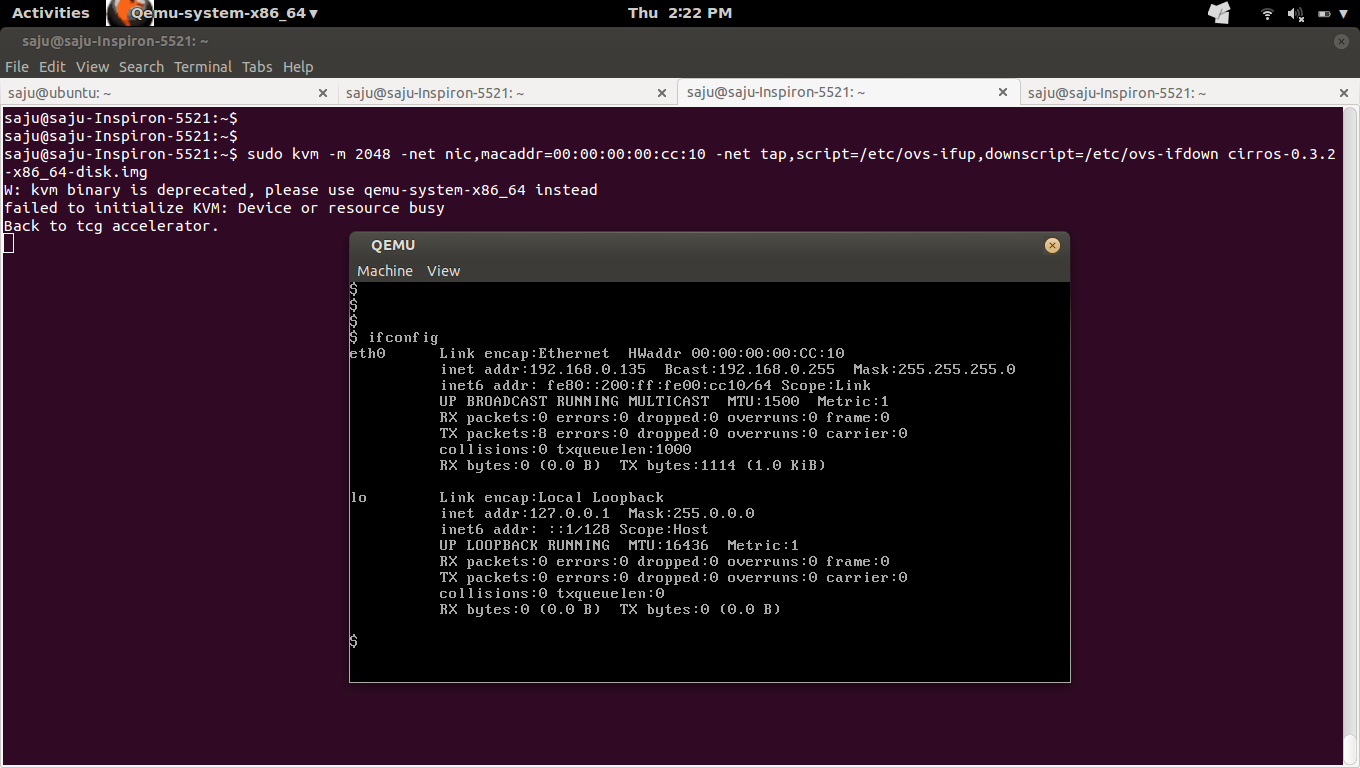
Create a KVM VM with cirros image and attach to OpenvSwitch Bridge "br-int"
#sudo kvm -m 2048 -net nic,macaddr=00:00:00:00:cc:10 -net tap,script=/etc/ovs-ifup,downscript=/etc/ovs-ifdown cirros-0.3.2-x86_64-disk.img


5)
Login to the cirros VM and set the IP. (Ip of the VM should be in the network of "br-int")
#sudo ifconfig eth0 192.168.0.135 netmask 255.255.255.0



6)
From cirros VM : Check routing table
#route -n
7)
From cirros VM : Ping to "br-int", Should work
#ping 192.168.0.131
8)
From cirros VM : Ping to google, Should not work
#ping ip-of-google
9)
List all POSTROUTING iptables rule
#sudo iptables -t nat -L POSTROUTING -nv
10)
Add MASQUERADE target rule for OpenvSwitch Bridge "br-int" to make ping to IP of google working
#sudo iptables -t nat -A POSTROUTING -o br-int -j MASQUERADE


10)
Ping to IP of Google


11)
Ping to www.google.com
Login to cirros VM and open /etc/resolve.conf and add
nameserver 8.8.8.8


12)
From Host System : SSH to cirros VM, Should work
#ssh cirros@192.168.0.135


13)
Ref
http://networkstatic.net/openflow-openvswitch-lab/
Install OpenvSwitch, Create an OpenvSwitch Bridge and attach eth0/wlan0
http://fosshelp.blogspot.com/2014/10/add-eth0-wlan0-openvswitch-bridge.html
2)
Script for create the interface "tap0" and attach it to OpenvSwitch Bridge "br-int"
#sudo vim /etc/ovs-ifup
#!/bin/sh
switch='br-int'
/sbin/ifconfig $1 0.0.0.0 up
ovs-vsctl add-port ${switch} $1
3)
Script for delete the interface "tap0" and detach it from OpenvSwitch Bridge "br-int"
#vim /etc/ovs-ifdown
#!/bin/sh
switch='br-int'
/sbin/ifconfig $1 0.0.0.0 down
ovs-vsctl del-port ${switch} $1
4)
Create a KVM VM with cirros image and attach to OpenvSwitch Bridge "br-int"
#sudo kvm -m 2048 -net nic,macaddr=00:00:00:00:cc:10 -net tap,script=/etc/ovs-ifup,downscript=/etc/ovs-ifdown cirros-0.3.2-x86_64-disk.img
5)
Login to the cirros VM and set the IP. (Ip of the VM should be in the network of "br-int")
#sudo ifconfig eth0 192.168.0.135 netmask 255.255.255.0
6)
From cirros VM : Check routing table
#route -n
7)
From cirros VM : Ping to "br-int", Should work
#ping 192.168.0.131
8)
From cirros VM : Ping to google, Should not work
#ping ip-of-google
9)
List all POSTROUTING iptables rule
#sudo iptables -t nat -L POSTROUTING -nv
10)
Add MASQUERADE target rule for OpenvSwitch Bridge "br-int" to make ping to IP of google working
#sudo iptables -t nat -A POSTROUTING -o br-int -j MASQUERADE
10)
Ping to IP of Google
11)
Ping to www.google.com
Login to cirros VM and open /etc/resolve.conf and add
nameserver 8.8.8.8
12)
From Host System : SSH to cirros VM, Should work
#ssh cirros@192.168.0.135
13)
Ref
http://networkstatic.net/openflow-openvswitch-lab/
How to add eth0 and wlan0 to OpenvSwitch Bridge
1)
Find configuration of "wlan0"
#ifconfig wlan0

2)
Note the route table entries
#route -n


3)
Add an OpenvSwitch Bridge
#sudo ovs-vsctl add-br br-int


4)
Add the interface "wlan0" to OpenvSwitch Bridge "br-int" and Zero out your wlan0 interface
#sudo ovs-vsctl add-port br-int wlan0
#sudo ifconfig wlan0 0


5)
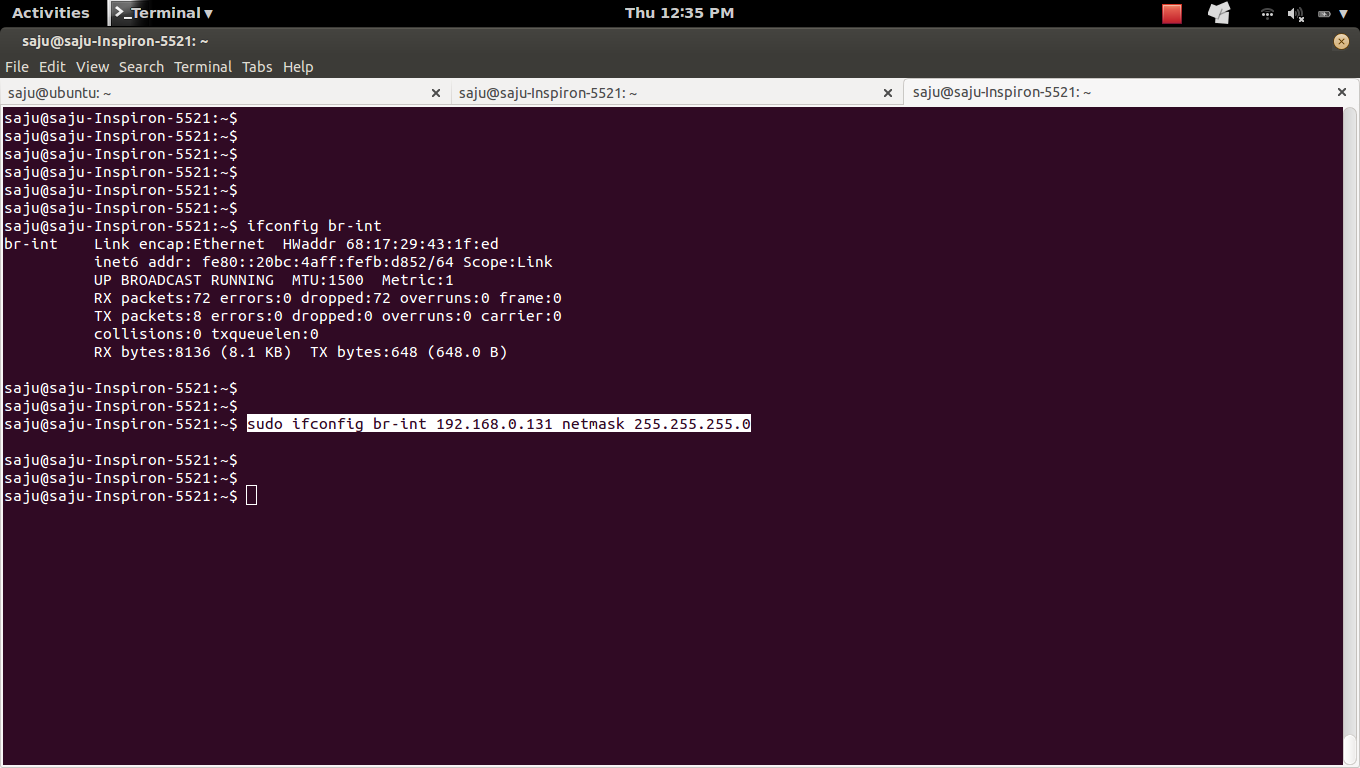
Assign IP to OpenvSwitch Bridge "br-int"
$sudo ifconfig br-int 192.168.0.131 netmask 255.255.255.0

6)
Change your default route
#sudo route add default gw 192.168.0.1 br-int


7)
Check the configuration of "wlan0" and "br-int"
#ifconfig wlan0
#ifconfig br-int
8)
Check the route table entries
#route -n
9)
a)
Before


b)
Commands
sudo ovs-vsctl add-br br-int
sudo ovs-vsctl add-port br-int wlan0
sudo ifconfig wlan0 0
sudo ifconfig br-int 192.168.0.131 netmask 255.255.255.0
sudo route add default gw 192.168.0.1 br-int
c)
After


10)
Delete OpenvSwitch Bridge "br-int"
#sudo ovs-vsctl del-br br-int
#route -n
*Wifi: Disconnect and connect again
Find configuration of "wlan0"
#ifconfig wlan0
2)
Note the route table entries
#route -n
3)
Add an OpenvSwitch Bridge
#sudo ovs-vsctl add-br br-int
4)
Add the interface "wlan0" to OpenvSwitch Bridge "br-int" and Zero out your wlan0 interface
#sudo ovs-vsctl add-port br-int wlan0
#sudo ifconfig wlan0 0
5)
Assign IP to OpenvSwitch Bridge "br-int"
$sudo ifconfig br-int 192.168.0.131 netmask 255.255.255.0
6)
Change your default route
#sudo route add default gw 192.168.0.1 br-int
7)
Check the configuration of "wlan0" and "br-int"
#ifconfig wlan0
#ifconfig br-int
8)
Check the route table entries
#route -n
9)
a)
Before
b)
Commands
sudo ovs-vsctl add-br br-int
sudo ovs-vsctl add-port br-int wlan0
sudo ifconfig wlan0 0
sudo ifconfig br-int 192.168.0.131 netmask 255.255.255.0
sudo route add default gw 192.168.0.1 br-int
c)
After
10)
Delete OpenvSwitch Bridge "br-int"
#sudo ovs-vsctl del-br br-int
#route -n
*Wifi: Disconnect and connect again
Tuesday, October 28, 2014
Friday, October 17, 2014
Howto OpenvSwitch Delete/Clear Flows
##List all flows from the switch
sudo ovs-ofctl dump-flows name-of-switch/bridge
##Delete all flows from the switch
sudo ovs-ofctl del-flows name-of-switch/bridge
##List all datapath
sudo ovs-dpctl dump-dps
##Delete flows in the datapath
sudo ovs-dpctl del-flows
##Delete datapatch (Danger)
sudo ovs-dpctl del-dp
##Describe datapath
sudo ovs-dpctl show
sudo ovs-dpctl show -s
sudo ovs-dpctl show -s
##Clear netflow
sudo ovs-vsctl clear Bridge name-of-switch/bridge netflow
sudo ovs-ofctl dump-flows name-of-switch/bridge
##Delete all flows from the switch
sudo ovs-ofctl del-flows name-of-switch/bridge
##List all datapath
sudo ovs-dpctl dump-dps
##Delete flows in the datapath
sudo ovs-dpctl del-flows
##Delete datapatch (Danger)
sudo ovs-dpctl del-dp
##Describe datapath
sudo ovs-dpctl show
sudo ovs-dpctl show -s
sudo ovs-dpctl show -s
##Clear netflow
sudo ovs-vsctl clear Bridge
Tuesday, October 14, 2014
Howto Create an OpenvSwitch and connect to Opendaylight openflow SDN controller
http://www.opencloudblog.com/?p=207

create a bridge/ovs-switch with the name openflow
#sudo ovs-vsctl add-br openflow
2)
List all controllers
#sudo ovs-vsctl list controller
3)
Connect the bridge/ovs-switch to the opendaylight openflow controller
#ovs-vsctl set-controller openflow tcp:127.0.0.1:6633
Note:
Howto install Opendaylight openflow SDN controller
http://fosshelp.blogspot.in/2014/10/howto-install-opendaylight-sdn.html
4)
Show/Describe all bridges/ovs-switches
#sudo ovs-vsctl show
Bridge openflow
Controller "tcp:127.0.0.1:6633"
is_connected: true
Port openflow
Interface openflow
type: internal
Note:
* controller endpoint 127.0.0.1:6633
* Bridge : openflow
* Local Port : openflow and its interface : openflow
5)
List all controllers
#sudo ovs-vsctl list controller
_uuid : 00a28fc5-acb3-4166-9198-f597b80f2457
connection_mode : []
controller_burst_limit: []
controller_rate_limit: []
enable_async_messages: []
external_ids : {}
inactivity_probe : []
is_connected : true
local_gateway : []
local_ip : []
local_netmask : []
max_backoff : []
other_config : {}
role : other
status : {sec_since_connect="7374", state=ACTIVE}
target : "tcp:127.0.0.1:6633"
Note:
* Status should be like : status : {sec_since_connect="117", state=ACTIVE}
6)
Goto the controller (OpenDaylight)
Goto http://controller-ip:8080/#devices
There you should able to see the newly added ovs-switch/bridge under "Nodes Learned".


Note:
http://fosshelp.blogspot.com/2014/10/howto-install-opendaylight-sdn.html
7)
Create the test infrastructure
7a)
Create 2 Namespaces
#sudo ip netns add ns1
#sudo ip netns add ns2
7b)
Create first internal ovs port "ovs-port1" with interface "ovs-port1" in our OpenvSwitch/bridge "openflow"
#sudo ovs-vsctl add-port openflow ovs-port1 -- set Interface ovs-port1 type=internal
* Name of the port and interface should be same
7b1)
List ports and interfaces in the OpenvSwitch "openflow"
#sudo ovs-vsctl show
Bridge openflow
Controller "tcp:127.0.0.1:6633"
is_connected: true
Port "ovs-port1"
Interface "ovs-port1"
type: internal
Port openflow
Interface openflow
type: internal
7b2)
Attach OpenvSwitch port "ovs-port1" to namespace "ns1"
#sudo ip link set ovs-port1 netns ns1
* Run "#ifconfig -a" in "ns1" namespace to see "ovs-port1" interface.
* Example:#sudo ip netns exec ns1 ifconfig -a
#sudo ip netns exec ns1 ifconfig -a
lo Link encap:Local Loopback
LOOPBACK MTU:65536 Metric:1
RX packets:0 errors:0 dropped:0 overruns:0 frame:0
TX packets:0 errors:0 dropped:0 overruns:0 carrier:0
collisions:0 txqueuelen:0
RX bytes:0 (0.0 B) TX bytes:0 (0.0 B)
ovs-port1 Link encap:Ethernet HWaddr b2:3c:e9:7c:cb:06
BROADCAST MTU:1500 Metric:1
RX packets:16 errors:0 dropped:16 overruns:0 frame:0
TX packets:8 errors:0 dropped:0 overruns:0 carrier:0
collisions:0 txqueuelen:0
RX bytes:1568 (1.5 KB) TX bytes:648 (648.0 B)
7b3)
Set the interfaces in the namespace "ns1" to up
#sudo ip netns exec ns1 ip link set dev ovs-port1 up
#sudo ip netns exec ns1 ip link set dev lo up
Note:
*Check the status of interfaces "lo" and "ovs-port1" in the namespace "ns1"
#sudo ip netns exec ns1 ifconfig -a
lo Link encap:Local Loopback
inet addr:127.0.0.1 Mask:255.0.0.0
inet6 addr: ::1/128 Scope:Host
UP LOOPBACK RUNNING MTU:65536 Metric:1
RX packets:0 errors:0 dropped:0 overruns:0 frame:0
TX packets:0 errors:0 dropped:0 overruns:0 carrier:0
collisions:0 txqueuelen:0
RX bytes:0 (0.0 B) TX bytes:0 (0.0 B)
ovs-port1 Link encap:Ethernet HWaddr b2:3c:e9:7c:cb:06
inet6 addr: fe80::b03c:e9ff:fe7c:cb06/64 Scope:Link
UP BROADCAST RUNNING MTU:1500 Metric:1
RX packets:16 errors:0 dropped:16 overruns:0 frame:0
TX packets:15 errors:0 dropped:0 overruns:0 carrier:0
collisions:0 txqueuelen:0
RX bytes:1568 (1.5 KB) TX bytes:1226 (1.2 KB)
7c)
Create second internal ovs port "ovs-port2" with interface "ovs-port2" in our OpenvSwitch/bridge "openflow"
#sudo ovs-vsctl add-port openflow ovs-port2 -- set Interface ovs-port2 type=internal
* Name of the port and interface should be same
7c1)
List ports and interfaces in the OpenvSwitch "openflow"
#sudo ovs-vsctl show
Bridge openflow
Controller "tcp:127.0.0.1:6633"
is_connected: true
Port "ovs-port1"
Interface "ovs-port1"
type: internal
Port openflow
Interface openflow
type: internal
Port "ovs-port2"
Interface "ovs-port2"
type: internal
7c2)
Attach OpenvSwitch port "ovs-port2" to namespace "ns2"
#sudo ip link set ovs-port2 netns ns2
* Run "#ifconfig -a" in "ns2" namespace to see "ovs-port2" interface.
* Example:#sudo ip netns exec ns2 ifconfig -a
#sudo ip netns exec ns2 ifconfig -a
lo Link encap:Local Loopback
LOOPBACK MTU:65536 Metric:1
RX packets:0 errors:0 dropped:0 overruns:0 frame:0
TX packets:0 errors:0 dropped:0 overruns:0 carrier:0
collisions:0 txqueuelen:0
RX bytes:0 (0.0 B) TX bytes:0 (0.0 B)
ovs-port2 Link encap:Ethernet HWaddr ce:ae:15:19:e2:16
BROADCAST MTU:1500 Metric:1
RX packets:3 errors:0 dropped:3 overruns:0 frame:0
TX packets:8 errors:0 dropped:0 overruns:0 carrier:0
collisions:0 txqueuelen:0
RX bytes:294 (294.0 B) TX bytes:648 (648.0 B)
7c3)
Set the interfaces in the namespace "ns2" to up
#sudo ip netns exec ns2 ip link set dev ovs-port2 up
#sudo ip netns exec ns2 ip link set dev lo up
Note:
*Check the status of interfaces "lo" and "ovs-port2" in the namespace "ns2"
#sudo ip netns exec ns2 ifconfig -a
lo Link encap:Local Loopback
inet addr:127.0.0.1 Mask:255.0.0.0
inet6 addr: ::1/128 Scope:Host
UP LOOPBACK RUNNING MTU:65536 Metric:1
RX packets:0 errors:0 dropped:0 overruns:0 frame:0
TX packets:0 errors:0 dropped:0 overruns:0 carrier:0
collisions:0 txqueuelen:0
RX bytes:0 (0.0 B) TX bytes:0 (0.0 B)
ovs-port2 Link encap:Ethernet HWaddr ce:ae:15:19:e2:16
inet6 addr: fe80::ccae:15ff:fe19:e216/64 Scope:Link
UP BROADCAST RUNNING MTU:1500 Metric:1
RX packets:3 errors:0 dropped:3 overruns:0 frame:0
TX packets:16 errors:0 dropped:0 overruns:0 carrier:0
collisions:0 txqueuelen:0
RX bytes:294 (294.0 B) TX bytes:1296 (1.2 KB)
7d)
Check the newly created ports in OpenDaylight Controller
Goto http://controller-ip:8080/#devices and find your switch/node and click on "Ports" link


7e)
Assign IP address to the interfaces "ovs-port1" in the namespace "ns1 and "ovs-port2" in the namespace "ns2" and ping from "ns1" to "ns2".
7e1)
Assign IP address to the interface "ovs-port1" in the namespace "ns1".
#sudo ip netns exec ns1 ip addr add 10.1.1.4/24 dev ovs-port1
7e2)
Assign IP address to the interface "ovs-port2" in the namespace "ns2".
#sudo ip netns exec ns2 ip addr add 10.1.1.5/24 dev ovs-port2
7e3)
Check the IP address of the interfaces "ovs-port1" and "ovs-port2"
#sudo ip netns exec ns1 ifconfig -a ovs-port1
#sudo ip netns exec ns2 ifconfig -a ovs-port2
#sudo ip netns exec ns1 ifconfig -a ovs-port1
ovs-port1 Link encap:Ethernet HWaddr b2:3c:e9:7c:cb:06
inet addr:10.1.1.4 Bcast:0.0.0.0 Mask:255.255.255.0
inet6 addr: fe80::b03c:e9ff:fe7c:cb06/64 Scope:Link
UP BROADCAST RUNNING MTU:1500 Metric:1
RX packets:16 errors:0 dropped:16 overruns:0 frame:0
TX packets:16 errors:0 dropped:0 overruns:0 carrier:0
collisions:0 txqueuelen:0
RX bytes:1568 (1.5 KB) TX bytes:1296 (1.2 KB)
#sudo ip netns exec ns2 ifconfig -a ovs-port2
ovs-port2 Link encap:Ethernet HWaddr ce:ae:15:19:e2:16
inet addr:10.1.1.5 Bcast:0.0.0.0 Mask:255.255.255.0
inet6 addr: fe80::ccae:15ff:fe19:e216/64 Scope:Link
UP BROADCAST RUNNING MTU:1500 Metric:1
RX packets:3 errors:0 dropped:3 overruns:0 frame:0
TX packets:16 errors:0 dropped:0 overruns:0 carrier:0
collisions:0 txqueuelen:0
RX bytes:294 (294.0 B) TX bytes:1296 (1.2 KB)
* You should see the IP for the interfaces "ovs-port1" and "ovs-port2"
7f)
Ping from "ns1" to "ns2".
#sudo ip netns exec ns1 ping 10.1.1.5
PING 10.1.1.5 (10.1.1.5) 56(84) bytes of data.
From 10.1.1.4 icmp_seq=1 Destination Host Unreachable
From 10.1.1.4 icmp_seq=2 Destination Host Unreachable
* The ping does not work – the flow entries are missing.
* This ping will add a flow entry to OpenvSwitch "openflow" which tells that if any packet comes with "nw_dst=10.1.1.4" forward to the OpenvSwitch port "ovs-port1".You can see the MAC address on the OpenvSwitch port "ovs-port1" in the flow entry.
* Because of the entry, ping will work, if you ping from "ns2" to "ns1" like #sudo ip netns exec ns2 ping 10.1.1.4.
7f1)
Goto http://controller-ip:8080/#devices and check the Graph

* You can see the graph with OpenvSwitch "openflow" and interface "ovs-port1" from namespace "ns1" connected to it.
7f2)
Dump flows from OpenvSwitch "openflow"
#sudo ovs-ofctl dump-flows openflow
NXST_FLOW reply (xid=0x4):
cookie=0x0, duration=341.337s, table=0, n_packets=0, n_bytes=0, idle_age=341, priority=1,ip,nw_dst=10.1.1.4 actions=mod_dl_dst:da:cf:0d:90:c0:53,output:1
* This means that if any packet comes with "nw_dst=10.1.1.4" forward to the OpenvSwitch port "ovs-port1". You can see the MAC address on the OpenvSwitch port "ovs-port1" in the flow entry.
* Note nw_dst=10.1.1.4 and actions=mod_dl_dst:da:cf:0d:90:c0:53
Howto Install OpenDaylight SDN Controller
https://wiki.opendaylight.org/view/OpenDaylight_Controller:Installation
1)
Download opendaylight
Goto https://jenkins.opendaylight.org/controller/job/controller-merge/lastSuccessfulBuild/artifact/opendaylight/distribution/opendaylight/target/
#wget https://jenkins.opendaylight.org/controller/job/controller-merge/lastSuccessfulBuild/artifact/opendaylight/distribution/opendaylight/target/distribution.opendaylight-osgipackage.zip
Unzip
#unzip distribution.opendaylight-osgipackage.zip
#cd opendaylight/
2)
Launch the OpenDaylight Controller on Linux/Unix system
#./run
Need to set JAVA_HOME environment variable
3)
Install Java
#sudo add-apt-repository ppa:webupd8team/java
#sudo apt-get update
#sudo apt-get install oracle-java8-installer
#sudo apt-get install oracle-java8-set-default
4)
Launch the OpenDaylight Controller on Linux/Unix system
#./run
5)
Navigate to http://controller-ip:8080 to open the web interface, then use the following credentials to log in:
Username: admin
Password: admin
6)
Howto Create an OpenvSwitch and connect to Opendaylight openflow SDN controller
http://fosshelp.blogspot.com/2014/10/create-openvswitch-connect-opendaylight.html
How to restart OpenvSwitch
1)
Restart OpenvSwitch
#sudo /etc/init.d/openvswitch-switch restart
* Killing ovs-vswitchd (1320)
* Killing ovsdb-server (1288)
* Starting ovsdb-server
* Configuring Open vSwitch system IDs
* Starting ovs-vswitchd
* Enabling remote OVSDB managers
2)
Status
#sudo /etc/init.d/openvswitch-switch status
ovsdb-server is running with pid 8086
ovs-vswitchd is running with pid 8096
Restart OpenvSwitch
#sudo /etc/init.d/openvswitch-switch restart
* Killing ovs-vswitchd (1320)
* Killing ovsdb-server (1288)
* Starting ovsdb-server
* Configuring Open vSwitch system IDs
* Starting ovs-vswitchd
* Enabling remote OVSDB managers
2)
Status
#sudo /etc/init.d/openvswitch-switch status
ovsdb-server is running with pid 8086
ovs-vswitchd is running with pid 8096
Monday, October 13, 2014
HowTo OpenvSwitch Add and Test OpenFlow Flow Entries
1)
creates a new bridge/ovs-switch "my-ov-switch1" and puts "my-ov-switch1" into so-called "fail-secure" mode.
#sudo ovs-vsctl add-br my-ov-switch1 -- set Bridge my-ov-switch1 fail-mode=secure
http://git.openvswitch.org/cgi-bin/gitweb.cgi?p=openvswitch;a=blob_plain;f=tutorial/Tutorial;hb=HEAD
2)
Check the newly created bridge/ovs-switch "my-ov-switch1"
#sudo ovs-vsctl show
* The new bridge/ovs-switch has only one port on it so far, the "local port" my-ov-switch1.
3)
List all bridges/ovs-switchs
#sudo ovs-vsctl list-br
4)
List all ports in the bridge/ovs-switch "my-ov-switch1"
#sudo ovs-vsctl list-ports my-ov-switch1
5)
We need to add ports my-ovs-port1, my-ovs-port2, my-ovs-port3, and my-ovs-port4 to bridge/ovs-switch "my-ov-switch1".A shell "for" loop is one way to do it.
for i in 1 2 3 4; do
sudo ovs-vsctl add-port my-ov-switch1 my-ovs-port$i -- set Interface my-ovs-port$i ofport_request=$i type=internal
sudo ovs-ofctl mod-port my-ov-switch1 my-ovs-port$i up
done
* In addition to adding a port, the ovs-vsctl command above sets its
"ofport_request" column to ensure that port my-ovs-port1 is assigned OpenFlow
port 1, my-ovs-port2 is assigned OpenFlow port 2, and so on.
6)
Run following command to see what we've done so far.
#sudo ovs-vsctl show
#sudo ovs-ofctl show my-ov-switch1
7)
Check the Flow Table of an OpenvSwitch "my-ov-switch1"
#sudo ovs-ofctl show my-ov-switch1
List/Dump all OpenFlow flow tables of an OpenvSwitch "my-ov-switch1"
#sudo ovs-ofctl dump-tables my-ov-switch1
List/Dump all OpenFlow flows of an OpenvSwitch "my-ov-switch1"
#sudo ovs-ofctl dump-flows my-ov-switch1
8)
Delete all flows from OpenvSwitch "my-ov-switch1"
#sudo ovs-ofctl del-flows my-ov-switch1
9)
List all flows from OpenvSwitch "my-ov-switch1"
#sudo ovs-ofctl dump-flows my-ov-switch1
10)
Add and Test First OpenFlow Flow Entry
10a)
Add a flow to OpenFlow table "1" in the OpenvSwitch "my-ov-switch1"
#sudo ovs-ofctl add-flow my-ov-switch1 "table=1, priority=99, in_port=1 actions=mod_vlan_vid:20"
* Meaning: If a packet comes to OpenvSwitch Port "my-ovs-port1" (in_port=1, mapped as OpenFlow port 1), add vlan tag "20" to that packet.
10b)
List all flows from OpenvSwitch "my-ov-switch1"
#sudo ovs-ofctl dump-flows my-ov-switch1
Output
----------
NXST_FLOW reply (xid=0x4):
cookie=0x0, duration=4011.56s, table=0, n_packets=0, n_bytes=0, idle_age=4011, priority=99,in_port=1 actions=mod_vlan_vid:20
10c)
* Test the flow with tool "ofproto/trace", it shows, step-by-step, how
such a flow would be treated as it goes through the switch.
* Send a packet to OpenvSwitch Port "my-ovs-port1" in the OpenvSwitch "my-ov-switch1"
#sudo ovs-appctl ofproto/trace my-ov-switch1 in_port=1
Output
---------
Flow: metadata=0,in_port=1,vlan_tci=0x0000,dl_src=00:00:00:00:00:00,dl_dst=00:00:00:00:00:00,dl_type=0x0000
Rule: table=1 cookie=0 priority=99,in_port=1
OpenFlow actions=mod_vlan_vid:20
Final flow: metadata=0,in_port=1,dl_vlan=20,dl_vlan_pcp=0,dl_src=00:00:00:00:00:00,dl_dst=00:00:00:00:00:00,dl_type=0x0000
Relevant fields: skb_priority=0,in_port=1,vlan_tci=0x0000/0x1fff,dl_type=0x0000,nw_frag=no
Datapath actions: drop
-----------
* You can see "dl_vlan=20" in "Final flow:"
11)
Add an OpenFlow entry in OpenFlow table 1 of OpenvSwitch "my-ov-switch1" which would add vlan tag "20" to packet comming throught port "my-ovs-port1" and resubmit to next OpenFlow table (table 2).
11a)
Add flow
#sudo ovs-ofctl add-flow my-ov-switch1 "table=0, priority=100, in_port=1 actions=mod_vlan_vid:20, resubmit(,2)"
11b)
List all flows from OpenvSwitch "my-ov-switch1"
#sudo ovs-ofctl dump-flows my-ov-switch1
Output
----------
NXST_FLOW reply (xid=0x4):
cookie=0x0, duration=1048.791s, table=0, n_packets=0, n_bytes=0, idle_age=1048, priority=100,in_port=1 actions=mod_vlan_vid:20,resubmit(,2)
11c)
Send a packet to OpenvSwitch Port "my-ovs-port1" in the OpenvSwitch "my-ov-switch1" and test it.
#sudo ovs-appctl ofproto/trace my-ov-switch1 in_port=1
Output
----------
Flow: metadata=0,in_port=1,vlan_tci=0x0000,dl_src=00:00:00:00:00:00,dl_dst=00:00:00:00:00:00,dl_type=0x0000
Rule: table=0 cookie=0 priority=100,in_port=1
OpenFlow actions=mod_vlan_vid:20,resubmit(,2)
Resubmitted flow: metadata=0,in_port=1,dl_vlan=20,dl_vlan_pcp=0,dl_src=00:00:00:00:00:00,dl_dst=00:00:00:00:00:00,dl_type=0x0000
Resubmitted regs: reg0=0x0 reg1=0x0 reg2=0x0 reg3=0x0 reg4=0x0 reg5=0x0 reg6=0x0 reg7=0x0
Resubmitted odp: drop
No match
Final flow: unchanged
Relevant fields: skb_priority=0,in_port=1,vlan_tci=0x0000/0x1fff,dl_type=0x0000,nw_frag=no
Datapath actions: drop
-----------
* You can see "dl_vlan=20" in "Resubmitted flow:"
* Also note "OpenFlow actions=mod_vlan_vid:20,resubmit(,2)". Means, added vlan tag 20 to the packet and resubmitted to "table 2".
* Since there is no flows in "table 2" packet got dropped, see "Resubmitted odp: drop" No match
* "Final flow: unchanged" means, packet has no change in table 2 (final table).
12)
a)
Add an OpenFlow entry in OpenFlow table 1 of OpenvSwitch "my-ov-switch1" which would add vlan tag "20" to packet comming throught port "my-ovs-port1" and resubmit to next OpenFlow table (table 2).
b)
Add another OpenFlow entry in OpenFlow table 2 of OpenvSwitch "my-ov-switch1" which would simply resubmit packet to next OpenFlow table (table 3).
12a)
Add flows
#sudo ovs-ofctl add-flow br0 "table=0, priority=100, in_port=1 actions=mod_vlan_vid:20, resubmit(,2)"
#sudo ovs-ofctl add-flow br0 "table=2, priority=100, in_port=1 actions=resubmit(,3)"
12b)
List all flows from OpenvSwitch "my-ov-switch1"
#sudo ovs-ofctl dump-flows my-ov-switch1
NXST_FLOW reply (xid=0x4):
cookie=0x0, duration=6.724s, table=0, n_packets=0, n_bytes=0, idle_age=6, priority=100,in_port=1 actions=mod_vlan_vid:20,resubmit(,2)
cookie=0x0, duration=3.552s, table=2, n_packets=0, n_bytes=0, idle_age=3, priority=100,in_port=1 actions=resubmit(,3)
12c)
Send a packet to OpenvSwitch Port "my-ovs-port1" in the OpenvSwitch "my-ov-switch1" and test it.
#sudo ovs-appctl ofproto/trace my-ov-switch1 in_port=1
Output
----------
Flow: metadata=0,in_port=1,vlan_tci=0x0000,dl_src=00:00:00:00:00:00,dl_dst=00:00:00:00:00:00,dl_type=0x0000
Rule: table=0 cookie=0 priority=100,in_port=1
OpenFlow actions=mod_vlan_vid:20,resubmit(,2)
Resubmitted flow: metadata=0,in_port=1,dl_vlan=20,dl_vlan_pcp=0,dl_src=00:00:00:00:00:00,dl_dst=00:00:00:00:00:00,dl_type=0x0000
Resubmitted regs: reg0=0x0 reg1=0x0 reg2=0x0 reg3=0x0 reg4=0x0 reg5=0x0 reg6=0x0 reg7=0x0
Resubmitted odp: drop
Rule: table=2 cookie=0 priority=100,in_port=1
OpenFlow actions=resubmit(,3)
Resubmitted flow: unchanged
Resubmitted regs: reg0=0x0 reg1=0x0 reg2=0x0 reg3=0x0 reg4=0x0 reg5=0x0 reg6=0x0 reg7=0x0
Resubmitted odp: drop
No match
Final flow: unchanged
Relevant fields: skb_priority=0,in_port=1,vlan_tci=0x0000/0x1fff,dl_type=0x0000,nw_frag=no
Datapath actions: drop
-----------
* You can see "dl_vlan=20" in "Resubmitted flow:"
* Also note "OpenFlow actions=mod_vlan_vid:20,resubmit(,2)". Means, added vlan tag 20 to the packet and resubmitted to "table 2".
* You can see "Resubmitted flow: unchanged", "table 2" doesn't made any change in packet before resubmit to "table 3"
* Since there is no flows in "table 3" packet got dropped, see "Resubmitted odp: drop" No match
* "Final flow: unchanged" means, packet has no change in table 3 (final table).
creates a new bridge/ovs-switch "my-ov-switch1" and puts "my-ov-switch1" into so-called "fail-secure" mode.
#sudo ovs-vsctl add-br my-ov-switch1 -- set Bridge my-ov-switch1 fail-mode=secure
http://git.openvswitch.org/cgi-bin/gitweb.cgi?p=openvswitch;a=blob_plain;f=tutorial/Tutorial;hb=HEAD
2)
Check the newly created bridge/ovs-switch "my-ov-switch1"
#sudo ovs-vsctl show
* The new bridge/ovs-switch has only one port on it so far, the "local port" my-ov-switch1.
3)
List all bridges/ovs-switchs
#sudo ovs-vsctl list-br
4)
List all ports in the bridge/ovs-switch "my-ov-switch1"
#sudo ovs-vsctl list-ports my-ov-switch1
5)
We need to add ports my-ovs-port1, my-ovs-port2, my-ovs-port3, and my-ovs-port4 to bridge/ovs-switch "my-ov-switch1".A shell "for" loop is one way to do it.
for i in 1 2 3 4; do
sudo ovs-vsctl add-port my-ov-switch1 my-ovs-port$i -- set Interface my-ovs-port$i ofport_request=$i type=internal
sudo ovs-ofctl mod-port my-ov-switch1 my-ovs-port$i up
done
* In addition to adding a port, the ovs-vsctl command above sets its
"ofport_request" column to ensure that port my-ovs-port1 is assigned OpenFlow
port 1, my-ovs-port2 is assigned OpenFlow port 2, and so on.
6)
Run following command to see what we've done so far.
#sudo ovs-vsctl show
#sudo ovs-ofctl show my-ov-switch1
7)
Check the Flow Table of an OpenvSwitch "my-ov-switch1"
#sudo ovs-ofctl show my-ov-switch1
List/Dump all OpenFlow flow tables of an OpenvSwitch "my-ov-switch1"
#sudo ovs-ofctl dump-tables my-ov-switch1
List/Dump all OpenFlow flows of an OpenvSwitch "my-ov-switch1"
#sudo ovs-ofctl dump-flows my-ov-switch1
8)
Delete all flows from OpenvSwitch "my-ov-switch1"
#sudo ovs-ofctl del-flows my-ov-switch1
9)
List all flows from OpenvSwitch "my-ov-switch1"
#sudo ovs-ofctl dump-flows my-ov-switch1
10)
Add and Test First OpenFlow Flow Entry
10a)
Add a flow to OpenFlow table "1" in the OpenvSwitch "my-ov-switch1"
#sudo ovs-ofctl add-flow my-ov-switch1 "table=1, priority=99, in_port=1 actions=mod_vlan_vid:20"
* Meaning: If a packet comes to OpenvSwitch Port "my-ovs-port1" (in_port=1, mapped as OpenFlow port 1), add vlan tag "20" to that packet.
10b)
List all flows from OpenvSwitch "my-ov-switch1"
#sudo ovs-ofctl dump-flows my-ov-switch1
Output
----------
NXST_FLOW reply (xid=0x4):
cookie=0x0, duration=4011.56s, table=0, n_packets=0, n_bytes=0, idle_age=4011, priority=99,in_port=1 actions=mod_vlan_vid:20
10c)
* Test the flow with tool "ofproto/trace", it shows, step-by-step, how
such a flow would be treated as it goes through the switch.
* Send a packet to OpenvSwitch Port "my-ovs-port1" in the OpenvSwitch "my-ov-switch1"
#sudo ovs-appctl ofproto/trace my-ov-switch1 in_port=1
Output
---------
Flow: metadata=0,in_port=1,vlan_tci=0x0000,dl_src=00:00:00:00:00:00,dl_dst=00:00:00:00:00:00,dl_type=0x0000
Rule: table=1 cookie=0 priority=99,in_port=1
OpenFlow actions=mod_vlan_vid:20
Final flow: metadata=0,in_port=1,dl_vlan=20,dl_vlan_pcp=0,dl_src=00:00:00:00:00:00,dl_dst=00:00:00:00:00:00,dl_type=0x0000
Relevant fields: skb_priority=0,in_port=1,vlan_tci=0x0000/0x1fff,dl_type=0x0000,nw_frag=no
Datapath actions: drop
-----------
* You can see "dl_vlan=20" in "Final flow:"
11)
Add an OpenFlow entry in OpenFlow table 1 of OpenvSwitch "my-ov-switch1" which would add vlan tag "20" to packet comming throught port "my-ovs-port1" and resubmit to next OpenFlow table (table 2).
11a)
Add flow
#sudo ovs-ofctl add-flow my-ov-switch1 "table=0, priority=100, in_port=1 actions=mod_vlan_vid:20, resubmit(,2)"
11b)
List all flows from OpenvSwitch "my-ov-switch1"
#sudo ovs-ofctl dump-flows my-ov-switch1
Output
----------
NXST_FLOW reply (xid=0x4):
cookie=0x0, duration=1048.791s, table=0, n_packets=0, n_bytes=0, idle_age=1048, priority=100,in_port=1 actions=mod_vlan_vid:20,resubmit(,2)
11c)
Send a packet to OpenvSwitch Port "my-ovs-port1" in the OpenvSwitch "my-ov-switch1" and test it.
#sudo ovs-appctl ofproto/trace my-ov-switch1 in_port=1
Output
----------
Flow: metadata=0,in_port=1,vlan_tci=0x0000,dl_src=00:00:00:00:00:00,dl_dst=00:00:00:00:00:00,dl_type=0x0000
Rule: table=0 cookie=0 priority=100,in_port=1
OpenFlow actions=mod_vlan_vid:20,resubmit(,2)
Resubmitted flow: metadata=0,in_port=1,dl_vlan=20,dl_vlan_pcp=0,dl_src=00:00:00:00:00:00,dl_dst=00:00:00:00:00:00,dl_type=0x0000
Resubmitted regs: reg0=0x0 reg1=0x0 reg2=0x0 reg3=0x0 reg4=0x0 reg5=0x0 reg6=0x0 reg7=0x0
Resubmitted odp: drop
No match
Final flow: unchanged
Relevant fields: skb_priority=0,in_port=1,vlan_tci=0x0000/0x1fff,dl_type=0x0000,nw_frag=no
Datapath actions: drop
-----------
* You can see "dl_vlan=20" in "Resubmitted flow:"
* Also note "OpenFlow actions=mod_vlan_vid:20,resubmit(,2)". Means, added vlan tag 20 to the packet and resubmitted to "table 2".
* Since there is no flows in "table 2" packet got dropped, see "Resubmitted odp: drop" No match
* "Final flow: unchanged" means, packet has no change in table 2 (final table).
12)
a)
Add an OpenFlow entry in OpenFlow table 1 of OpenvSwitch "my-ov-switch1" which would add vlan tag "20" to packet comming throught port "my-ovs-port1" and resubmit to next OpenFlow table (table 2).
b)
Add another OpenFlow entry in OpenFlow table 2 of OpenvSwitch "my-ov-switch1" which would simply resubmit packet to next OpenFlow table (table 3).
12a)
Add flows
#sudo ovs-ofctl add-flow br0 "table=0, priority=100, in_port=1 actions=mod_vlan_vid:20, resubmit(,2)"
#sudo ovs-ofctl add-flow br0 "table=2, priority=100, in_port=1 actions=resubmit(,3)"
12b)
List all flows from OpenvSwitch "my-ov-switch1"
#sudo ovs-ofctl dump-flows my-ov-switch1
NXST_FLOW reply (xid=0x4):
cookie=0x0, duration=6.724s, table=0, n_packets=0, n_bytes=0, idle_age=6, priority=100,in_port=1 actions=mod_vlan_vid:20,resubmit(,2)
cookie=0x0, duration=3.552s, table=2, n_packets=0, n_bytes=0, idle_age=3, priority=100,in_port=1 actions=resubmit(,3)
12c)
Send a packet to OpenvSwitch Port "my-ovs-port1" in the OpenvSwitch "my-ov-switch1" and test it.
#sudo ovs-appctl ofproto/trace my-ov-switch1 in_port=1
Output
----------
Flow: metadata=0,in_port=1,vlan_tci=0x0000,dl_src=00:00:00:00:00:00,dl_dst=00:00:00:00:00:00,dl_type=0x0000
Rule: table=0 cookie=0 priority=100,in_port=1
OpenFlow actions=mod_vlan_vid:20,resubmit(,2)
Resubmitted flow: metadata=0,in_port=1,dl_vlan=20,dl_vlan_pcp=0,dl_src=00:00:00:00:00:00,dl_dst=00:00:00:00:00:00,dl_type=0x0000
Resubmitted regs: reg0=0x0 reg1=0x0 reg2=0x0 reg3=0x0 reg4=0x0 reg5=0x0 reg6=0x0 reg7=0x0
Resubmitted odp: drop
Rule: table=2 cookie=0 priority=100,in_port=1
OpenFlow actions=resubmit(,3)
Resubmitted flow: unchanged
Resubmitted regs: reg0=0x0 reg1=0x0 reg2=0x0 reg3=0x0 reg4=0x0 reg5=0x0 reg6=0x0 reg7=0x0
Resubmitted odp: drop
No match
Final flow: unchanged
Relevant fields: skb_priority=0,in_port=1,vlan_tci=0x0000/0x1fff,dl_type=0x0000,nw_frag=no
Datapath actions: drop
-----------
* You can see "dl_vlan=20" in "Resubmitted flow:"
* Also note "OpenFlow actions=mod_vlan_vid:20,resubmit(,2)". Means, added vlan tag 20 to the packet and resubmitted to "table 2".
* You can see "Resubmitted flow: unchanged", "table 2" doesn't made any change in packet before resubmit to "table 3"
* Since there is no flows in "table 3" packet got dropped, see "Resubmitted odp: drop" No match
* "Final flow: unchanged" means, packet has no change in table 3 (final table).
ovs-ofctl: br0: couldn't find port `p1'
Solution:
Specify interface "type" while adding port to bridge/ovs-switch
#sudo ovs-vsctl add-port br0 tap1 -- set Interface tap1 type=internal
#sudo ovs-ofctl mod-port br0 p1 up
Specify interface "type" while adding port to bridge/ovs-switch
#sudo ovs-vsctl add-port br0 tap1 -- set Interface tap1 type=internal
#sudo ovs-ofctl mod-port br0 p1 up
Multiple solutions to interconnect Linux namespaces using a software based switch
Howto connect two network namespaces using veth pairs
http://fosshelp.blogspot.com/2014/07/howto-connect-two-network-namespaces.html
Howto Connect two network namespaces using Linux Bridge and veth pairs
http://fosshelp.blogspot.com/2014/08/connect-two-network-namespaces-using.html
Howto Connect network namespaces using OpenvSwitch and veth pairs
http://fosshelp.blogspot.in/2014/10/network-namespaces-openvswitch-veth.html
Howto Connect network namespaces using OpenvSwitch and OpenvSwitch Ports
http://fosshelp.blogspot.com/2014/10/namespaces-openvswitch-and-openvswitch.html
Howto Connect network namespaces using OpenvSwitch and OpenvSwitch Ports
1)
Install OpenvSwitch
#sudo apt-get install openvswitch-switch
2)
Create Namespaces

http://www.opencloudblog.com/?p=66
2a)
Create 2 Namespaces
#sudo ip netns add ns1
#sudo ip netns add ns2
2b)
List all namespaces
#sudo ip netns list
3)
Create an OpenvSwitch
3a)
List all OpenvSwitchs
#sudo ovs-vsctl list-br
3b)
Create an OpenvSwitch "my-ov-switch1"
#sudo ovs-vsctl add-br my-ov-switch1
3c)
List all OpenvSwitchs
#sudo ovs-vsctl list-br
3d)
List all interfaces in the global namespace and find the OpenvSwitch "my-ov-switch1"
#ifconfig -a
OR
#ifconfig my-ov-switch1
4)
Create first internal ovs port and attach to namespace "ns1"
4a)
Create an internal ovs port
#sudo ovs-vsctl add-port my-ov-switch1 tap1 -- set Interface tap1 type=internal
4b)
List ports/interfaces in the OpenvSwitch "my-ov-switch1"
#sudo ovs-vsctl list-ports my-ov-switch1
* At this point you can see the port "tap1"
4c)
Check the newly created interface in the global namespace
#sudo ifconfig tap1
* At this point the interface "tap1" don't have IP associated with it.
4d)
Attach ovs port "tap1" to namespace "ns1"
#sudo ip link set tap1 netns ns1
* At this point if you run "#sudo ifconfig tap1" in global namespace you would not able to see the "tap1" interface there.
* Run "#ifconfig -a" in "ns1" namespace to see "tap1" interface.
* Example:#sudo ip netns exec ns1 ifconfig -a
4e)
Set the port/interface "tap1" to UP
#sudo ip netns exec ns1 ip link set dev tap1 up
#sudo ip netns exec ns1 ifconfig tap1
* At this point the port/interface "tap1" is in UP state. You can see the status as "UP BROADCAST MULTICAST", that means UP.
5)
Create second internal ovs port and attach to namespace "ns2"
5a)
Create an internal ovs port
#sudo ovs-vsctl add-port my-ov-switch1 tap2 -- set Interface tap2 type=internal
5b)
List ports/interfaces in the OpenvSwitch "my-ov-switch1"
#sudo ovs-vsctl list-ports my-ov-switch1
* At this point you can see the ports "tap1" and "tap2"
5c)
Check the newly created interface in the global namespace
#sudo ifconfig tap2
* At this point the interface "tap2" don't have IP associated with it.
5d)
Attach ovs port "tap2" to namespace "ns2"
#sudo ip link set tap2 netns ns2
* At this point if you run "#sudo ifconfig tap2" in global namespace you would not able to see the "tap2" interface there.
* Run "#ifconfig -a" in "ns2" namespace to see "tap2" interface.
* Example:#sudo ip netns exec ns2 ifconfig -a
5e)
Set the port/interface "tap2" to UP
#sudo ip netns exec ns2 ip link set dev tap2 up
#sudo ip netns exec ns2 ifconfig tap2
* At this point the port/interface "tap2" is in UP state. You can see the status as "UP BROADCAST MULTICAST", that means UP.
6)
Assign IP address to the interfaces "tap1" in the namespace "ns1 and "tap2" in the namespace "ns2" and ping from "ns1" to "ns2".
6a)
Assign IP address to the interface "tap1" in the namespace "ns1".
#sudo ip netns exec ns1 ip addr add 10.1.1.4/24 dev tap1
6b)
Assign IP address to the interface "tap2" in the namespace "ns2".
#sudo ip netns exec ns2 ip addr add 10.1.1.5/24 dev tap2
6c)
Check the IP address of the interfaces "tap1" and "tap2"
#sudo ip netns exec ns1 ifconfig -a tap1
#sudo ip netns exec ns2 ifconfig -a tap2
* You should see the IP for the interfaces "tap1" and "tap2"
6d)
Check the routing table in the namespace "ns1" and "ns2"
#sudo ip netns exec ns1 route -n
#sudo ip netns exec ns2 route -n
* You should see the entry for "tap1" and "tap2" in routing table of namespaces "ns1" and "ns2" respectively. If you can't see, that means interface is DOWN.
6e)
Ping from "ns1" to "ns2".
#sudo ip netns exec ns1 ping 10.1.1.5
* Ping should work
7)
7a)
Check the Flow Table of OpenvSwitch "my-ov-switch1"
#sudo ovs-ofctl show my-ov-switch1
#sudo ovs-ofctl dump-tables my-ov-switch1
#sudo ovs-ofctl dump-flows my-ov-switch1
7b)
#sudo ovs-vsctl show
8)
Ping to "173.194.36.16" (www.google.com)
8a)
Ping to "173.194.36.16" (www.google.com) from namespace "ns1"
#sudo ip netns exec ns1 ping 173.194.36.16
* Ping will not work : connect: Network is unreachable
8b)
Capture Ping (ICMP) packets from the OpenvSwitch "my-ov-switch1"
#sudo tshark -i my-ov-switch1 icmp
* We will not get any ICMP packets from the OpenvSwitch "my-ov-switch1" since the packet are droping from the namespace "ns1" itself since there is no default gateway (path to redirect all packets whose dest address not in 10.1.1.4/24 network) defined in the routing table of namespace "ns1".
8c)
Check the routing table in the namespace "ns1".
#sudo ip netns exec ns1 route -n
* You can see that there is no default gateway defined
8d)
Check the IP of the OpenvSwitch "my-ov-switch1"
#sudo ifconfig -a my-ov-switch1
8e)
Attach IP to OpenvSwitch "my-ov-switch1"
#sudo ip addr add 10.1.1.3/24 dev my-ov-switch1
8f)
Check the IP of the OpenvSwitch "my-ov-switch1"
#ifconfig -a my-ov-switch1
8g)
Add a default gateway to flow packets which are not destined for the network 10.1.1.x to outside.
Defalut gateway has to be set the IP address of the OpenvSwitch "my-ov-switch1"
#sudo ip netns exec ns1 route add default gw 10.1.1.3 tap1
8f)
Check the routing table in the namespace "ns1".
#sudo ip netns exec ns1 route -n
* You can see the entry of default gateway
8g)
Ping to 173.194.36.16 from namespace "ns1"
#sudo ip netns exec ns1 ping 173.194.36.16
* Ping will not work, But you will get the ICMP request packets in OpenvSwitch "my-ov-switch1" nad no reply packets.
* Use the command (#sudo tshark -i my-ov-switch1 icmp) to capture the packets from the OpenvSwitch "my-ov-switch1"
* That means reply packets are not routing properly. So we need to add SNAT in global namespace for packet which has source IP:10.1.1.4 or 10.1.1.x. OR we need to add MASQURIDE rule for interface "eth0"(virtualBox NAT).
Install OpenvSwitch
#sudo apt-get install openvswitch-switch
2)
Create Namespaces
http://www.opencloudblog.com/?p=66
2a)
Create 2 Namespaces
#sudo ip netns add ns1
#sudo ip netns add ns2
2b)
List all namespaces
#sudo ip netns list
3)
Create an OpenvSwitch
3a)
List all OpenvSwitchs
#sudo ovs-vsctl list-br
3b)
Create an OpenvSwitch "my-ov-switch1"
#sudo ovs-vsctl add-br my-ov-switch1
3c)
List all OpenvSwitchs
#sudo ovs-vsctl list-br
3d)
List all interfaces in the global namespace and find the OpenvSwitch "my-ov-switch1"
#ifconfig -a
OR
#ifconfig my-ov-switch1
4)
Create first internal ovs port and attach to namespace "ns1"
4a)
Create an internal ovs port
#sudo ovs-vsctl add-port my-ov-switch1 tap1 -- set Interface tap1 type=internal
4b)
List ports/interfaces in the OpenvSwitch "my-ov-switch1"
#sudo ovs-vsctl list-ports my-ov-switch1
* At this point you can see the port "tap1"
4c)
Check the newly created interface in the global namespace
#sudo ifconfig tap1
* At this point the interface "tap1" don't have IP associated with it.
4d)
Attach ovs port "tap1" to namespace "ns1"
#sudo ip link set tap1 netns ns1
* At this point if you run "#sudo ifconfig tap1" in global namespace you would not able to see the "tap1" interface there.
* Run "#ifconfig -a" in "ns1" namespace to see "tap1" interface.
* Example:#sudo ip netns exec ns1 ifconfig -a
4e)
Set the port/interface "tap1" to UP
#sudo ip netns exec ns1 ip link set dev tap1 up
#sudo ip netns exec ns1 ifconfig tap1
* At this point the port/interface "tap1" is in UP state. You can see the status as "UP BROADCAST MULTICAST", that means UP.
5)
Create second internal ovs port and attach to namespace "ns2"
5a)
Create an internal ovs port
#sudo ovs-vsctl add-port my-ov-switch1 tap2 -- set Interface tap2 type=internal
5b)
List ports/interfaces in the OpenvSwitch "my-ov-switch1"
#sudo ovs-vsctl list-ports my-ov-switch1
* At this point you can see the ports "tap1" and "tap2"
5c)
Check the newly created interface in the global namespace
#sudo ifconfig tap2
* At this point the interface "tap2" don't have IP associated with it.
5d)
Attach ovs port "tap2" to namespace "ns2"
#sudo ip link set tap2 netns ns2
* At this point if you run "#sudo ifconfig tap2" in global namespace you would not able to see the "tap2" interface there.
* Run "#ifconfig -a" in "ns2" namespace to see "tap2" interface.
* Example:#sudo ip netns exec ns2 ifconfig -a
5e)
Set the port/interface "tap2" to UP
#sudo ip netns exec ns2 ip link set dev tap2 up
#sudo ip netns exec ns2 ifconfig tap2
* At this point the port/interface "tap2" is in UP state. You can see the status as "UP BROADCAST MULTICAST", that means UP.
6)
Assign IP address to the interfaces "tap1" in the namespace "ns1 and "tap2" in the namespace "ns2" and ping from "ns1" to "ns2".
6a)
Assign IP address to the interface "tap1" in the namespace "ns1".
#sudo ip netns exec ns1 ip addr add 10.1.1.4/24 dev tap1
6b)
Assign IP address to the interface "tap2" in the namespace "ns2".
#sudo ip netns exec ns2 ip addr add 10.1.1.5/24 dev tap2
6c)
Check the IP address of the interfaces "tap1" and "tap2"
#sudo ip netns exec ns1 ifconfig -a tap1
#sudo ip netns exec ns2 ifconfig -a tap2
* You should see the IP for the interfaces "tap1" and "tap2"
6d)
Check the routing table in the namespace "ns1" and "ns2"
#sudo ip netns exec ns1 route -n
#sudo ip netns exec ns2 route -n
* You should see the entry for "tap1" and "tap2" in routing table of namespaces "ns1" and "ns2" respectively. If you can't see, that means interface is DOWN.
6e)
Ping from "ns1" to "ns2".
#sudo ip netns exec ns1 ping 10.1.1.5
* Ping should work
7)
7a)
Check the Flow Table of OpenvSwitch "my-ov-switch1"
#sudo ovs-ofctl show my-ov-switch1
#sudo ovs-ofctl dump-tables my-ov-switch1
#sudo ovs-ofctl dump-flows my-ov-switch1
7b)
#sudo ovs-vsctl show
8)
Ping to "173.194.36.16" (www.google.com)
8a)
Ping to "173.194.36.16" (www.google.com) from namespace "ns1"
#sudo ip netns exec ns1 ping 173.194.36.16
* Ping will not work : connect: Network is unreachable
8b)
Capture Ping (ICMP) packets from the OpenvSwitch "my-ov-switch1"
#sudo tshark -i my-ov-switch1 icmp
* We will not get any ICMP packets from the OpenvSwitch "my-ov-switch1" since the packet are droping from the namespace "ns1" itself since there is no default gateway (path to redirect all packets whose dest address not in 10.1.1.4/24 network) defined in the routing table of namespace "ns1".
8c)
Check the routing table in the namespace "ns1".
#sudo ip netns exec ns1 route -n
* You can see that there is no default gateway defined
8d)
Check the IP of the OpenvSwitch "my-ov-switch1"
#sudo ifconfig -a my-ov-switch1
8e)
Attach IP to OpenvSwitch "my-ov-switch1"
#sudo ip addr add 10.1.1.3/24 dev my-ov-switch1
8f)
Check the IP of the OpenvSwitch "my-ov-switch1"
#ifconfig -a my-ov-switch1
8g)
Add a default gateway to flow packets which are not destined for the network 10.1.1.x to outside.
Defalut gateway has to be set the IP address of the OpenvSwitch "my-ov-switch1"
#sudo ip netns exec ns1 route add default gw 10.1.1.3 tap1
8f)
Check the routing table in the namespace "ns1".
#sudo ip netns exec ns1 route -n
* You can see the entry of default gateway
8g)
Ping to 173.194.36.16 from namespace "ns1"
#sudo ip netns exec ns1 ping 173.194.36.16
* Ping will not work, But you will get the ICMP request packets in OpenvSwitch "my-ov-switch1" nad no reply packets.
* Use the command (#sudo tshark -i my-ov-switch1 icmp) to capture the packets from the OpenvSwitch "my-ov-switch1"
* That means reply packets are not routing properly. So we need to add SNAT in global namespace for packet which has source IP:10.1.1.4 or 10.1.1.x. OR we need to add MASQURIDE rule for interface "eth0"(virtualBox NAT).
Subscribe to:
Posts (Atom)